

Module · Services
Filtre des frais généraux
Filtre des frais généraux
Le filtre desfrais générauxpermet d’effectuer une recherche rapide et efficace des dépenses enregistrées dans le système. Grâce à plusieurs critères de sélection, il facilite l’analyse des coûts et la gestion des charges fixes et variables.
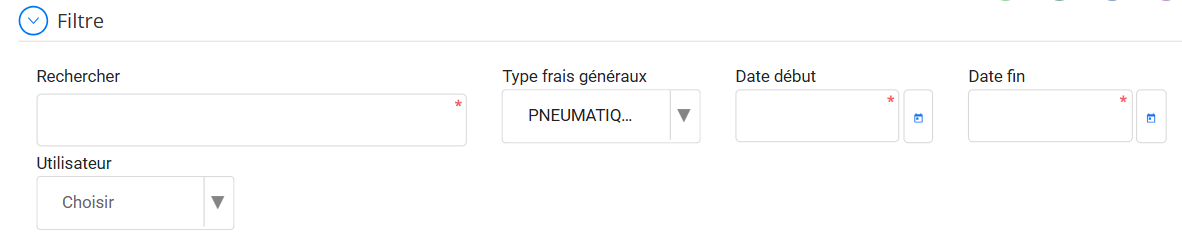
Où trouver le filtre ?
Le filtre est situé en haut de l’interface des frais généraux, juste sous le titre"Frais généraux". Il permet d'affiner la liste des dépenses affichées.
Critères de Filtrage Disponibles
1⃣Rechercher
-
Permet d’effectuer une recherche par mot-clé sur plusieurs champs (Code, Libellé, etc.).
-
Exemple : Rechercher "Pénalité" affichera toutes les pénalités enregistrées.
2⃣Type de Frais Généraux
-
Sélectionner un type de frais spécifique pour filtrer uniquement ces dépenses.
Exemples de types disponibles :
-
TAXES→ Frais fiscaux ou administratifs.
-
PARKING→ Dépenses liées aux parkings.
-
PNEUMATIQUE→ Achat ou réparation de pneus.
-
PÉNALITÉ→ Sanctions ou amendes payées.
-
HYDRO AIT SOUSS→ Type spécifique lié aux dépenses d'eau ou carburant.
3⃣Date Début & Date Fin
-
Permet de rechercher les frais généraux sur une période précise.
-
Exemple : Filtrer du01/01/2023 au 31/12/2023pour afficher uniquement les frais de l’année en cours.
4⃣Utilisateur
-
Afficher uniquement les frais enregistrés par un utilisateur spécifique.
-
Utile pour suivre les dépenses saisies par chaque responsable.
Comment Utiliser le Filtre ?
Étape 1: Cliquer sur"Filtre"en haut de la liste.
Étape 2: Renseigner un ou plusieurs critères.
Étape 3: Appuyer sur"Rechercher"pour appliquer le filtre.
Étape 4: Pour revenir à l'affichage complet, cliquer sur"Réinitialiser".
Avantages du Filtrage
Analyse rapidedes frais par catégorie ou période.
Gestion simplifiéedes coûts récurrents et exceptionnels.
Suivi précisdes dépenses par utilisateur.
Optimisation financièreen identifiant les postes les plus coûteux.
Grâce à ces filtres avancés, la gestion des frais généraux devient plus efficace et plus transparente !