Module · Services
Expense Management
Expense Management
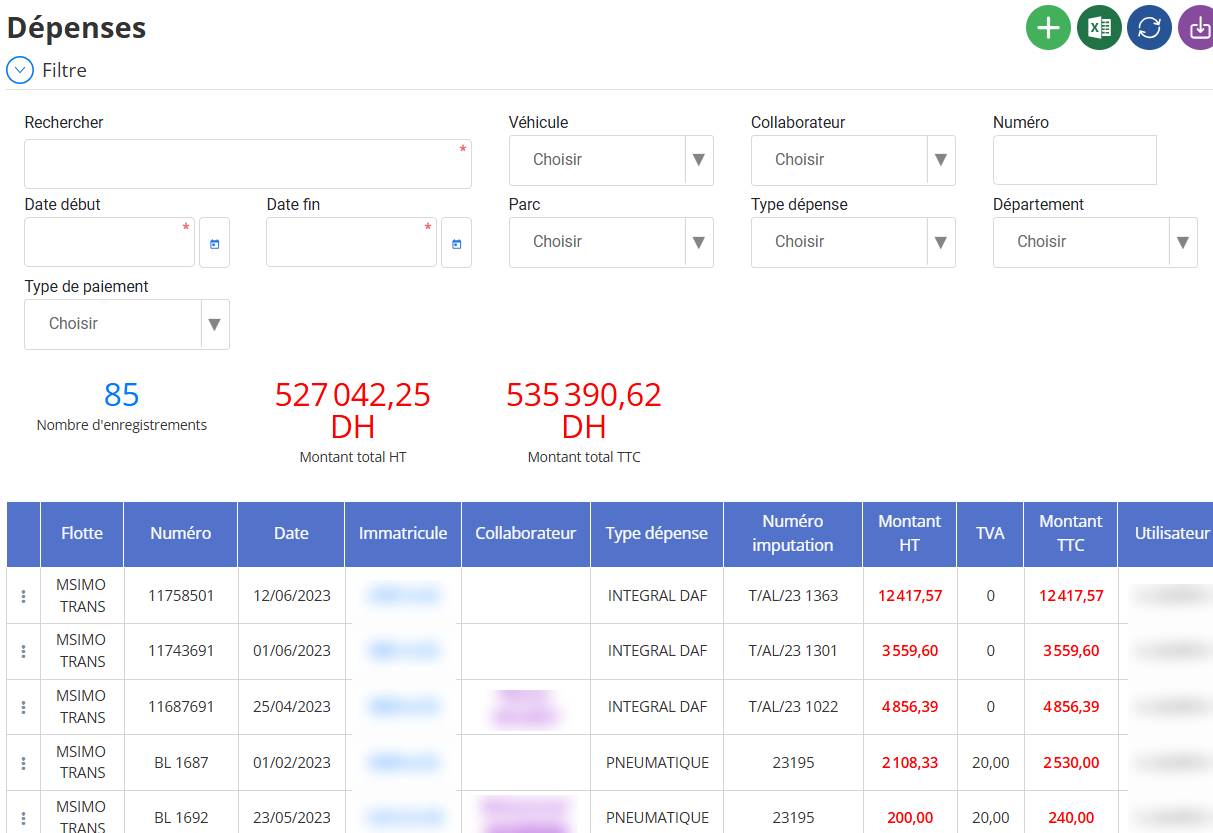
The expense management functionality allows you totrack, add, edit, delete and viewinformation relating to all expenses incurred. It provides detailed visibility into costs, making budgetary control and spend analysis easier.
Main features:
Addition and modificationexpenses with all the necessary details (vehicle, employee, type of expense, amount, etc.).
Filtering and advanced searchaccording to several criteria (date, vehicle, employee, type of payment, etc.).
Display of totals excluding tax and tax included, allowing a quick overview of expenses incurred.
Data exportfor in-depth analysis or archiving.
This interface guarantees smooth and precise management of expenses, thus optimizing financial control and decision-making.
Adding a Vehicle Expense
Adding a vehicle expense allows you to record costs related to a vehicle in the system.
1⃣ Displaying the add form
To access this form:
-
Click the button"+"(add) in the “Vehicle expense” section.

2⃣ Fill in the information
Vehicle and Collaborator

-
Select the vehicle concerned.
-
Select the employee associated with the expense.
General Information
-
Number: Unique identifier of the expense.
-
Date: Date of the expense.
-
Payment type: Choose (Cheque, Cash, Transfer, etc.).
-
Usage number(optional): Internal reference code.
-
Typical expense: Select the type of expense (Fuel, Toll, Repair, etc.).
-
Imputation number(optional): Accounting or budget code.
Cost
-
Amount excluding tax: Enter the amount excluding tax.
-
VAT: VAT rate applied (default 20%).
-
Amount including tax: Automatic calculation based on the amount excluding tax and VAT.
Management and Department
-
Select the direction and department concerned by the expense.
How(optional)
-
Add a description or justification for the expense.
3⃣ Registration
-
Click on"Save"pour sauvegarder la dépense.
-
Cliquez sur“Cancel”to cancel the operation.
Description of Vehicle Expense Management
This feature allows you to manage expenses related to a company's vehicles. It facilitates:
Monitoring costs incurred (fuel, maintenance, tolls, etc.).
Better accounting and budgetary management.
Analysis of expenses by vehicle and employee.
Objective: Ensure precise and efficient management of vehicle-related costs to optimize budgets and improve financial transparency.
Modifying a Vehicle Expense
Modifying a vehicle expense allows you to correct or update the information recorded.
1⃣ Access the list of expenses
-
Go to the section“Vehicle Expenses”.
-
A list of saved expenses appears.
2⃣ Select the expense to modify
-
Find the line corresponding to the expense to modify.
-
Click on the iconto modify.

-
The edit form opens with the existing information.
3⃣ Edit the necessary information
-
You can update the following fields:
vehicleAndCollaborator
Number, Date, Payment type, Type of expense
Amount excluding tax, VAT, Amount including tax
Direction, Department, How
Usage numberGoldImputation number
4⃣Save changes
-
Click on“Save”to save the changes.
-
Click on“Cancel”if you do not want to save the changes.
Noticed:
-
Modification is generally reserved for users with the necessary rights.
-
Certain information may be locked after accounting validation.
Consultation of a Vehicle Expense
The consultation allows you to display the details of a vehicle expense without the possibility of modification.
1⃣ Access the list of expenses
-
Go to the section“Vehicle Expenses”.
-
A list of recorded expenses appears.
2⃣ Select an expense to consult
-
Find the line item for the expense you want to see.
-
Click on the icon"..." (or a similar button dedicated to consultation).

-
A new window or form opens with all the details of the expense.

3⃣ Verification of information
-
You can view all recorded data:
Vehicle, Collaborator
Number, Date
Payment type, Expense type
Amount excluding VAT, Amount including VAT
Management, Department
How
Remarque:
-
No fields can be modified in this mode.
-
Si vous devez apporter des changements, il faudra passer par l’option "Modifier"(si vous avez les droits nécessaires).

