

Module · Services
Highway filtering
Highway filtering
The system offers a tool foradvanced filteringallowing users toquickly sort and searchinformation related to motorway tolls according to several criteria. This tool optimizes data management and facilitates access to essential information.
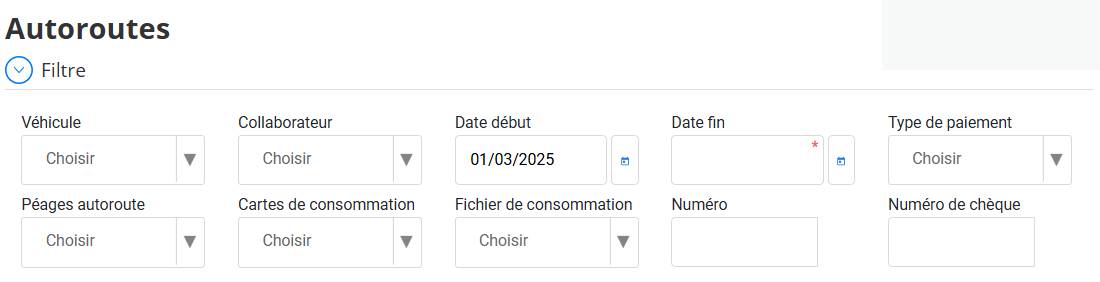
How does filtering work?
Access filter
-
The filter section is available at the top of the interface under the title“Highways”.
Select one or more criteria
-
As soon as you choose a criterion in one of the available fields, the results areautomatically updated.
You can filter transactions by these criteria:
-
vehicle→ Only shows trips linked to a specific vehicle.
-
Collaborator→ Filter by the driver or employee who made the trip.
-
Start date / End date→ Allows you to view transactions over a given period.
-
Motorway tolls→ Restricts the search to payments made on a specific toll.
-
Consumption cards→ Shows transactions made with a given card.
-
Consumption file→ Search based on a saved file.
-
Number→ Search for a specific transaction via its unique identifier.
-
Payment type→ Filtrage par mode de paiement (Carte, Espèces, Chèque, etc.).
-
Check number→ Search for a payment made by check by entering its number.
Dynamic display of results
-
Each time you select or enter a criterion,the list of transactions updates instantly.
Edit or reset filter
-
To change a criterion, simply select another orclear fieldto return to a broader view.
Advantages of automatic filtering:
Save time→ No need to click on a button, the display is instantaneous.
Ease of use→ The user selects their criteria and immediately sees the results.
Better analysis→ Allows transactions to be reviewed quickly as needed.
Thanks to this approachintuitive and fluid, users can quickly view highway transactions and get the desired information without additional effort.