Module · Services
Overhead management
Overhead management
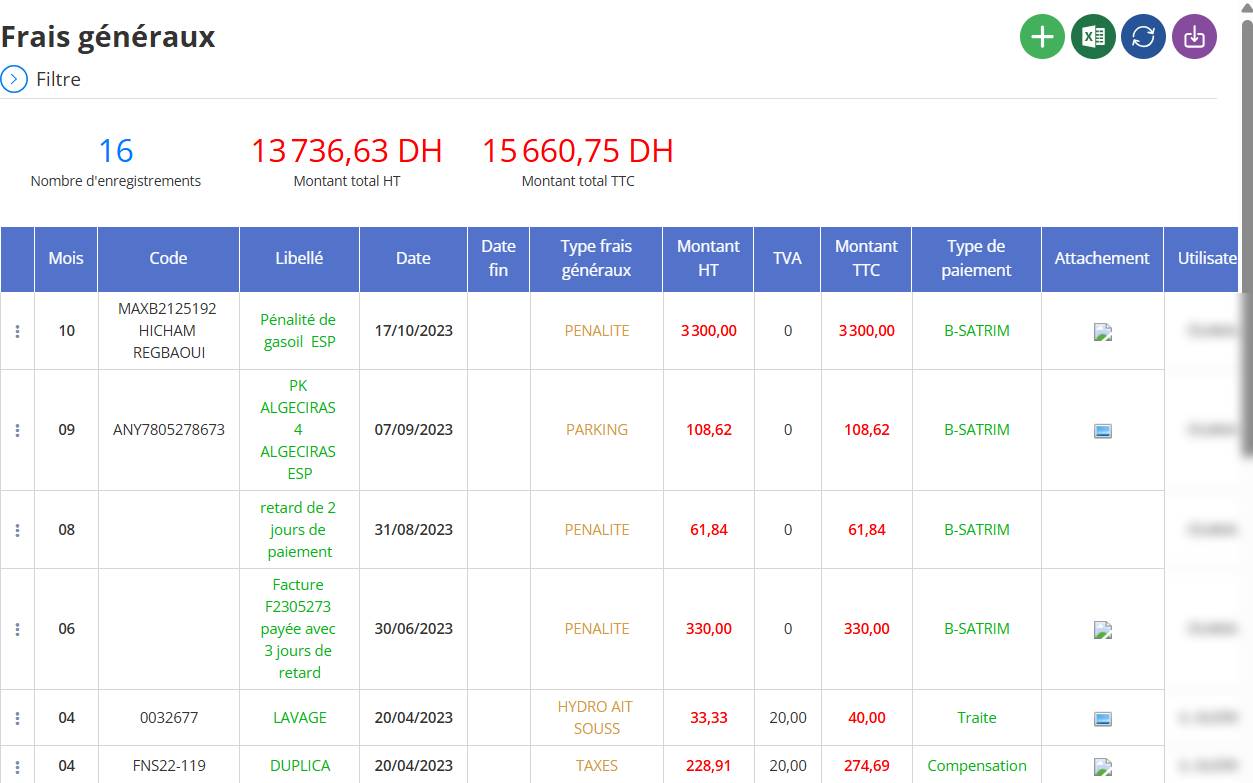
La gestion desfrais générauxpermet de centraliser et d’analyser toutes les dépenses liées auxopérations quotidiennesde l’entreprise. Cette fonctionnalité offre unevue complète et détailléedes charges, permettant ainsi un meilleursuivi financieret uneoptimisation des coûts.
Principales Actions Disponibles
Dans l’interface des frais généraux, les utilisateurs ont la possibilité de :
1⃣Ajouterune nouvelle dépense.
2⃣Modifierune dépense existante.
3⃣Supprimerune dépense.
4⃣Consulterles détails d’une dépense.
Ajout d’un Frais Général
Cette action permet d’enregistrer une nouvelle dépense dans le système.
Étapes pour ajouter un frais général
Cliquer sur le bouton vert ""situé en haut à droite.

Remplir les informations requises :

-
Code→ Référence unique du frais.
-
Libellé→ Description du frais général.
-
Date→ Date de la dépense.
-
Type de frais généraux→ Ex: PÉNALITÉ, PARKING, TAXES...
-
Montant HT→ Montant hors taxes.
-
TVA→ Taux de TVA applicable.
-
Montant TTC→ Montant toutes taxes comprises.
-
Type de paiement→ Moyen de paiement utilisé.
-
Attachement→ Joindre une facture ou un justificatif (optionnel).
-
Utilisateur→ Personne qui a saisi la dépense.
Cliquer sur le bouton vert ""en haut à droite pour ouvrir le formulaire d’ajout.
2⃣Remplir les champs obligatoires:
-
Code→ Référence unique du frais.
-
Libellé→ Description du frais général.
-
Date→ Date à laquelle la dépense est enregistrée.
-
Type de frais généraux→ Exemple : PÉNALITÉ, PARKING, TAXES, etc.
-
Montant HT→ Montant hors taxes.
-
TVA→ Taux de TVA applicable.
-
Montant TTC→ Montant toutes taxes comprises.
-
Type de paiement→ Moyen utilisé (Ex: Virement, Espèces, Chèque, etc.).
-
Attachement(optionnel) → Ajouter une facture ou un justificatif.
Activation des Frais Récurrents
Lors de l’ajout d’un frais général, il est possible d’activer l’option"Frais récurrent".
Comment ça fonctionne ?
Par défaut, l’option est désactivée→ La dépense est unique.

Si activée, un champ supplémentaire"Date fin"* apparaît pour indiquer la période de validité du frais récurrent.

Cas d’usage des frais récurrents :
Loyers mensuels→ Ex: Paiement d’un loyer de bureau.
Contrats de maintenance→ Ex: Abonnement à un service de maintenance.
Assurances→ Ex: Paiement d’une prime d’assurance annuelle.
Valider l’enregistrementpour sauvegarder les informations.
Modification d’un Frais Général
Si une dépense doit être corrigée ou mise à jour, il est possible de modifier ses détails.
Comment modifier une dépense ?
Repérer la ligne de la dépense à modifier.
Cliquer sur le menu"..."(trois points à gauche de la ligne).
Sélectionner"Modifier".

Mettre à jour les champs nécessaires.
Valider les modifications.
Suppression d’un frais général
Une dépense peut être supprimée si elle est incorrecte ou n’est plus nécessaire.
Étapes pour supprimer une dépense
Cliquer sur le menu"..."en début de ligne.
Sélectionner"Supprimer".

Confirmer la suppression. Cette action est irréversible !

Consultation des détails d’un frais général
Les gestionnaires peuvent afficher toutes les informations relatives à une dépense spécifique.
Comment consulter un frais général ?
Ouvrir le menu"..."en face de la ligne concernée.
Sélectionner"Consulter".

Une fenêtre affichera toutes les informations du frais, y compris les pièces jointes si disponibles.

Avantages de cette Gestion
Transparence financière→ Vision claire des charges fixes et variables.
Optimisation des coûts→ Identification des dépenses superflues.
Centralisation des données→ Facilité d’accès et d’analyse.
Suivi détaillé→ Gestion améliorée des factures et paiements.
Cette gestion des frais généraux est essentiellepour le contrôle budgétaireet permet une prise de décision éclairéesur les finances de l’entreprise.

