

Module · Services
Exportation des services
Exportation des services
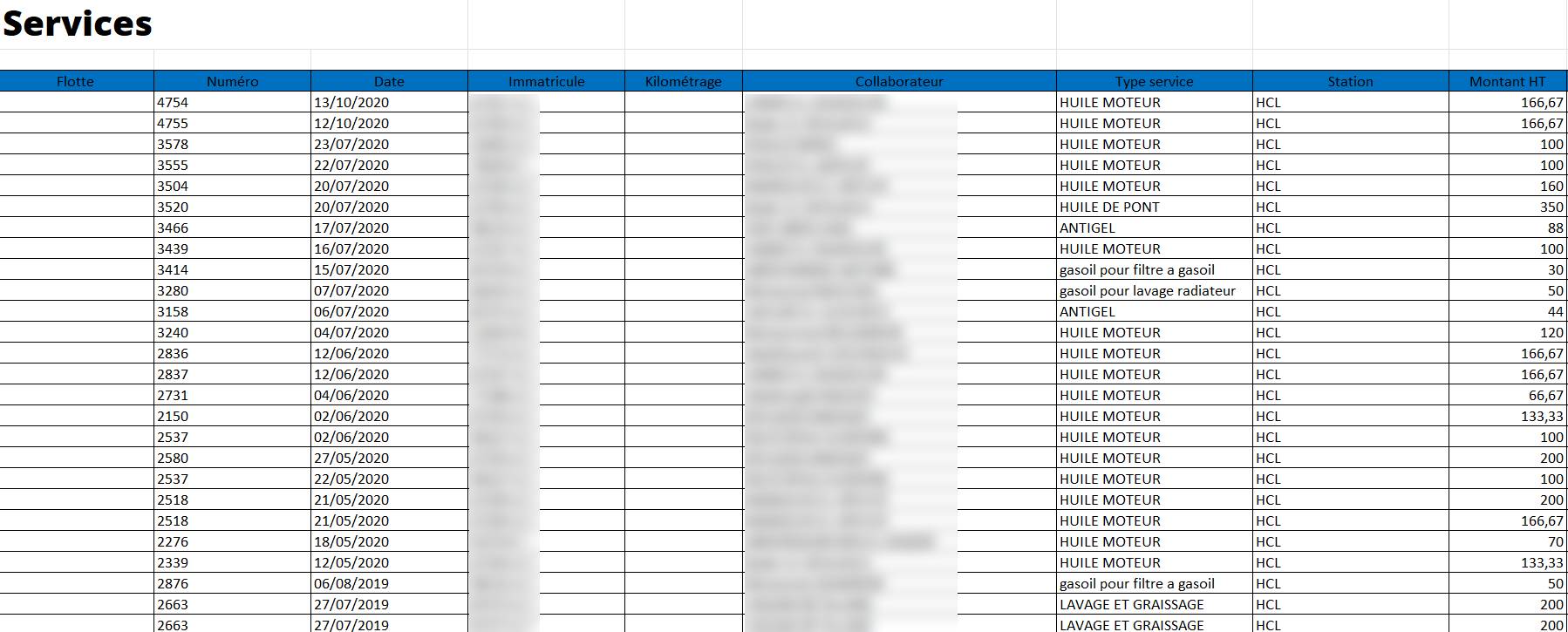
L’exportation des services permet de générer un fichier contenant toutes les données relatives aux services enregistrés dans le système. Cette fonctionnalité facilite le partage des informations avec d’autres services internes ou partenaires externes (comptabilité, direction, prestataires, etc.). Elle permet également d’effectuer une analyse approfondie des données en dehors du système, en utilisant des outils comme Excel ou des logiciels de gestion avancés.
Cliquer sur le bouton vert d’exportationsitué en haut à droite de l’écran.

Le fichier contenant toutes les données des services sera automatiquement généré et téléchargé.
Exportation avec filtres spécifiques
Si vous souhaitez exporter uniquement certaines informations (par exemple, une période donnée ou un véhicule spécifique), suivez ces étapes :
-
Appliquer un filtreen utilisant les options disponibles (date, véhicule, station, type de service, etc.).
-
Vérifier que la liste affichée correspond aux informations souhaitées.
-
Cliquer sur le bouton d’exportationpour générer un fichier contenant uniquement les données filtrées.
Objectifs et Valeur Ajoutée
-
Optimisation de la gestion: Permet une meilleure visibilité sur les services réalisés et leur coût.
-
Transparence: Facilite le contrôle et la vérification des opérations par les différentes parties prenantes.
-
Analyse approfondie: Offre la possibilité d’exploiter les données pour identifier les tendances, optimiser les coûts et planifier les entretiens futurs.
-
Partage facilité: Permet d’envoyer les informations à des tiers sans nécessiter un accès direct au système.
Données exportées
Le fichier exporté contient généralement :
-
Les informations des véhicules (immatriculation, kilométrage)
-
Les détails des services (type, date, station, montant HT/TTC, TVA)
-
L’identité des conducteurs et des utilisateurs ayant saisi les services
-
Tout autre élément pertinent pour la gestion et le suivi