

Module · CMMS
Détails Commandes
Détails Commandes
La section dédiée aux bons de commande offre une vision approfondie et structurée des éléments constitutifs de chaque commande passée dans le cadre des interventions ou des approvisionnements. Elle garantit une organisation claire des informations, permettant aux utilisateurs d’évaluer et de gérer efficacement les achats de prestations et de pièces nécessaires.
Grâce à une présentation soignée et une mise en page intuitive, cette section devient un outil clé pour assurer le suivi des commandes, analyser les coûts, et optimiser les processus d’approvisionnement. Chaque bon de commande y est détaillé avec précision, renforçant la transparence des transactions et facilitant la prise de décisions stratégiques.
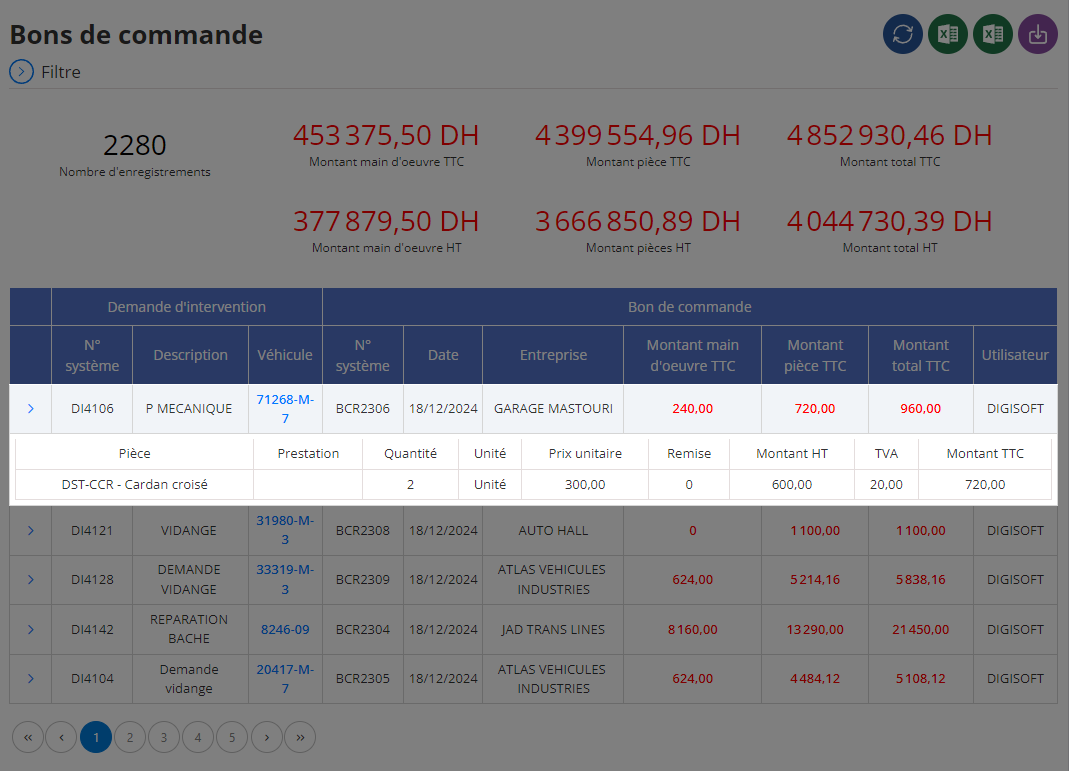
Affichage des bons de commande
Les données relatives aux bons de commande sont présentées sous forme de tableau structuré, chaque ligne correspondant à un élément distinct de la commande. Voici les champs principaux et leur utilité :
-
Pièce :Ce champ liste les pièces nécessaires dans le cadre de la commande. Ces éléments constituent une base essentielle pour identifier les équipements requis pour l’intervention ou l’approvisionnement.
-
Prestation :Cette colonne décrit les services associés à la commande, tels que des réparations spécifiques, des travaux de maintenance ou d’autres tâches réalisées par les prestataires.
-
Quantité :La quantité commandée est précisée pour chaque élément, qu’il s’agisse de pièces ou de prestations. Cette information permet de contrôler l’exactitude des besoins et d’éviter les écarts entre commande et exécution.
-
Unité :Ce champ précise l’unité de mesure des quantités, qu’il s’agisse de "pièce", "heure", ou "lot", garantissant une compréhension uniforme des informations.
-
Prix Unitaire :Indique le coût par unité de chaque pièce ou prestation. Ce détail est primordial pour analyser la compétitivité des tarifs et identifier les opportunités d’économie.
-
Remise :Cette colonne affiche les éventuelles remises appliquées à chaque ligne de commande. Cela offre une transparence totale sur les réductions obtenues et leur impact sur les coûts globaux.
-
Montant HT :Regroupe le coût hors taxes pour chaque élément, fournissant une première estimation des dépenses avant l’application des taxes.
-
TVA :Précise le montant de la taxe sur la valeur ajoutée, contribuant à une meilleure compréhension des charges fiscales associées à la commande.
-
Montant TTC :Affiche le coût total toutes taxes comprises pour chaque ligne, offrant une vue complète et précise des engagements financiers.
En regroupant toutes les informations relatives aux bons de commande dans une interface unique, cette section devient un levier essentiel pour optimiser les processus d’approvisionnement et garantir une gestion transparente des achats.
La présentation détaillée des pièces, prestations et coûts associés permet aux utilisateurs de suivre chaque commande de manière rigoureuse, tout en identifiant les leviers d’optimisation possibles. Cette approche garantit non seulement une réduction des dépenses inutiles, mais aussi une amélioration de la qualité des services et produits achetés.
La section des bons de commande est bien plus qu’un simple outil de gestion administrative. Elle constitue un pilier stratégique pour les entreprises soucieuses de rationaliser leurs processus d’achat et de renforcer la transparence dans leurs transactions.
Avec des informations précises, une traçabilité totale et une organisation intuitive, cette section facilite la maîtrise des coûts et la planification des ressources. En centralisant les données essentielles, elle permet aux utilisateurs de prendre des décisions éclairées, d’améliorer la collaboration avec les fournisseurs, et de garantir la qualité et la pertinence des approvisionnements.