Module · CMMS
Intervention Management
Intervention Management
The intervention request management module offers a complete solution for organizing and supervising all requests related to necessary interventions on your fleet or equipment. Designed to centralize essential information, this system ensures rigorous monitoring and increased responsiveness, in line with modern operational requirements.
Each request can be documented in detail, including information such as the nature of the intervention, the priority level, the location, the equipment concerned and the expected deadlines. This careful structuring allows teams to plan and execute interventions with precision, while avoiding delays or oversights.
Thanks to an intuitive and accessible interface, the module facilitates the consultation and monitoring of requests, offering users a clear overview of current or future actions. Stakeholders can therefore prioritize tasks based on emergencies, while managers have the necessary tools to assess workload and allocate resources optimally.
This system also contributes to complete traceability of interventions, by making it possible to consult the history of requests, the actions undertaken and the results obtained. This transparency improves the quality of services provided and increases stakeholder satisfaction.
By integrating this module, organizations can improve their overall efficiency, ensuring proactive management of intervention requests and supporting smooth and well-coordinated operations.
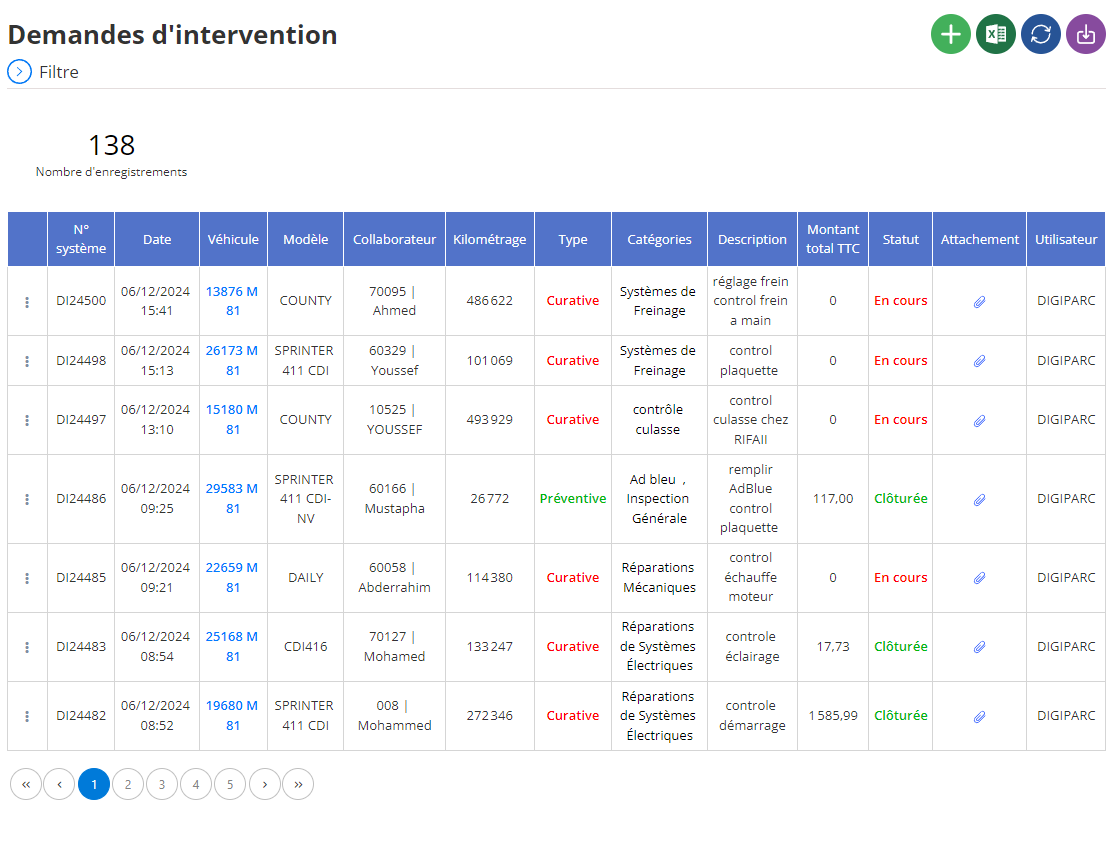
Repair Shop Management Process
This document describes the detailed process of managing repairs in a workshop, from initial request to final validation of work, highlighting the key stages and stakeholders involved.
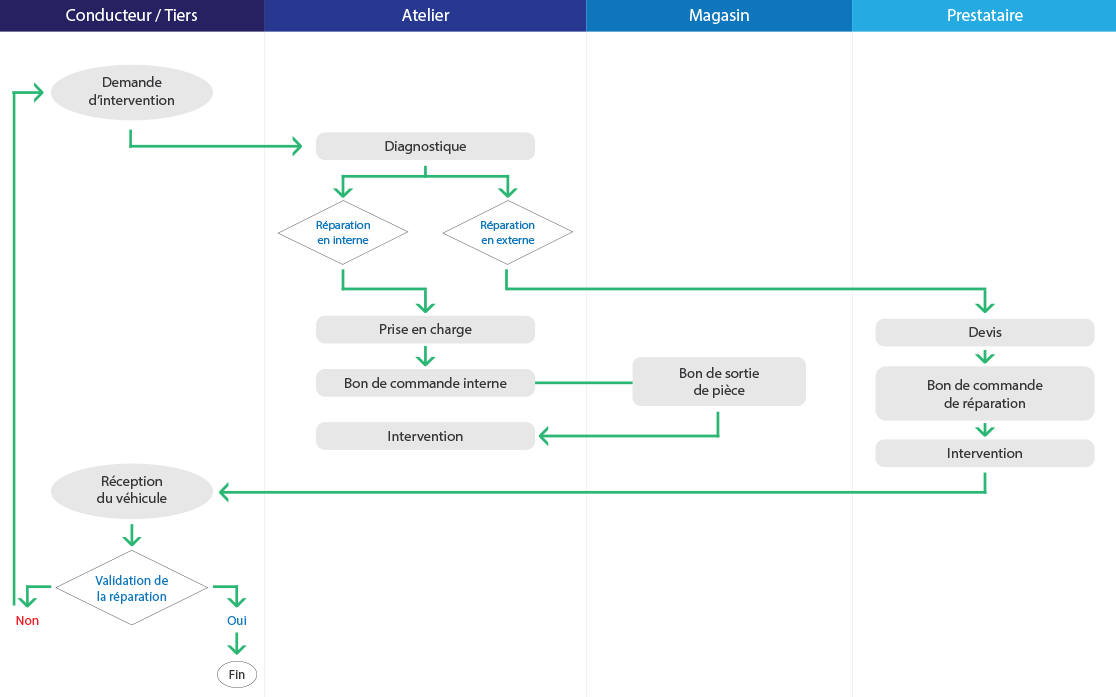
1. Initiation: Request for intervention
The process begins when a driver or third party submits an intervention request for a vehicle requiring repairs.
2. Diagnosis carried out by the workshop
Once the request is received, the workshop carries out a diagnosis to assess the nature and extent of the necessary repairs. Two scenarios can arise:
- In-house repair: If repairs can be carried out directly by the workshop.
- External repair: If the repairs require the intervention of an external service provider.
3. Steps for an in-house repair
If the workshop decides to proceed internally:
- Support: The vehicle is officially supported by the workshop.
- Creation of an internal purchase order: This document specifies the work to be carried out and the resources required.
- Intervention and parts management:
- If parts are required, aroom exit voucheris issued by the store.
- Repairs are then carried out by technicians.
4. Steps for External Repair
If the work must be carried out by an external service provider:
- Estimate: The service provider prepares a quote detailing the costs and necessary work.
- Validation by a purchase order: The workshop validates the repairs via a repair order form.
- Intervention: The service provider carries out the necessary work before returning the vehicle to the workshop.
5. Return and validation
Once repairs are complete:
- Receipt of the vehicle: The vehicle is returned to the driver/third party.
- Validation of the repair: A check is carried out to ensure that the work has been carried out correctly.
- If the repair is validated: The process is closed.
- If the repair is not validated: The vehicle is reinstated in the repair cycle.
Summary of interactions
This process involves four main parts:
- Driver/Third Party: Originating the request and receiving the repaired vehicle.
- Workshop: Responsible for diagnosis, repair management and coordination.
- Store: Provides necessary parts for internal repairs.
- Provider: Performs external repairs when necessary.
This process guarantees efficient and transparent management of repairs, while allowing smooth collaboration between the different parties involved.
Note: This diagram can be used as a guide in the operational management of repair centers.
Adding an intervention request
The interface for adding an intervention request allows you to record all the necessary information related to a maintenance or repair operation. This tool facilitates the management of requests by ensuring complete traceability and centralization of data.
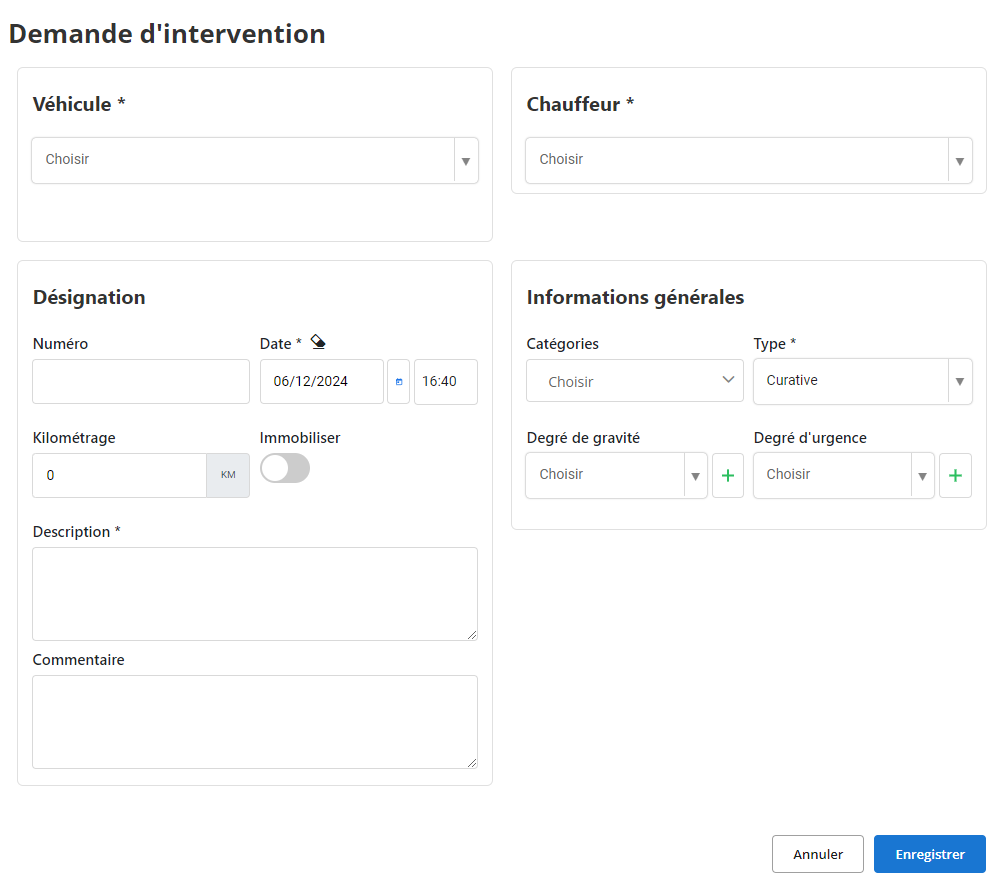
When creating a request, several sections must be completed to provide a complete and precise description of the intervention to be carried out:
Vehicle concerned: Select the vehicle involved in the request via a drop-down list. This step is crucial to associate the request with a specific vehicle and allow precise monitoring of its intervention history.
Assigned driver: Mention the driver responsible for the vehicle. This information makes it possible to directly link the intervention to the driver in charge, thus facilitating communication and management of responsibilities.
Designation of the intervention:
- Number:This field is typically auto-incremented and assigns a unique number to each request.
- Date :The date and time of the request are automatically recorded.
General information:
- Categories:This drop-down field allows you to classify the request in a specific category (example: mechanical breakdown, maintenance, etc.).
- Type:This field allows you to specify whether the intervention is curative (repair of a fault) or preventive (maintenance).
- Mileage:The mileage of the vehicle at the time of request is indicated.
- Immobilize:This field allows you to indicate whether the vehicle must be immobilized while awaiting intervention.
- Degree of seriousness and Degree of urgency:These fields make it possible to assess the importance of the request and prioritize interventions.
- Description :This field allows you to describe in detail the nature of the problem encountered.
- How:This field is intended to add any other useful additional information.
By using this interface, each intervention request is documented in a structured manner, guaranteeing rapid and efficient processing. This process not only helps improve intervention management, but also extends vehicle lifespan and reduces operational interruptions. A well-informed database also facilitates subsequent analyzes to optimize maintenance plans and identify trends in intervention needs.
Modification of an intervention request
To update information regarding an intervention request, start by accessing the dedicated section in the intervention management system. Use the available filters to easily locate the request in question, based on criteria such as vehicle, driver, date of intervention or any other relevant parameter. Once the request has been identified, select the option“To modify”to access the update interface.
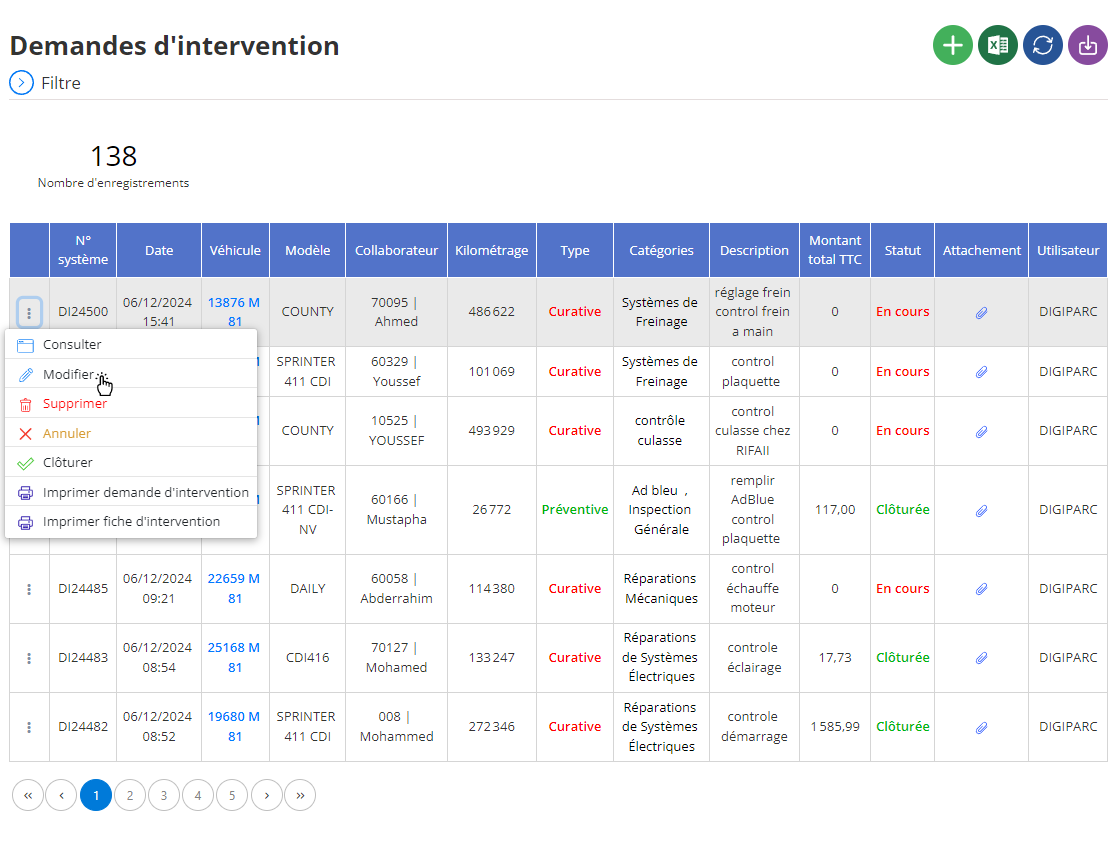
In this interface, you can adjust several key elements related to the intervention:
- Vehicle information: Change or update data about the affected vehicle, such as mileage at the time of request, to ensure the history remains consistent and accurate.
- Intervention details: You can refine or add details to the initial problem description. For example, additional observations on the condition of the vehicle, anomalies identified after inspection or specific technical details to be resolved.
- Categorization and prioritization: It is also possible to revise the degree of urgency or seriousness of the intervention based on new information, thus ensuring better organization of priorities.
- General data: If necessary, update driver or schedule data to reflect changes to the response schedule.
Particular attention must be paid to the precision and consistency of modified information, as it directly impacts the monitoring and management of interventions. Each update must be based on reliable information to guarantee optimal processing of requests.
Once the changes are complete, click“Save”to validate and save the new data. This validation not only maintains a detailed and accessible history of interventions, but also ensures that the information remains usable for future reporting and analysis.
By updating requests regularly and methodically, managers can ensure smooth monitoring of interventions, optimize vehicle maintenance and guarantee a rapid and efficient response to incidents. This process also plays a key role in long-term strategic planning, identifying recurring needs and adapting resources accordingly.
Deleting an intervention request
To delete an intervention request saved in the system, start by accessing the list of available interventions. Use filters and search tools to identify the relevant request, based on criteria such as vehicle, driver, date or other specific parameters. Once the request is located, select it, then click on the option“DELETE”to start the deletion process.
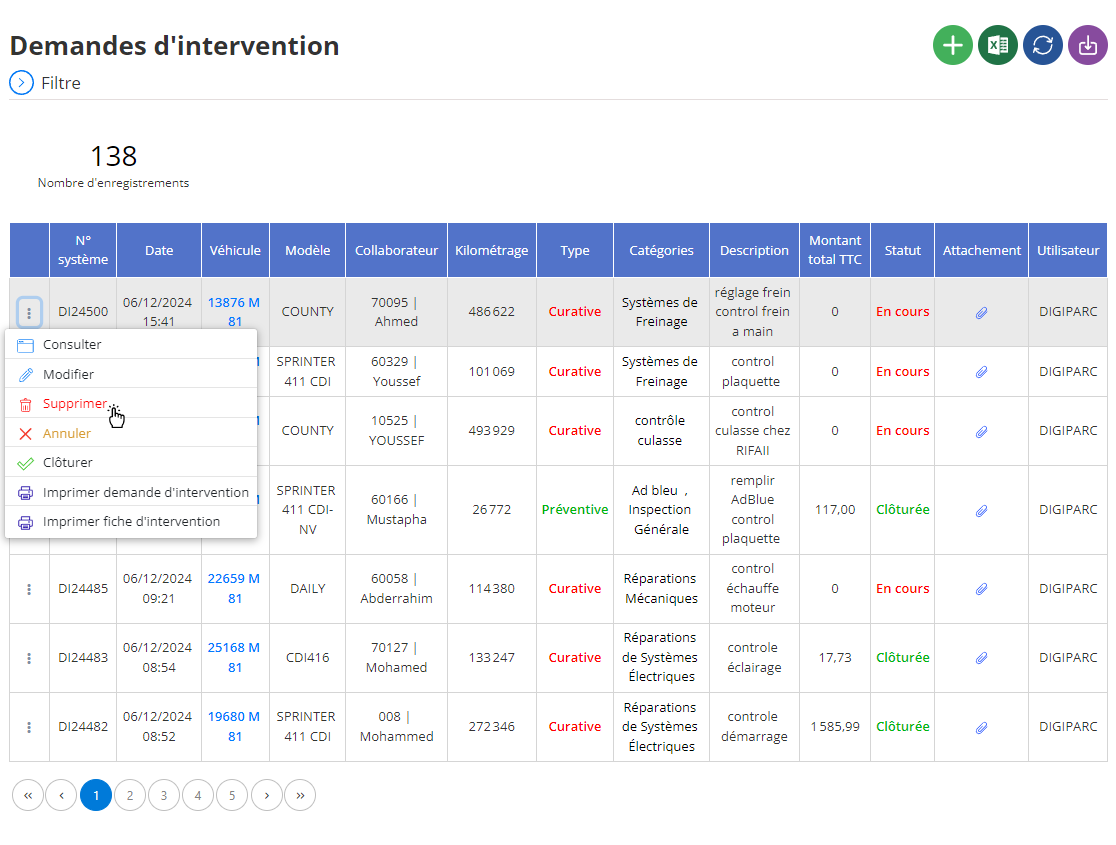
Before validating this action, a confirmation window will be displayed to allow you to verify that the deletion is indeed intentional. It is important to note that this action is permanent: all data associated with the intervention request, including vehicle information, description of the problem and any additional observations, will be permanently deleted.
To avoid accidental loss of important information, it is recommended to carefully verify that deletion is justified. If the request contains data useful for future analysis, such as outage trends or performance indicators, it may be appropriate to archive this information before deleting it.
The deletion of an intervention request must be carried out with caution, particularly within the framework of rigorous management of history. This ensures that only obsolete or incorrect data is eliminated from the system, while maintaining a reliable and relevant information base.
By centralizing deletions around a validation process, the system contributes to more secure management and better traceability of interventions. This also allows managers to intervene quickly in the event of an error or the need for data recovery before permanent deletion.
Consultation of an intervention request
The interface for consulting an intervention request offers direct access to all the data recorded concerning a specific intervention. This tool is designed to provide a detailed view of essential information, allowing clear monitoring and optimized management of interventions related to vehicles and drivers.
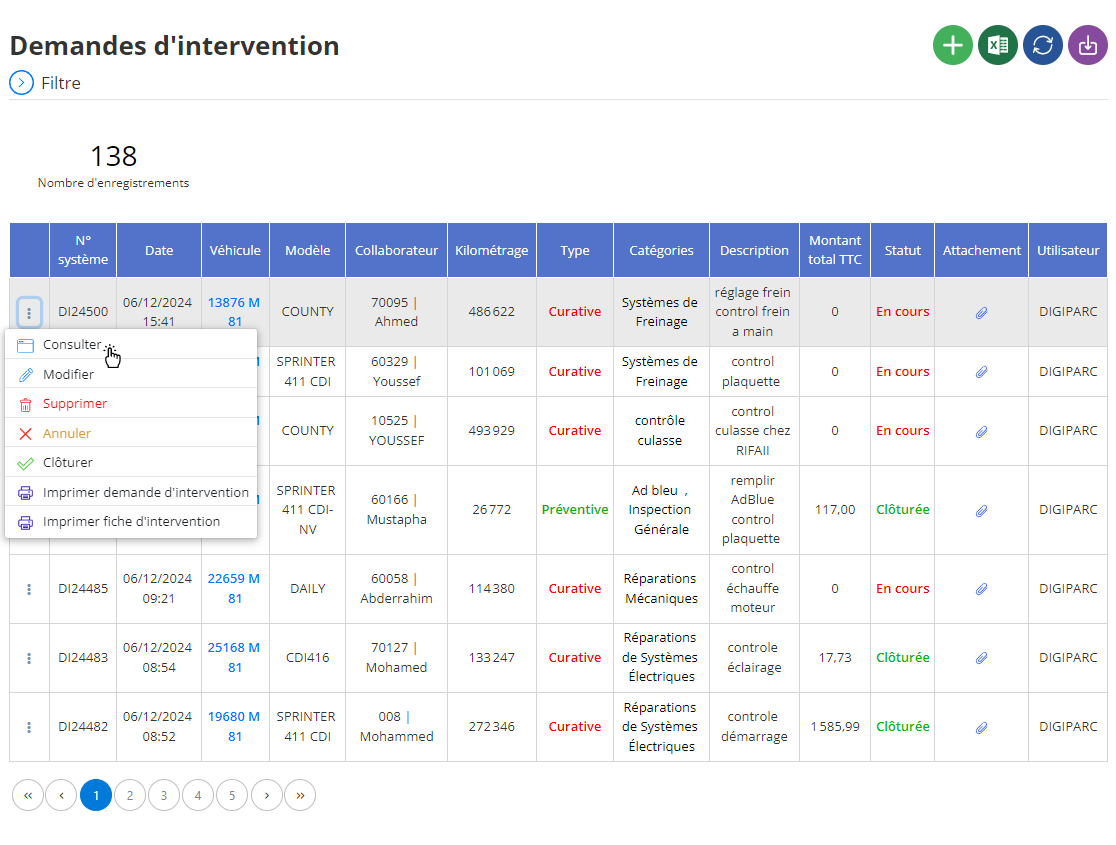
When you select a particular service request, the associated information is displayed in an organized manner on the screen, including the following:
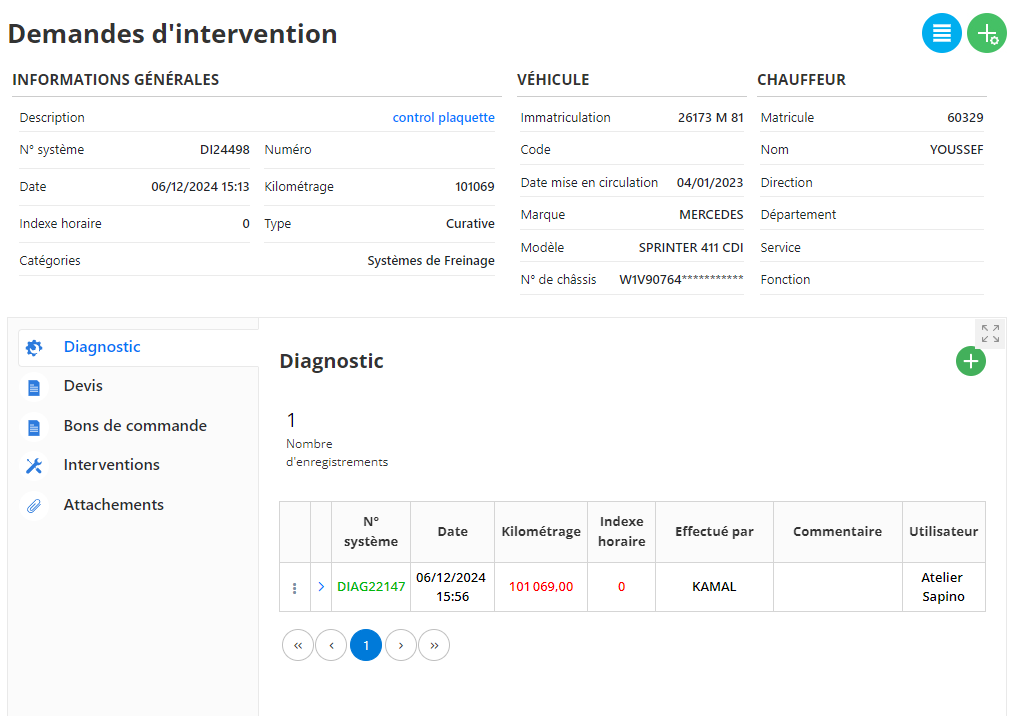
In the upper section of the interface, you will find a summary of the main information of the request:
- Description: Summarizes the nature of the intervention (here, “control brochure”).
- System No.: Unique reference automatically assigned to the request (example: DI24498).
- Date: Date and time the request was created.
- Mileage: Indique le kilométrage du véhicule lors de la demande (101 069 km dans cet exemple).
- Type: Définit si l'intervention est curative (réparative) ou préventive (anticipative).
- Catégories: Identifie le domaine technique concerné, comme "Systèmes de freinage" dans cet exemple.
In the right part, the details of the vehicle concerned are displayed:
- Immatriculation: Plaque d’immatriculation (exemple : 26173 M 81).
- Marque et Modèle: Identification précise du véhicule, ici un Mercedes Sprinter 411 CDI.
- N° de châssis: Numéro de série unique permettant une identification formelle du véhicule.
- Date de mise en circulation: Fournit l’historique d’utilisation du véhicule (04/01/2023).
On the right, you will also find the data associated with the driver assigned to the vehicle:
- Matricule: Numéro d’identification du chauffeur (exemple : 60329).
- Nom: Nom du chauffeur (ici, "Youssef").
In the lower left, several tabs provide a detailed and organized view of the steps and elements related to the request:
- Diagnostic: Contient le résultat de l’analyse initiale réalisée par un technicien. Dans cet exemple, un diagnostic "DIAG22147" a été effectué par "Kamal" le 06/12/2024 à 15h56.
- Devis: Permet de gérer les devis générés pour cette intervention.
- Bons de commande: Liste les bons de commande associés à cette demande.
- Interventions: Répertorie les actions effectuées pour résoudre la demande.
- Attachements: Permet d’ajouter et de consulter des documents ou images liés à l’intervention.
The intervention request management interface is organized around several functional tabs, located on the left side of the screen. These tabs provide quick access to information associated with each intervention request, promoting smooth navigation and complete management.
1. Diagnosis
This tab displays the diagnostics carried out for the intervention request.
- Contenu principal: Liste des diagnostics associés à la demande, avec des détails comme le numéro du diagnostic (exemple : DIAG22147), la date, le kilométrage du véhicule, l’index horaire, et le technicien ayant réalisé le diagnostic (ici, "Kamal").
- Utilité: Fournit des informations initiales cruciales pour comprendre le problème détecté, posant ainsi les bases pour planifier les réparations ou interventions nécessaires.
2. Quote
This tab allows you to manage quotes related to the intervention.
- Contenu principal: Liste des devis générés, avec des informations telles que le montant estimé, la date de création du devis, et son statut (validé, en attente, ou refusé).
- Utilité: Permet de suivre les aspects financiers de l’intervention et d’assurer que les réparations sont budgétées conformément.
3. Purchase orders
This tab groups together the purchase orders issued for this intervention request.
- Contenu principal: Liste des commandes de pièces ou services nécessaires pour effectuer les réparations. Chaque bon inclut des informations comme le numéro du bon, la description, et le statut.
- Utilité: Facilite le suivi des achats liés à la demande et garantit la disponibilité des pièces ou des ressources nécessaires.
4. Interventions
This tab details all actions performed or planned to resolve the intervention request.
- Contenu principal: Historique des interventions réalisées, avec des informations comme :
- La date de l’intervention.
- Les tâches effectuées (exemple : remplacement de plaquettes de frein).
- Le technicien responsable.
- Utilité: Assure une traçabilité complète des opérations effectuées sur le véhicule.
5. Attachments
This tab centralizes all the documents or files attached to the intervention request.
- Contenu principal:
- Rapports techniques ou diagnostics.
- Photos de l’état du véhicule ou des pièces défectueuses.
- Certificats ou autres documents administratifs.
- Utilité: Garantit que toutes les données complémentaires à la demande sont accessibles et conservées pour référence future.
By combining these tabs, the interface offers complete and centralized management of each intervention request, allowing better coordination between technical and administrative teams. This organization also improves traceability and guarantees a clear view of the progress of each request.

