Module · CMMS
Import/Export Entretiens
Import/Export Entretiens
La gestion des plans d'entretiens devient plus fluide et efficace grâce aux fonctionnalités d'importation en masse et d'exportation des données.
L'importation en masse des plans d'entretiens permet aux utilisateurs d'ajouter rapidement plusieurs plans à la fois dans le système à l’aide d’un fichier préformaté. Cette fonctionnalité est idéale pour les entreprises ou organisations gérant de nombreux plans d’entretien, leur permettant d'intégrer rapidement les données tout en minimisant les erreurs. En réduisant le temps consacré à la saisie manuelle, elle garantit une mise à jour cohérente et précise des informations, tout en assurant la gestion optimisée des opérations d’entretien. Cette méthode intuitive permet de maintenir une base de données d’entretien constamment actualisée et cohérente, facilitant ainsi le suivi des actions et leur mise à jour régulière.
L'exportation des données des plans d’entretiens constitue un outil stratégique pour centraliser et analyser toutes les informations liées aux entretiens programmés. Les fichiers générés, au format CSV ou Excel, permettent une gestion simplifiée et une vue d’ensemble des maintenances à venir, tout en offrant une transparence et une meilleure planification des besoins futurs. Cette fonctionnalité facilite l'analyse, la gestion proactive et le suivi de la flotte, garantissant une gestion optimale des ressources.
En combinant ces outils d'importation et d'exportation, la gestion des plans d’entretiens devient plus structurée, réactive et adaptée aux besoins de maintenance de la flotte.
Importation en masse des plans d'entretiens
L'importation en masse des plans d'entretiens offre aux utilisateurs une méthode efficace pour ajouter plusieurs plans simultanément dans le système, en utilisant un fichier préformaté. Cette option est particulièrement avantageuse pour les entreprises ou les organisations gérant un grand nombre de plans d’entretien, leur permettant de les intégrer rapidement et sans erreurs.
En permettant de télécharger un fichier contenant toutes les informations nécessaires sur chaque plan, cette fonctionnalité simplifie considérablement le processus d’ajout. Elle réduit le temps consacré à la saisie manuelle des données et garantit une mise à jour rapide des plans d’entretien disponibles. Ainsi, les gestionnaires peuvent se concentrer sur des tâches à plus forte valeur ajoutée, tout en assurant que les données d’entretien restent constamment actualisées et cohérentes.
Cette méthode d'importation est simple à utiliser et garantit que tous les plans sont ajoutés de manière cohérente et selon les normes du système. Elle favorise également une gestion optimisée de l’ensemble des opérations d’entretien, facilitant leur suivi et leur mise à jour régulière.
Étape 1 : Télécharger et préparer le fichier modèle
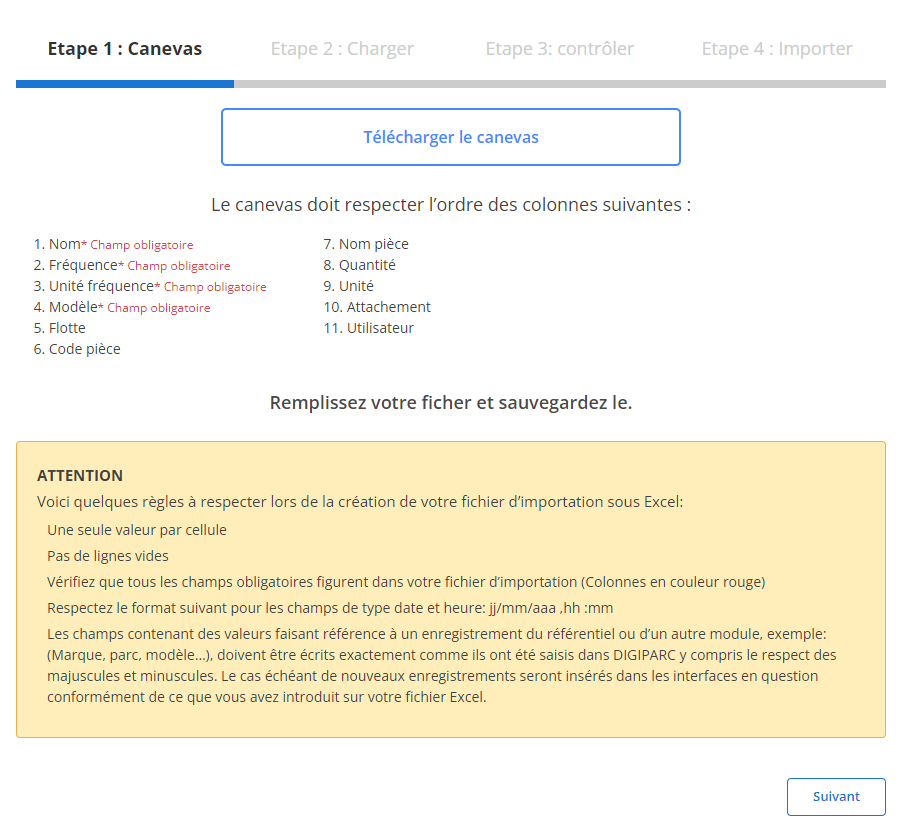
Avant de commencer l'importation, vous devez d'abord télécharger un fichier modèle conçu spécifiquement pour cette tâche. Ce fichier contient des colonnes prédéfinies qui doivent être respectées pour assurer une importation fluide et sans erreur. Voici comment préparer ce fichier :
-
Téléchargez le modèle:
Le fichier modèle est facilement accessible via l'interface. Il contient toutes les colonnes nécessaires à l’importation.
-
Respectez l’ordre des colonnes:
Chaque colonne du fichier correspond à une donnée spécifique. Voici les champs inclus dans le modèle :
Leschamps obligatoiressont :
- Nom(obligatoire)
- Fréquence(obligatoire)
- Unité fréquence(obligatoire)
- Modèle
- Flotte
- Code pièce
- Nom pièce
- Quantité
- Unité
- Attachement
- Code
- Niveau d’opération
- Utilisateur
- Nom
- Fréquence
- Unité fréquence
-
Préparez votre fichier:
- Assurez-vous que chaque cellule contient une seule valeur.
- Évitez les lignes vides au milieu du fichier.
- Remplissez tous les champs obligatoires pour chaque ligne.
- Assurez-vous que les données respectent le format attendu (par exemple, les fréquences doivent être numériques, les unités bien définies).
Étape 2 : Charger le fichier des plans d'entretiens
Une fois le fichier correctement préparé, vous pouvez passer à l’étape suivante : le chargement du fichier dans le système.
-
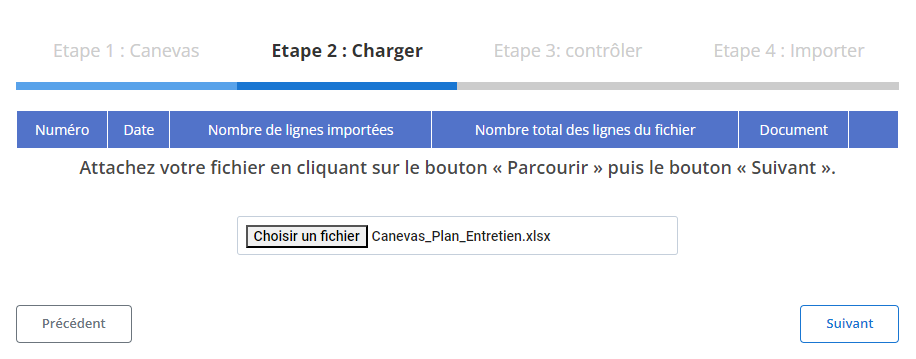
Sélectionnez le fichier:
Cliquez sur le bouton"Parcourir"pour localiser le fichier modèle sur votre ordinateur, puis sélectionnez-le.
-
Lancez le chargement:
Une fois le fichier sélectionné, cliquez sur"Suivant"pour démarrer le processus de chargement des données. Le système analysera le fichier pour identifier toute anomalie et préparer les informations pour une vérification finale.
-
Récapitulatif des données:
Un récapitulatif s'affichera à l'écran, indiquant le nombre total de lignes dans le fichier ainsi que le nombre de lignes prêtes pour l’importation. Cette étape permet une première validation avant d’aller plus loin.
Étape 3 : Vérification des données importées
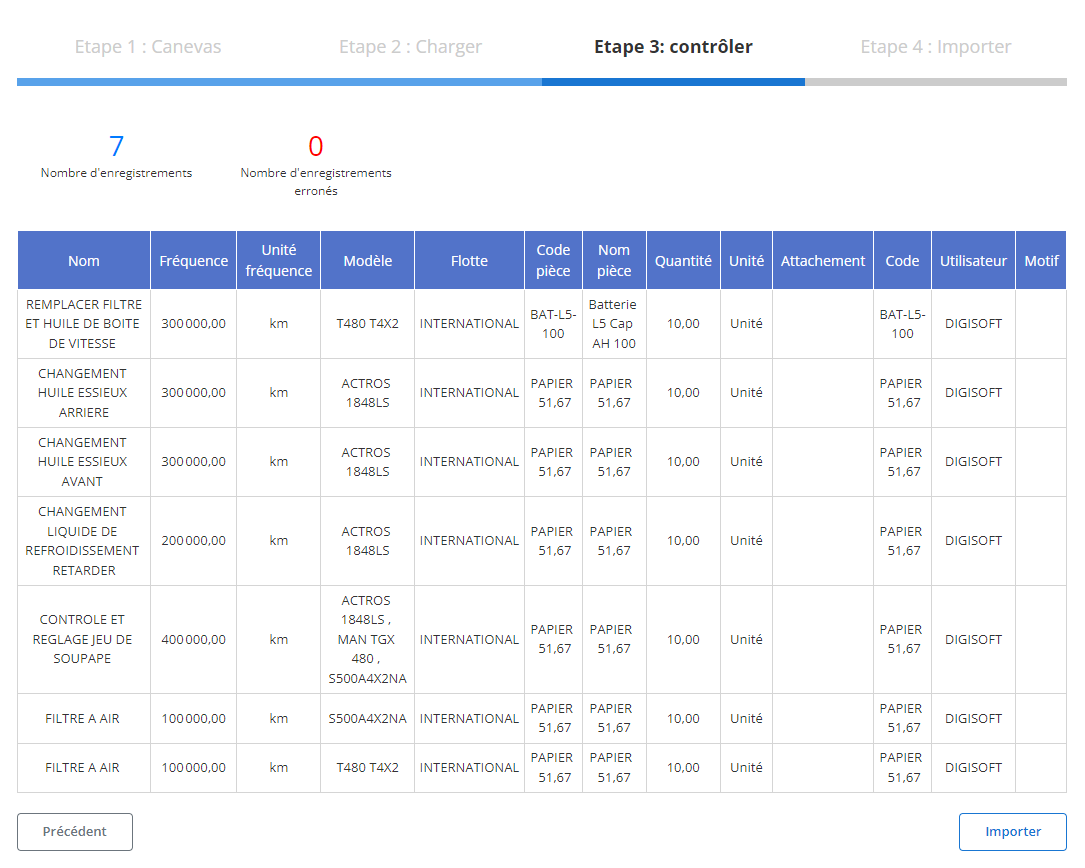
Après le chargement du fichier, un tableau récapitulatif s’affichera avec toutes les lignes issues du fichier. À cette étape, il est crucial de vérifier que toutes les données sont conformes.
-
Contrôle des erreurs:
- Le système mettra en évidence toute erreur potentielle, comme des champs obligatoires manquants (Nom, Fréquence, ouUnité fréquence) ou des données incorrectes (par exemple, une fréquence non numérique).
- Les erreurs identifiées devront être corrigées pour permettre l’importation.
-
Validation des enregistrements corrects:
- Les lignes sans erreur seront marquées comme prêtes pour l’importation finale.
- Vous pouvez examiner les informations clés pour chaque plan, telles que :
- Nom
- Fréquence
- Unité fréquence
- Code pièce
- Nom pièce
- Quantité
- Utilisateur
Étape 4 : Finaliser l’importation des plans d'entretiens
Une fois toutes les données vérifiées et corrigées, vous pouvez procéder à l’importation définitive des plans d’entretien.
-
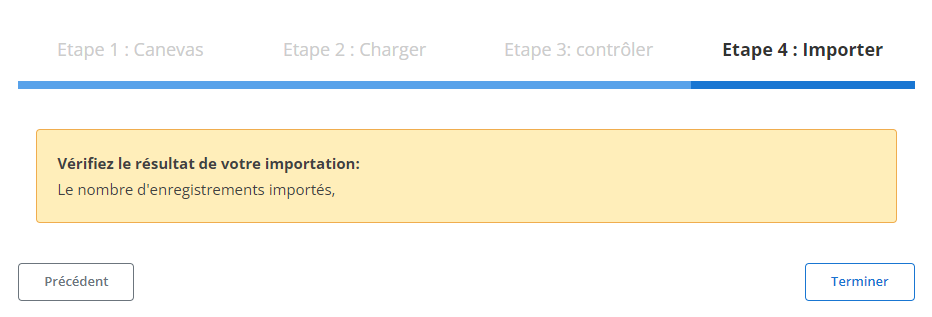
Cliquez sur "Importer":
Validez l’ajout des plans d’entretien dans le système.
-
Confirmation d’importation:
Un message de confirmation apparaîtra pour indiquer que l’importation a été réalisée avec succès et que tous les plans ont été ajoutés correctement.
Grâce à cette méthode, les gestionnaires peuvent intégrer efficacement un grand volume de plans d’entretien tout en assurant la précision et la cohérence des informations. Cela garantit une gestion optimale des entretiens et un suivi efficace des opérations d'entretien au sein de l'organisation.
Exportation des Données : Plans d’Entretiens
L’exportation desplans d’entretiensconstitue un pilier stratégique pour assurer la maintenance proactive des véhicules et équipements, garantissant ainsi une gestion optimale de la flotte. Cette fonctionnalité permet aux entreprises de centraliser toutes les informations relatives aux entretiens programmés, facilitant l’analyse des besoins futurs et le suivi des actions réalisées. En générant des fichiers dans des formats courants tels que CSV ou Excel, elle assure une gestion simplifiée des données tout en offrant une vue d’ensemble sur la planification des maintenances.
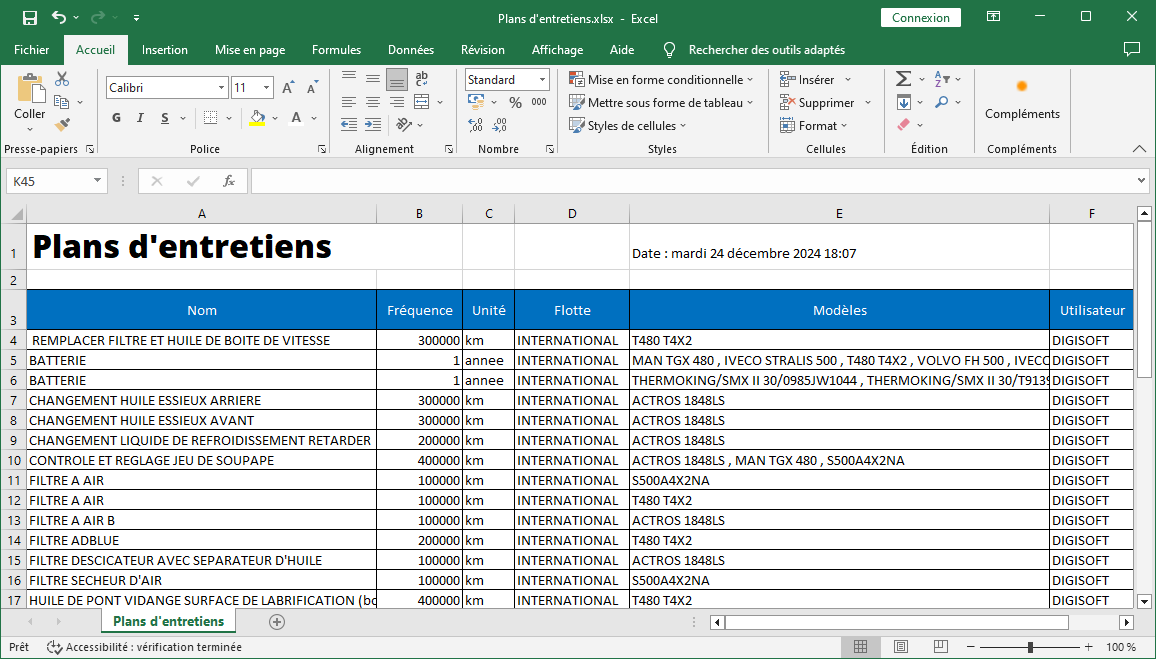
Les données exportées incluent plusieurs colonnes permettant une gestion précise et exhaustive des entretiens programmés :
- Nom :Le nom ou l’intitulé du plan d’entretien, permettant d’identifier rapidement les différents types d’interventions prévues.
- Fréquence :La fréquence des entretiens, qu’elle soit mensuelle, trimestrielle, annuelle, ou selon un autre intervalle défini. Cette information permet de suivre et d’anticiper les maintenances à venir.
- Unité :L’unité de mesure associée à la fréquence, par exemple, kilomètres ou heures d’utilisation. Cela permet de planifier les entretiens en fonction des paramètres les plus pertinents pour chaque véhicule ou équipement.
- Flotte :La désignation de la flotte concernée par le plan d’entretien, permettant de gérer plusieurs catégories d’équipements ou de véhicules.
- Modèles :Les modèles de véhicules ou d’équipements spécifiés pour chaque entretien, offrant ainsi une planification spécifique en fonction des caractéristiques techniques de chaque unité.
- Utilisateur :L’identification de la personne ayant enregistré ou validé le plan d’entretien, garantissant une traçabilité et un suivi approprié des actions effectuées.
En résumé, l'exportation desplans d’entretiensreprésente un levier stratégique pour une gestion rigoureuse et proactive de la flotte et des équipements. Elle permet aux entreprises de planifier efficacement la maintenance, d’optimiser les coûts associés et d’améliorer la performance globale des véhicules et équipements. Cette fonctionnalité renforce la gestion des actifs, tout en assurant une traçabilité complète et une visibilité accrue, indispensables pour maintenir une flotte en excellent état de fonctionnement.

