

Module · CMMS
Import/Export Interventions
Import/Export Interventions
Management of intervention requests is optimized thanks to mass import and export data functionalities, offering a complete solution for centralizing and structuring maintenance and repair operations.
Mass import allows you to quickly integrate several intervention requests into the system using a preformatted file. This method significantly simplifies the entry process by reducing the time and effort required, while avoiding manual errors. It guarantees organized and coherent management of interventions, allowing effective monitoring and updating of data.
Data export, for its part, centralizes all information related to intervention requests in a structured file, available in common formats such as CSV or Excel. This file includes essential details such as the vehicles concerned, intervention categories, associated costs and the status of requests. This data provides a global and detailed view of operations, facilitating their analysis, decision-making and optimal allocation of resources.
By combining these functionalities, managers have a powerful tool to ensure smooth, transparent and efficient management of intervention requests, while improving the traceability and performance of operations.
Mass import of intervention requests
Bulk import of service requests provides a convenient and quick method to integrate multiple requests simultaneously into the system using a preformatted file. This feature is ideal for businesses wanting to efficiently manage a large number of requests while avoiding data entry errors.
By allowing you to upload a file containing all the necessary information, this feature reduces the time and effort required to manually enter data. It also guarantees coherent and organized management of interventions, facilitating their monitoring and updating.
Step 1: Download and prepare the template file
Before proceeding with the import, it is necessary to prepare a template file containing all the information required for each request.
-
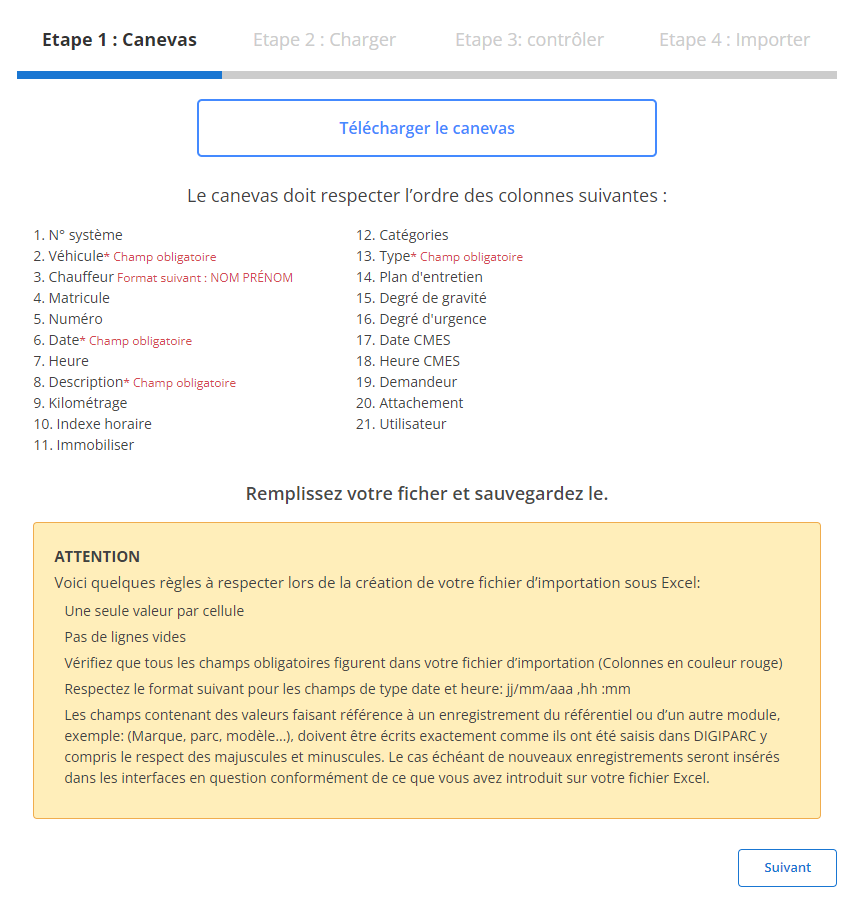
Download the template:
The template file is available through the system interface. It has predefined columns, corresponding to the fields required for import.
-
Respect the order of the columns:
The fieldsobligatoryfor each line are:
- vehicle
- Driver
- Date
- Description
- kind
-
Prepare your file:
- Make sure that only one value is entered per cell.
- Complete all required fields to avoid errors.
- Make sure the dates follow the expected format (dd/mm/yyyy).
- Check that there are no empty lines in the middle of the file.
Step 2: Load the requests file
Once the file is properly prepared, proceed to upload it to the system.
-
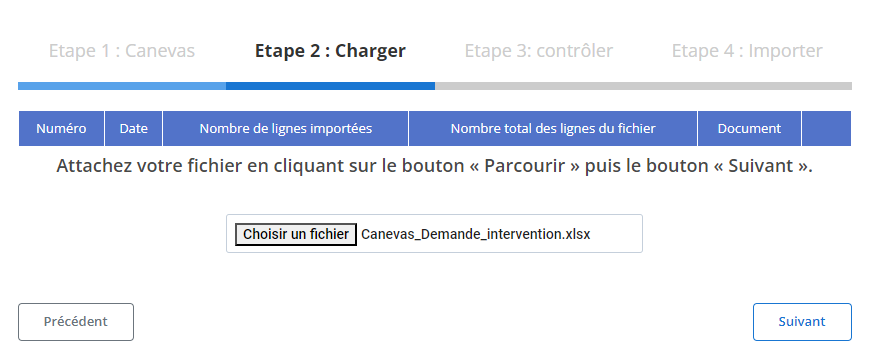
Select file:
Click the button“Browse”to locate the file on your computer, then select it.
-
Start loading:
Once the file is selected, click“Following”for the system to analyze the data and prepare a summary.
-
Data Summary:
- A summary table will show the total number of lines in the file and those ready for import.
- Use this view to perform an initial validation of the data before continuing.
Step 3: Verifying the imported data
After loading the file, a detailed table of records will be displayed for review.
-
Error checking:
- The system will highlight errors, such as mandatory fields not filled in (example:vehicle, Date, Description, kind, GoldDriver) or incorrect formats (example: date format).
- Each reported error must be corrected before final import.
-
Validation of correct records:
- Rows without errors will be marked as ready for final import.
- Check critical fields, such as:
- vehicle
- Driver
- Date
- Kind
- Description
- And any other relevant field related to the intervention.
Step 4: Finalize the import of intervention requests
After correcting and validating the data, finalize the import.
-
Click “Import”:
This action will validate the definitive addition of requests to the system.
-
Import confirmation:
A message will be displayed to confirm that the import was successful and that all service requests were added correctly.
Thanks to this method, managers can focus on priority interventions, while ensuring continuous and precise updating of their system.
Exporting intervention request data
The export of data relating to intervention requests constitutes an essential tool for rigorous and centralized management of vehicle maintenance and repair operations. This data, exportable in standard formats such as CSV or Excel, makes it possible to follow each request in detail, from its submission to its resolution, integrating crucial information such as the vehicle concerned, the intervention categories and the associated costs. This process provides managers with a clear and structured vision, facilitating the analysis of operational needs and optimization of resources.
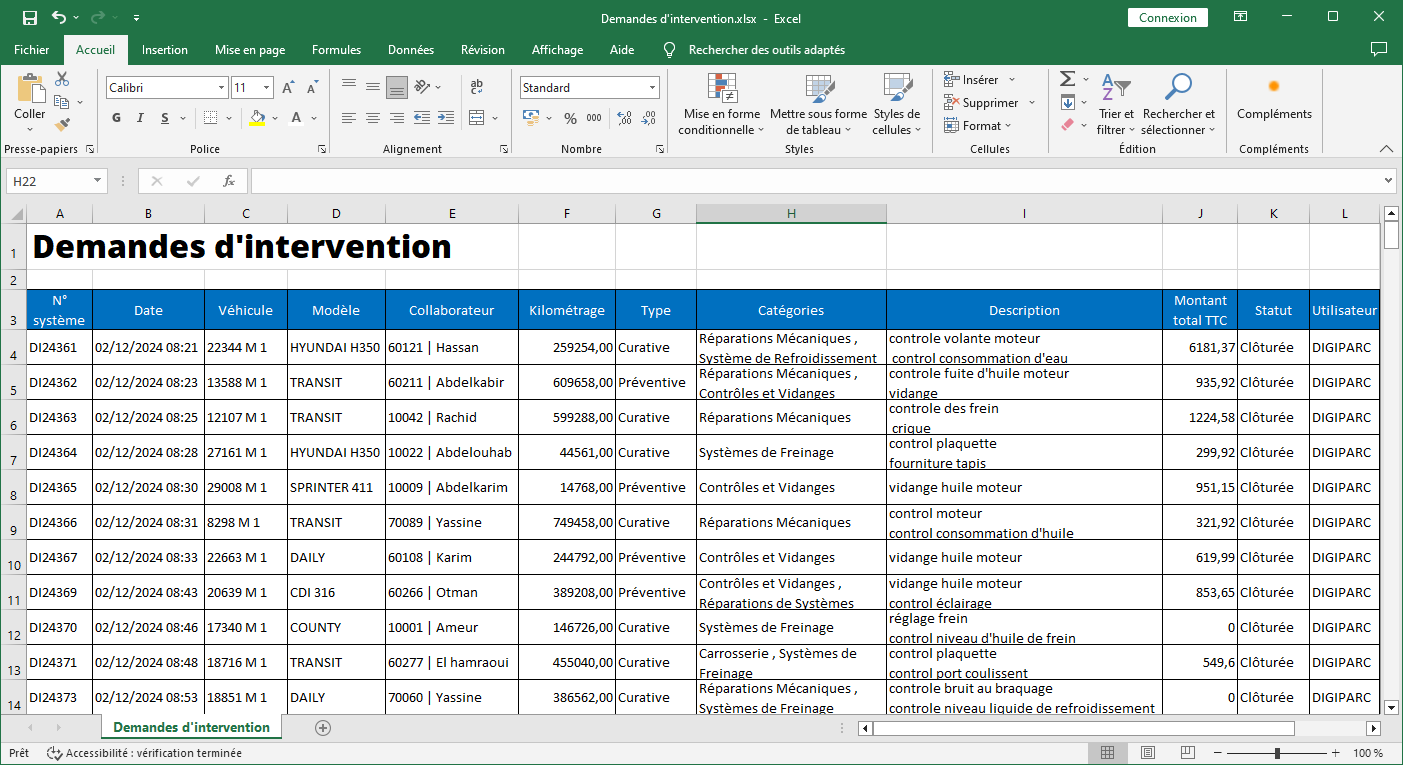
The export file includes precise and detailed columns for a complete and exhaustive analysis of intervention requests:
-
System No.: This unique number identifies each request, facilitating the monitoring and traceability of interventions.
-
Date: Indicates the date the request was submitted, allowing the intervention to be placed in time and processing times to be monitored.
-
vehicle: Mentions the vehicle concerned, providing visibility on models frequently requiring intervention.
-
Model: Specifies the vehicle model, useful for detecting possible recurring problems linked to a specific range.
-
Collaborator: Displays the name of the employee who submitted the request or linked to the incident, guaranteeing individualized follow-up.
-
To have: Indicates whether a credit or credit is associated with the intervention, which is useful for clear accounting management.
-
Mileage: Records vehicle mileage at the time of intervention, allowing interventions to be linked to usage cycles.
-
kind: Categorizes the nature of the intervention, whether it is a repair, preventive maintenance or a technical inspection.
-
Categories: Provides additional details on the classification of the intervention, such as the systems affected (engine, brakes, etc.).
-
Efficiency: Evaluates the effectiveness of the intervention, providing an indication of the quality of the service provided and the results obtained.
-
Description: Contains a summary or detailed explanation of the request, allowing a better understanding of the context of the intervention.
-
Total amount including tax: Indicates the total cost of the intervention, including VAT, for transparent financial management.
-
Status: Specifies whether the request is "pending", "in progress" or "finalized", facilitating real-time tracking.
-
User: Identifies the person who registered or modified the request, reinforcing the traceability and accountability of actions.
Thanks to methodical organization and rapid data extraction, the export of intervention requests not only facilitates the daily management of maintenance processes, but it also offers a solid basis for strategic analyses. Managers can, for example, detect particularly costly vehicle models or types of interventions, improve the quality of services provided by technical partners and optimize resource allocation.
In conclusion, this functionality constitutes a major asset for any company wishing to fully control the costs, deadlines and efficiency of its maintenance operations. It guarantees optimal transparency and strengthens the ability of managers to anticipate future needs, while ensuring maximum availability of vehicles for daily operations.