Module · GPS
Alerte Zone Entrée
Alerte Zone Entrée
Introduction
L’interface Alerte d'Entrée de Zone est une composante essentielle du système de gestion de flotte. Elle permet de superviser les événements d’entrée des véhicules dans des zones prédéfinies et d’en archiver les alertes pour un suivi rigoureux. Cette interface offre à la fois des capacités de reporting et des notifications instantanées par email, garantissant ainsi une surveillance optimale et un accès rapide à l’information stratégique.
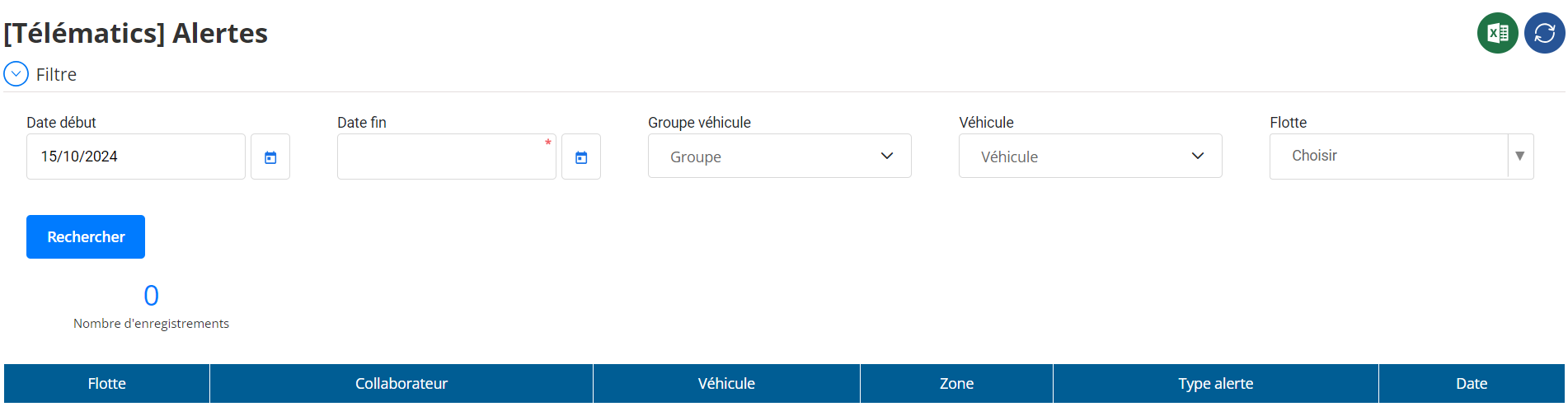
Filtres de Recherche
Les filtres présents dans cette interface permettent derechercher et d’afficher des alertes spécifiquesen fonction de critères personnalisés. Voici les champs de filtre disponibles :
-
Date de Début / Date de Fin:
Ces champs permettent de définir une plage de dates précise afin decibler les alertes survenues à une période donnée. Cela facilite l’analyse des mouvements des véhicules sur une journée, une semaine, ou une période personnalisée. -
Groupe de Véhicules:
Ce filtre permet desélectionner un ou plusieurs groupes de véhicules(par exemple : véhicules de service, camions de livraison, etc.). Cela simplifie la gestion de flottes importantes en filtrant uniquement les alertes correspondant à un segment spécifique. -
Véhicule:
L’utilisateur peut choisirun véhicule ou plusieurs véhicules spécifiquesafin de suivre leurs déplacements et leurs alertes d’entrée dans les zones. -
Flotte:
Ce filtre permet d’isoler lesalertes liées à une flotte donnée, facilitant la consultation pour les gestionnaires responsables d’une flotte particulière.
Ces filtres garantissent une recherche précise et rapide, réduisant le temps nécessaire pour trouver des informations pertinentes dans un large volume d’alertes.
Tableau des Alertes
Une fois les critères de recherche définis, les résultats apparaissent dans untableau interactifqui affiche les alertes d’entrée de zone sous forme structurée. Chaque ligne du tableau correspond à une alerte et contient les informations suivantes :
- Flotte: Le nom de la flotte à laquelle appartient le véhicule, facilitant l’organisation par segment.
- Collaborateur: Le conducteur responsable du véhicule à ce moment-là.
- Véhicule: L’immatriculation ou l’identifiant du véhicule concerné par l'alerte.
- Zone: Le nom de la zone dans laquelle le véhicule est entré.
- Type d’Alerte: Précise qu’il s’agit d’unealerte d’entrée de zone.
- Date: L’heure et la date exactes où le véhicule a franchi les limites de la zone définie.
Le tableau permet ainsiune analyse rapide et efficacedes alertes générées en temps réel ou différé.
Associées au Tableau
Le tableau des alertes est enrichi de plusieurs fonctionnalités pour améliorer l’expérience utilisateur :
-
Tri et Recherche Dynamique:
L’utilisateur peut trier les colonnes ou rechercher une alerte spécifique par nom de collaborateur, immatriculation de véhicule, ou nom de zone. -
Choix des Colonnes à Afficher:
L’utilisateur peutpersonnaliser l’affichage des colonnespour ne montrer que les informations les plus pertinentes, optimisant ainsi la visualisation du tableau. -
Exportation des Données:
Le tableau permetl’exportation des alertesdans plusieurs formats (CSV, Excel) afin de faciliter le partage et l’analyse ultérieure.
Alertes par Email
Comme vu dans l’interface de gestion des zones, il est possible deconfigurer des alertes par emailpour notifier les responsables dès qu’un véhicule pénètre une zone définie. Cette fonctionnalité assure uneréactivité immédiateface à des événements importants.
Les alertes peuvent être envoyées selon les préférences de l’utilisateur :
- À chaque entrée de zone: Assure une surveillance en temps réel des véhicules sensibles.
- Uniquement pour certaines zones: Permet de ne recevoir que les alertes concernant des zones à haute priorité.
Archivage et Suivi des Alertes
L'objectif principal de cette interface est d’assurer unarchivage completdes alertes dans unrapport détaillé. Ce rapport permet :
- Un suivi historique des événementspour analyser les schémas d’entrée des véhicules.
- La génération de statistiquessur les véhicules les plus actifs ou les zones les plus fréquentées.
- L'optimisation des opérationsen anticipant les besoins de surveillance et en ajustant les paramètres des zones.
Le fait de conserver ces alertes sous forme de rapport permet également unetraçabilitéaccrue, essentielle pour des audits ou des rapports réglementaires.
Conclusion
L'interfaceAlerte d'Entrée de Zoneest unesolution complète et performantequi combine des outils de notification instantanée avec des capacités avancées de reporting et d’archivage. Grâce àune interface intuitiveet desfonctionnalités de filtrageprécises, elle garantit une gestion optimale des mouvements de véhicules au sein des zones définies. Que ce soit pour une surveillance en temps réel via les alertes par email ou pour une analyse différée à l'aide des rapports archivés, cette interface est un outil indispensable pour assurerla sécurité et la conformité des déplacements.

