Module · GPS
Trajets
Trajets
Introduction
L'interfaceRapport de Trajetoffre un suivi détaillé des trajets réalisés par les véhicules de la flotte. Elle permet d'identifier les périodes de déplacement, la distance parcourue, et la destination finale de chaque trajet. Ce module joue un rôle central dans l’analyse des performances des véhiculeset l’optimisation de la gestion des déplacements.
Objectif de l'Interface
L'interface vise à :
- Tracer l’historique des trajetsréalisés par les véhicules.
- Assurer unetraçabilité des déplacements avec une granularité précise(début, fin, durée et distance).
- Faciliterl’exportation des donnéespour une analyse plus approfondie et une prise de décision éclairée.
Définition d’un Trajet
Un trajet estdéclenchélorsque :
- Le véhiculepasse en mode "marche"(moteur démarré).
- Il parcourt unedistance minimale prédéfinie(par exemple 10 mètres).
- La fin du trajet estenregistrée lorsque le véhicule s’arrêteet passe en mode "off".
Remarque: Les démarrages et arrêts sans dépasser la distance minimale définie ne sontpas comptabilisés comme un trajet, afin d’éviter l’enregistrement de mouvements insignifiants (ex. déplacements dans un parking).
Filtre de Recherche
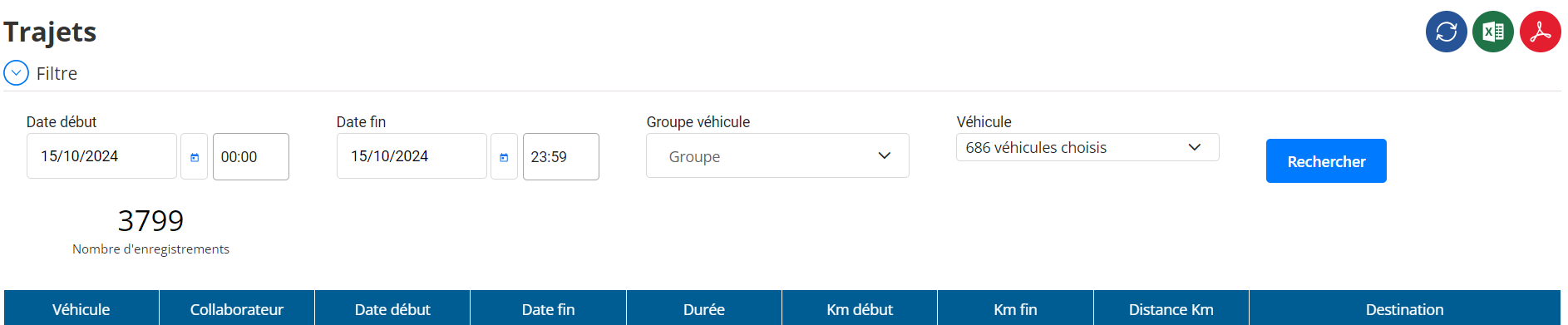
L'interface permet defiltrer les trajetsen fonction des critères suivants :
- Date début: Exemple – 15/10/2024 00:00
- Date fin: Exemple – 15/10/2024 23:59
- Groupe véhicule: Sélectionner un groupe de véhicules de la flotte.
- Véhicule: Choix du ou des véhicules à analyser.
Structure du Tableau de Trajets
Le tableau affiche les informations détaillées sur chaque trajet réalisé par les véhicules sélectionnés :
- Véhicule: Immatriculation ou identifiant du véhicule.
- Collaborateur: Nom du conducteur associé au trajet.
- Date début: Horodatage du début du trajet.
- Date fin: Horodatage de la fin du trajet.
- Durée: Durée totale du trajet (en heures et minutes).
- Km début: Kilométrage au début du trajet.
- Km fin: Kilométrage à la fin du trajet.
- Distance Km: Distance totale parcourue pendant le trajet (en kilomètres).
- Destination: Adresse postale générée automatiquementà partir des coordonnées GPS du lieu d’arrivée.
Fonctionnalités Clés
-
Exportation des Données:
L’interface permet l'export des trajets enregistrés enformats PDF et Excel, facilitant :- La production derapports de suivi.
- L'archivage et lacommunication des trajets aux responsables.
-
Génération Automatique des Destinations:
La colonne "Destination" affichel’adresse postale exactedu lieu où le trajet s’est terminé, en exploitant lesdonnées GPS en temps réel.
Avantages et Utilisation
- Optimisation de la gestion de flotte: Identifier les trajets pertinents et ignorer les événements sans déplacement significatif.
- Suivi détaillé des conducteurs: Visualiser les distances parcourues et les durées de trajet pour chaque collaborateur.
- Analyse des performances: Contrôler l’efficacité des trajets et ajuster les plans logistiques si nécessaire.
- Contrôle des destinations: Assurer que les véhicules atteignent les lieux attendus, grâce à la génération automatique des adresses de destination.
Conclusion
L’interfaceRapport de Trajetest essentielle pour unegestion efficace des déplacementsdes véhicules de la flotte. Grâce à son filtre avancé et à sonsystème d’enregistrement automatique basé sur un seuil de distance, elle permet defocaliser sur les trajets significatifs. De plus, sesfonctionnalités d'export en PDF et Excelfacilitent l’analyse et la prise de décisions rapides.

