Module · GPS
Rapport Vitesse
Rapport Vitesse
Introduction
L'interfacerapport de vitessepermet de visualiser en détail les vitesses enregistrées par les véhicules sur une période donnée. Elle offre un aperçu du comportement des conducteurs et aide à identifier les moments critiques de conduite.
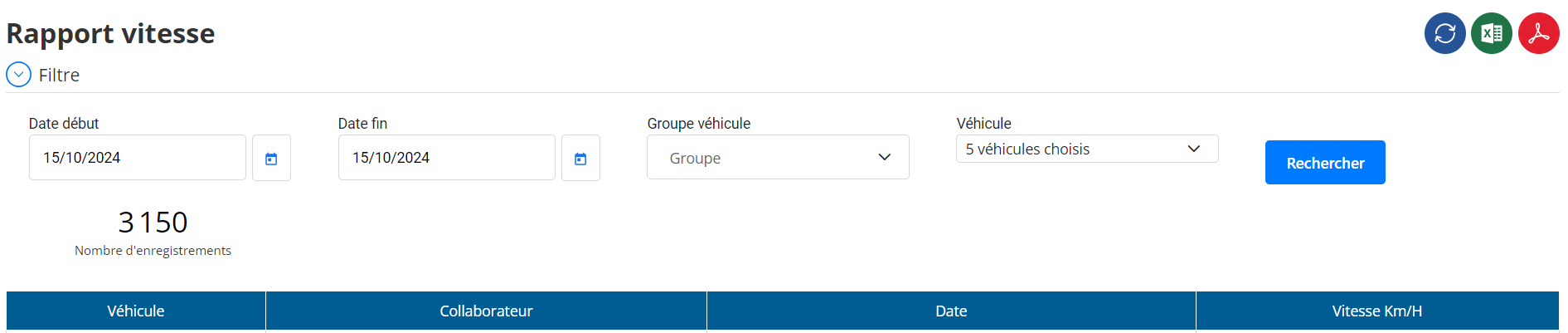
Filtre de l'Interface
L’utilisateur peut affiner sa recherche à l’aide des filtres suivants :
- Date de début: Permet de sélectionner la date et l’heure de début de la période d’analyse.
- Date de fin: Détermine la fin de la période.
- Groupe de véhicules: Sélection d'un ou plusieurs groupes pour limiter la recherche à un segment spécifique.
- Véhicule: Permet de choisir un ou plusieurs véhicules de manière ciblée.
Tableau de Résultats
Le tableau de l’interface affiche les informations suivantes :
- Véhicule: Immatriculation du véhicule concerné.
- Collaborateur: Nom du conducteur associé.
- Date: Horodatage précis de l’enregistrement.
- Vitesse (Km/h): Vitesse instantanée du véhicule au moment indiqué.
Fonctionnalités de l'Interface
- Filtrage avancé:
Les filtres permettent une recherche précise selon les dates et les véhicules souhaités, facilitant ainsi l’analyse ciblée. - Exportation des données:
Les résultats du rapport peuvent être exportés aux formatsExceletCSVpour une exploitation ultérieure. - Mise à jour en temps réel:
Les informations sont alimentées en continu par le système GPS, garantissant des données précises et à jour.
Utilisation et Objectif
- Surveillance des comportements: Le rapport permet de suivre la vitesse des véhicules et d'identifier les éventuels dépassements.
- Optimisation de la sécurité: Les gestionnaires peuvent utiliser ces données pour sensibiliser les conducteurs à une conduite plus prudente.
- Analyse de performance: L’interface offre des informations exploitables pour évaluer l’efficacité de la flotte.
Cette interface est un outil essentiel pour lesuivi de la vitesse des véhicules, offrant une visibilité complète pour améliorer la sécurité et l'efficacité de la flotte.

