Module · GPS
Extended Shutdown Alert
Extended Shutdown Alert
Introduction
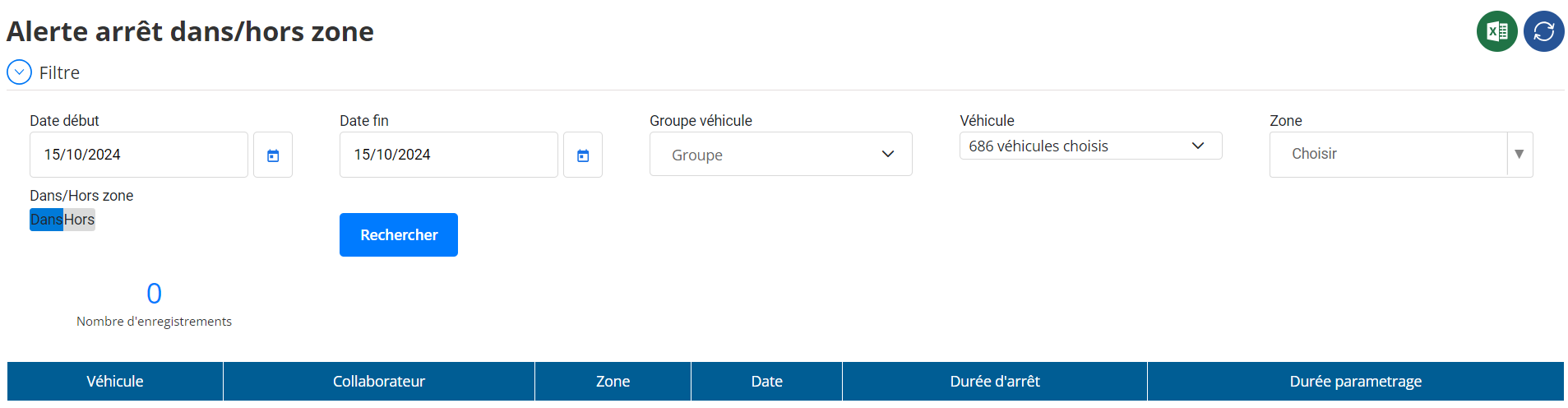
The interfaceLong Stop in and Out of Areais designed fortrack and analyze extended shutdownsvehicles, whether they take placeinside or outside predefined zones. The main objective is to helpmeasure the efficiency of drivers and optimize their work, while monitoring excessive downtime that could impact productivity or report anomalies.
Purpose of the Interface
This interface allows:
- To distinguish between long stops inside and outside the zonesof interest.
- Analyze consumption habitstime by the drivers.
- Identify gapswhich could harm operational efficiency.
- Improve downtime management, whether justified or not.
Long Downtime Setting
The interface offers atime threshold setting optionbeyond which a stop is considered long. For example,a duration of 15 minutes or morecan be defined as long stop. This makes it possible to personalize the analysis according to thespecific business needsand adapt monitoring according to sectors of activity.
Structure of the Search Filter
Users can refine their search using thefollowing filters:
- Start date: Choice of the date from which to start the analysis.
- End date: Selection of the end date of the analysis.
- Vehicle group: Allows you to filter by vehicle groups.
- vehicle: Filtering by a specific vehicle for detailed analysis.
- Area: Selection of one or more predefined zones.
- In/Out of Area: Allows you to specify whether you want to display long stopsinsideGoldoutsideareas.
Results Table
The results table presents the following information:
- vehicle: Identifier or registration of the vehicle concerned.
- Collaborator: Name of the driver associated with the vehicle.
- Area: Zone in which the stop took place (or “Out of Zone” indication).
- Date: Date on which the stoppage was noted.
- Downtime: Total time during which the vehicle remained stationary.
- Duration Setting: Time threshold configured to identify a stop as long.
Interface Keys
- Setting the time threshold: Users can define how many minutes or hours are considered a long shutdown.
- Showing stops in or out of zones: Detailed analysis according to the context of the judgment.
- Quick and filtered search: The user can choose a date range, a specific vehicle or an area for targeted searches.
- Creation and management of zones: The zones displayed are those defined in the zone interface, which guarantees consistency between modules.
Usefulness and Benefits of the Interface
This interface offers many advantages:
- Optimization of routes and working timeby identifying unnecessary prolonged downtime.
- Monitoring driver behaviorto detect ineffective or inappropriate habits.
- Improved fuel managementby reducing unnecessary stops.
- Increased responsivenessto detect suspicious or unplanned shutdowns.
Integration with other Interfaces
- Areas Interface: The zones used in this interface are defined and configured from the zones module. This ensures consistency between alerts and reporting.
- Reporting Interface: Stop information can be exported as reports fordeeper analysisgold hassharing between teams.
Analysis and Recommended Actions
Long stops can signal:
- Unplanned breaksunauthorized.
- Stoppages linked to technical problemsof the vehicle.
- Optimization needsin route planning.
Managers can use this data toimplement corrective actions: - Reevaluate journeys.
- Supervise drivers to reduce unnecessary stops.
- Check the condition of vehicles in the event of frequent and prolonged stops.
Conclusion
The interfaceLong Stop in and Out of Areais a powerful tool foreffectively manage vehicle downtimeAndimprove operational efficiency. Thanks to a detailed analysis of stops in zones or outside zones, this interface allows companies tomaximize their productivitywhile ensuring aproactive managementbehavior on the ground.

