Module · GPS
Distance Journalière
Distance Journalière
Introduction
L’interface rapport de distance parcourue par jour fournit un aperçu détaillé des kilomètres parcourus quotidiennement par chaque véhicule de la flotte. Elle permet une analyse rapide des performances et du niveau d'utilisation des véhicules, facilitant le suivi des trajets réalisés.
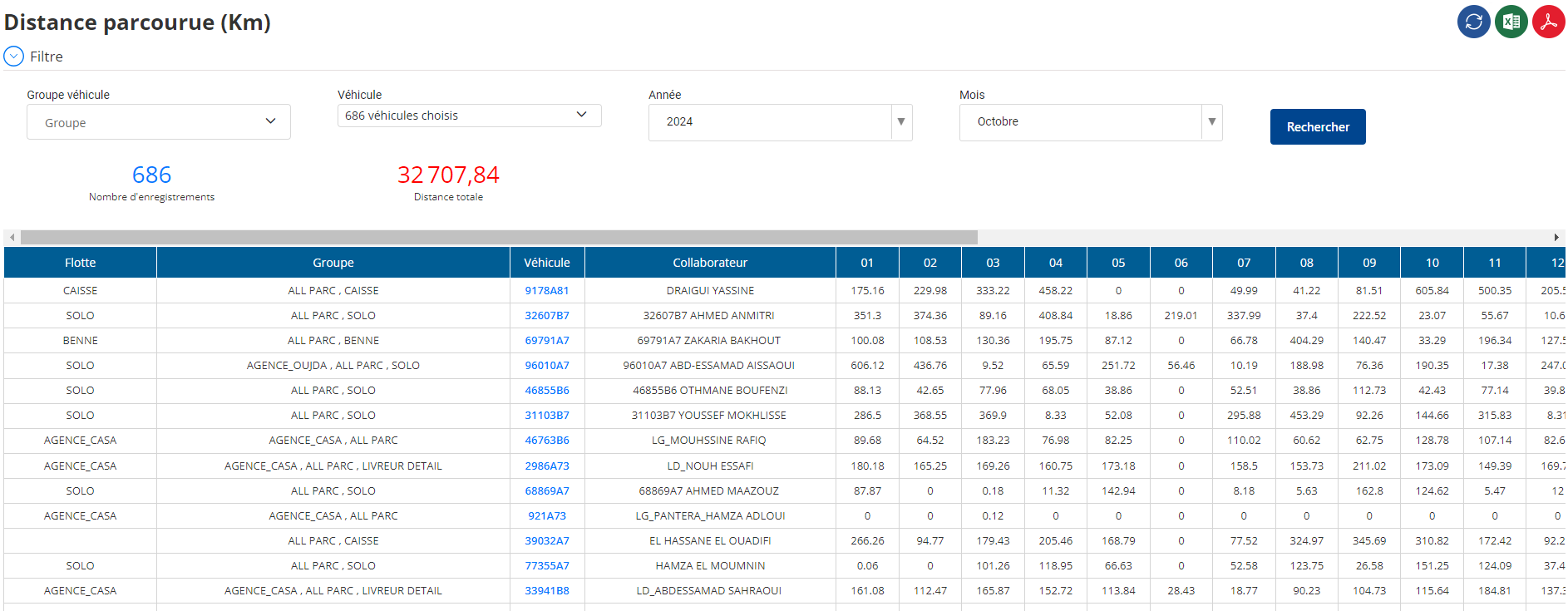
Filtre de l'Interface
Pour optimiser la recherche et l'analyse des distances parcourues, l'utilisateur dispose des filtres suivants :
- Groupe de véhicules: Sélection d'un ou plusieurs groupes de véhicules pour un filtrage ciblé.
- Véhicule: Permet de choisir un ou plusieurs véhicules spécifiques.
- Année: Affine les résultats par année.
- Mois: Permet de limiter l'affichage aux distances parcourues sur un mois précis.

Tableau de Résultats
Le tableau affiche les informations essentielles pour chaque véhicule et jour de la période sélectionnée :
- Flotte: La flotte à laquelle appartient le véhicule.
- Groupe: Le groupe auquel le véhicule est rattaché.
- Véhicule: Immatriculation ou identification du véhicule.
- Collaborateur: Conducteur associé au véhicule.
- Jour: Date du jour concerné avec la distance parcourue.
Fonctionnalités
-
Filtrage avancé:
L'utilisateur peut rechercher les distances parcourues par véhicule en fonction du mois, de l'année et du groupe de véhicules. -
Exportation des Données:
Les résultats peuvent être exportés sous les formatsExceletPDF, facilitant la documentation et l'analyse des performances à long terme. -
Visualisation intuitive des kilométrages:
Cette interface offre une vue claire et concise du niveau d’activité quotidien, utile pour planifier l’entretien et optimiser l'utilisation de la flotte.
Objectif
- Suivi de l’efficacité de la flotte: Identifier les véhicules sur- ou sous-utilisés.
- Gestion de l’entretien préventif: Basé sur les distances parcourues, le gestionnaire peut planifier les entretiens nécessaires.
- Optimisation des ressources: Faciliter la répartition des véhicules et évaluer les besoins futurs.
Cette interface constitue un outil indispensable pour les gestionnaires de flotte, offrant une visibilité détaillée sur l’utilisation quotidienne des véhicules, tout en permettant un export facile des rapports pour une analyse approfondie.

