Module · GPS
Rapport Arrêts
Rapport Arrêts
Le rapport des arrêts est un outil clé pour le suivi des véhicules d’une flotte, permettant d’analyser la durée et l’emplacement des arrêts effectués. Ce guide détaille chaque colonne du rapport et met en avant sa valeur ajoutée.
Explication des Colonnes
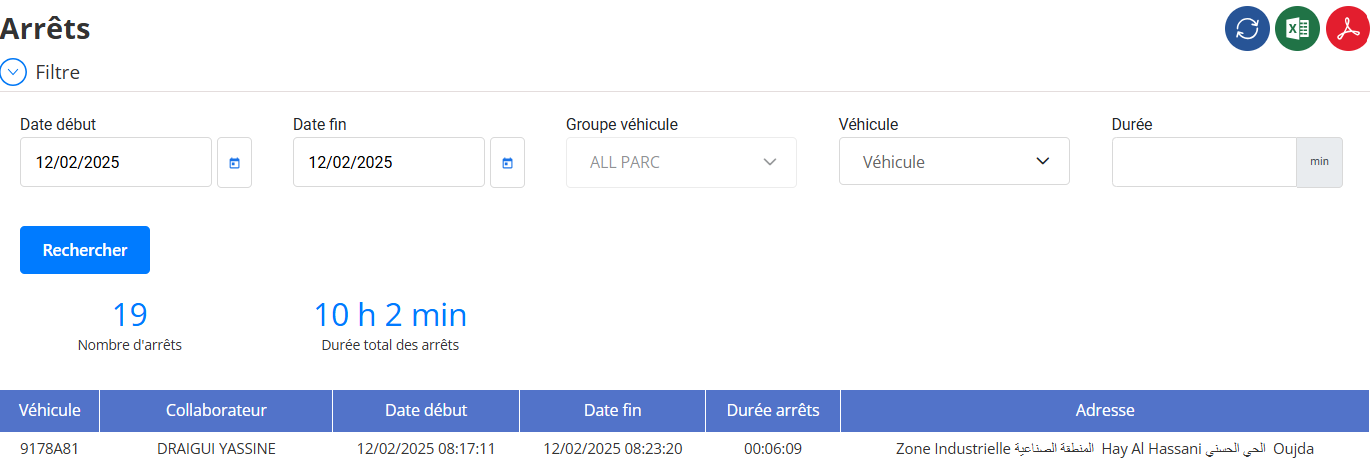
1. Véhicule
Identifiant du véhicule concerné par l’arrêt, souvent représenté par un numéro ou une plaque d’immatriculation. Permet d’associer les arrêts aux véhicules spécifiques.
2. Collaborateur
Nom du conducteur ou de l’utilisateur du véhicule lors de l’arrêt. Utile pour suivre l’activité des employés et l’utilisation des véhicules.
3. Date début
Indique la date et l’heure précises du début de l’arrêt. Permet d’analyser les moments où les véhicules sont immobilisés.
4. Date fin
Indique la date et l’heure précises de la fin de l’arrêt. Cette donnée est utilisée pour calculer la durée totale de l’arrêt.
5. Durée arrêts
Durée totale de l’arrêt, exprimée en heures, minutes et secondes. Permet d’évaluer les temps d’inactivité et d’optimiser les opérations.
6. Adresse
Emplacement exact où l’arrêt a eu lieu. Peut inclure des zones industrielles, des quartiers ou des adresses précises pour analyser les tendances d’arrêt.
Valeur Ajoutée du Rapport
-
Optimisation du temps d’exploitation: Permet d’identifier les arrêts prolongés et d’optimiser l’utilisation des véhicules.
-
Analyse des habitudes des conducteurs: Suivi des arrêts fréquents pour adapter la planification et améliorer l’efficacité.
-
Réduction des coûts opérationnels: En réduisant les arrêts inutiles, il est possible d’optimiser la consommation de carburant et la productivité.
-
Sécurité et conformité: Suivi des arrêts pour garantir le respect des temps de repos et des réglementations en vigueur.
-
Planification logistique améliorée: Aide à optimiser les itinéraires et à identifier les zones à fort taux d’arrêt.
Le rapport des arrêts est un outil essentiel pour la gestion et l’optimisation d’une flotte de véhicules, permettant d’améliorer l’efficacité opérationnelle et de réduire les coûts.

