Module · GPS
Alerte Zone Sortie
Alerte Zone Sortie
Introduction
L’interfaceAlerte de Sortie de Zonerepose sur le même principe que celle des alertes d'entrée, mais elle se concentre sur les événementsde sortie des véhiculesdes zones prédéfinies. Ce système permet desurveiller les départs des véhiculesdes zones critiques et d’enarchiver les alertespour un suivi efficace. L’objectif principal est d’assurerun contrôle rigoureux des mouvementset d’alerter les responsables lorsque les véhicules quittent des zones importantes.
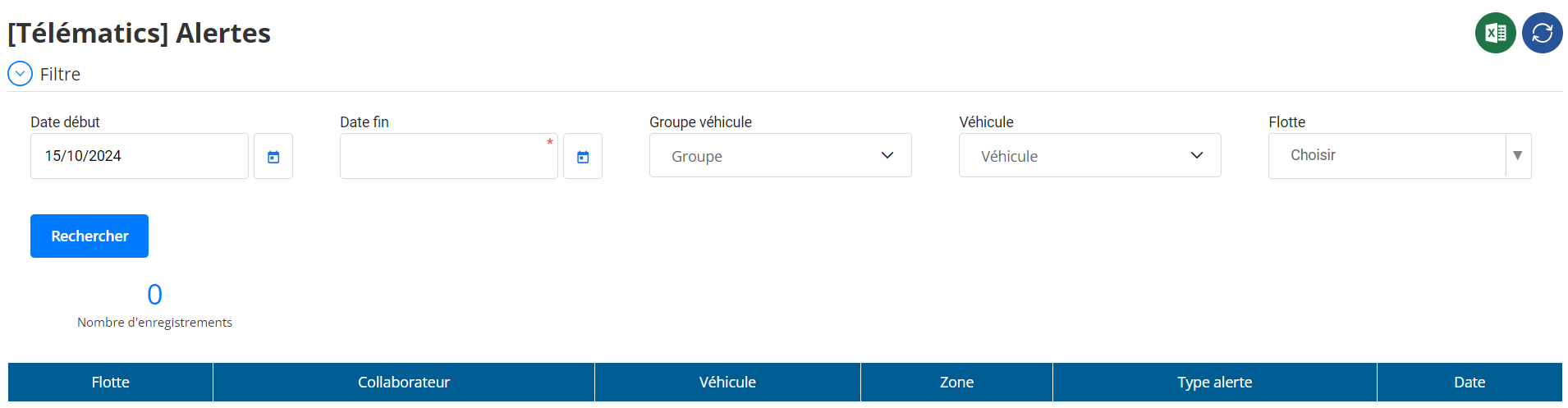
Filtres de Recherche
Les filtres présents dans cette interface permettent unerecherche ciblée des événements de sortie de zoneen fonction de critères définis par l’utilisateur :
-
Date de Début / Date de Fin:
Délimite la plage de temps sur laquelle les alertes de sortie doivent être affichées. -
Groupe de Véhicules:
Permet de sélectionner ungroupe spécifiquepour afficher uniquement les sorties associées à ces véhicules. -
Véhicule:
Offre la possibilité dechoisir un ou plusieurs véhiculeset de consulter leur historique de sortie. -
Flotte:
Facilite la recherche enfiltrant par flotte, ce qui est utile pour les responsables qui supervisent plusieurs flottes.
Ces filtres garantissent une consultation rapide des informations pertinentes, même dans des environnements contenant un grand volume de données.
Tableau des Alertes
Les résultats de la recherche sont affichés sous forme d’untableau interactif, où chaque ligne correspond à une alerte de sortie de zone. Ce tableau contient les colonnes suivantes :
- Flotte: Nom de la flotte à laquelle appartient le véhicule.
- Collaborateur: Conducteur du véhicule au moment de l'alerte.
- Véhicule: Immatriculation ou identifiant du véhicule.
- Zone: Zone quittée par le véhicule.
- Type d’Alerte: Indique qu’il s’agit d’unealerte de sortie de zone.
- Date: Date et heure précises de la sortie.
Cette présentation permetune visualisation claire et ordonnéedes sorties de zone, facilitant ainsi l’analyse et le suivi.
Associées au Tableau
Le tableau intègre plusieurs options pouraméliorer l’expérience utilisateuret optimiser l’analyse :
-
Tri et Recherche Dynamique:
Permet detrier les donnéesou d’effectuer une recherche rapide par nom de collaborateur, immatriculation de véhicule, ou zone. -
Choix des Colonnes à Afficher:
L’utilisateur peutpersonnaliser l’affichage des colonnespour n’afficher que les informations essentielles. -
Exportation des Données:
Le tableau peut êtreexporté en différents formats(CSV, Excel) pour permettre une analyse ou un partage ultérieurs.
Alertes par Email
Cette interface offre également uneoption de notification par emailpour alerter les responsables en temps réel lorsque des véhicules quittent certaines zones. Cette fonctionnalité peut être configurée pour :
- Notifier à chaque sortie de zone.
- Limiter les alertes à certaines zones spécifiques(par exemple, zones sensibles ou à haute sécurité).
Les utilisateurs peuventactiver ou désactiverces notifications selon leurs besoins, assurant uneréactivité maximaleface aux événements critiques.
Archivage et Suivi des Alertes
L’objectif de cette interface est d'assurerun archivage completdes alertes de sortie dans unrapport détaillé, permettant :
- Un suivi historique précispour analyser les habitudes de sortie des véhicules.
- L’identification de comportements anormaux, comme des sorties non autorisées.
- Une gestion plus efficace des opérations, en ajustant les horaires et les paramètres de zone.
L’archivage garantit égalementune traçabilité complète, ce qui peut s'avérer utile pour les audits ou les rapports de conformité.

