

Module · Purchasing
List of purchase requests
List of purchase requests
The interfaceList of purchase requestsprovides an overview of all requests recorded in the system, allowing astructured and rapid follow-uppurchasing operations.
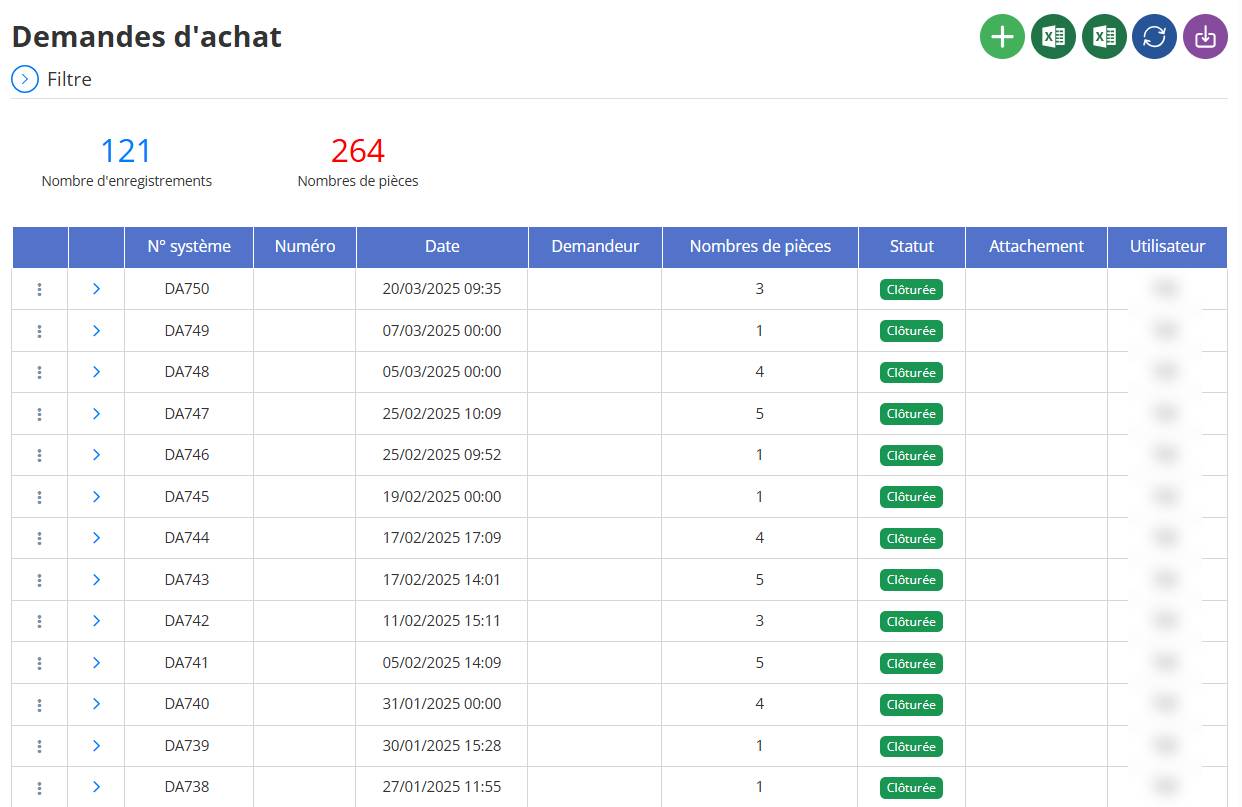
List contents:
Each line corresponds to a purchase request and displays the following information:
-
System No.: unique identifier automatically generated.
-
Number: internal or manual number of the request.
-
Date: date and time of creation of the request.
-
Applicant: person who initiated the request (displayed if provided).
-
Number of pieces: quantity of articles or references included in the request.
-
Status: progress status of the request (for example:Closed, In progress, etc.).
-
Attachment: indication if there is an attached document or file (not displayed in the example).
-
User: name of the user who registered the request.
Indicators at the top of the list:
-
Number of records: total requests displayed in the list.
-
Number of pieces: accumulation of all the documents requested in the different requests.
Available actions (icons at top right):
-
Add a new purchase request(green + icon)
-
Exporter les données(Excel format) purchase requests
-
Export data(Excel format) purchase requests with parts details
-
Refresh list
-
Import
Benefits:
-
Allows aeffective follow-uprequests through a clear presentation.
-
Give aglobal visionpurchase history and status.
-
Make it easierverification, control and exportdata at any time.