Module · TMS
Liste des ordres de transport
Liste des ordres de transport
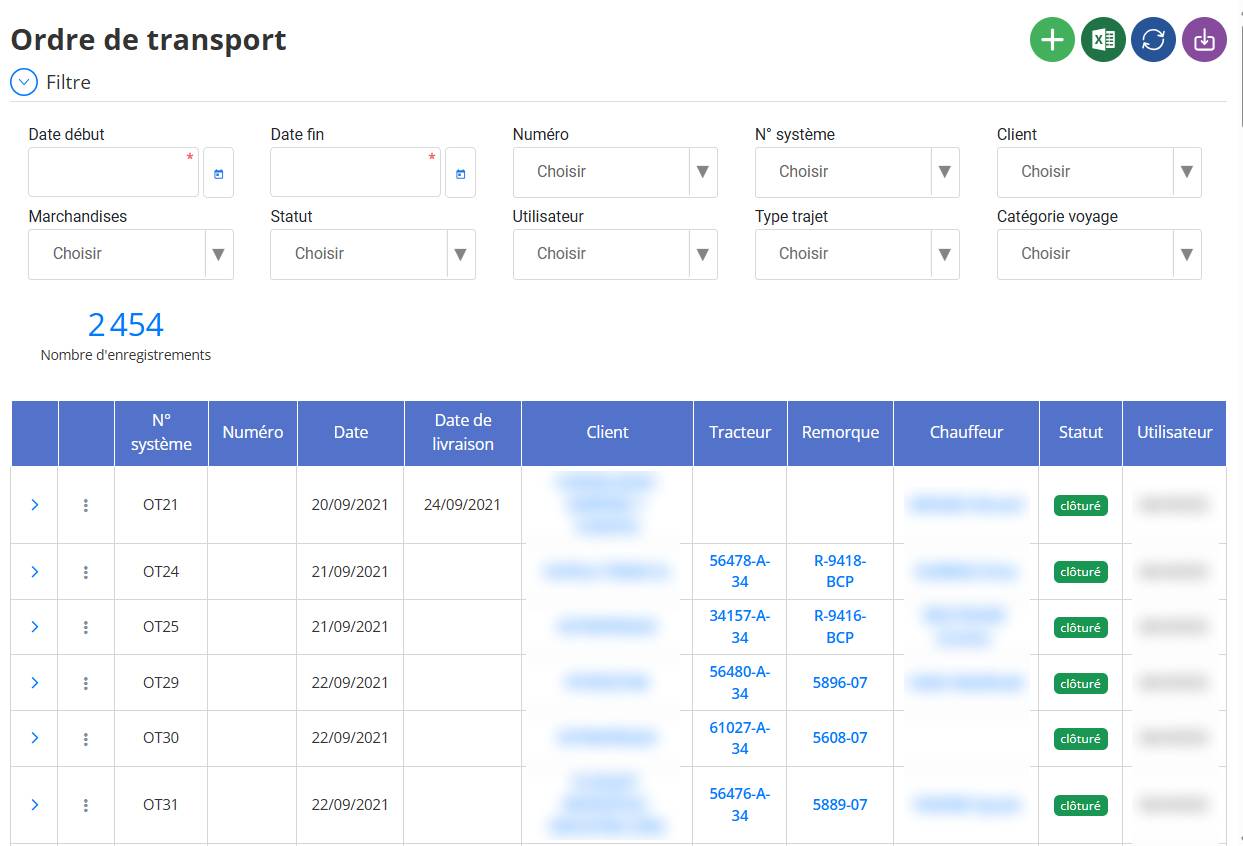
Laliste des ordres de transportconstitue un module essentiel dans la gestion logistique. Elle présente l'ensemble des opérations de transport enregistrées dans le système, permettant une consultation rapide, claire et centralisée des informations liées à chaque mission de transport.
1. Présentation Générale
La page affiche tous les ordres de transport déjà créés dans le système. Chaque ligne représente un ordre unique avec ses informations spécifiques. Le tableau est conçu pour une lecture fluide, une recherche efficace et une gestion optimisée des flux logistiques.
2. Informations Affichées
Les colonnes du tableau contiennent :
-
N° système: Identifiant interne attribué automatiquement par le système (ex. OT21).
-
Numéro: Référence ou code de l’ordre utilisé pour un suivi administratif.
-
Date: Date de création de l’ordre.
-
Date de livraison: Date prévue ou réelle de livraison de la marchandise.
-
Client: Nom du client pour lequel l’ordre est effectué.
-
Tracteur: Immatriculation du véhicule principal utilisé pour le transport.
-
Remorque: Immatriculation de la remorque attachée.
-
Chauffeur: Nom du conducteur affecté à cet ordre.
-
Statut: État de l’ordre (par exemple :clôturé).
-
Utilisateur: Nom de l’utilisateur ayant créé ou traité l’ordre.
3. Fonctionnalités disponibles
-
Bouton "Ajouter"(icône verte avec un "+") : permet de créer un nouvel ordre de transport.
-
Filtre: un bouton situé en haut à gauche ouvre un panneau de filtres avancés. Il permet de rechercher des ordres selon plusieurs critères (dates, clients, chauffeurs, etc.).
-
Rafraîchir(icône bleue circulaire) : recharge la page pour afficher les données mises à jour.
-
Importation(icône Excel) : permet d'importer plusieurs ordres à partir d’un fichier Excel pré-formaté.
-
Exportation(icône violette avec une flèche) : permet de télécharger/exporter la liste affichée au format PDF, Excel ou autre.
4. Objectif et Utilité
-
Faciliter lesuivi logistiquedes transports.
-
Offrir unetraçabilité complètedes opérations de livraison.
-
Permettre unerecherche rapidegrâce au filtrage.
-
Servir de base pour l’analyse des performancesde transport.

