Module · TMS
Travel List
Travel List
Objective of this interface:
Theretravel listpresent in a mannerclear, complete and organizedall trips recorded in the system. It allows users to:
-
Quickly consult essential informationde chaque voyage,
-
Gérer, modifier ou suivreles voyages (chargement, déchargement, facturation, etc.),
-
Assurer le suivi administratif, logistique et financier.
Colonnes affichées et rôle de chaque champ :
| Nom de la colonne | Description |
|---|---|
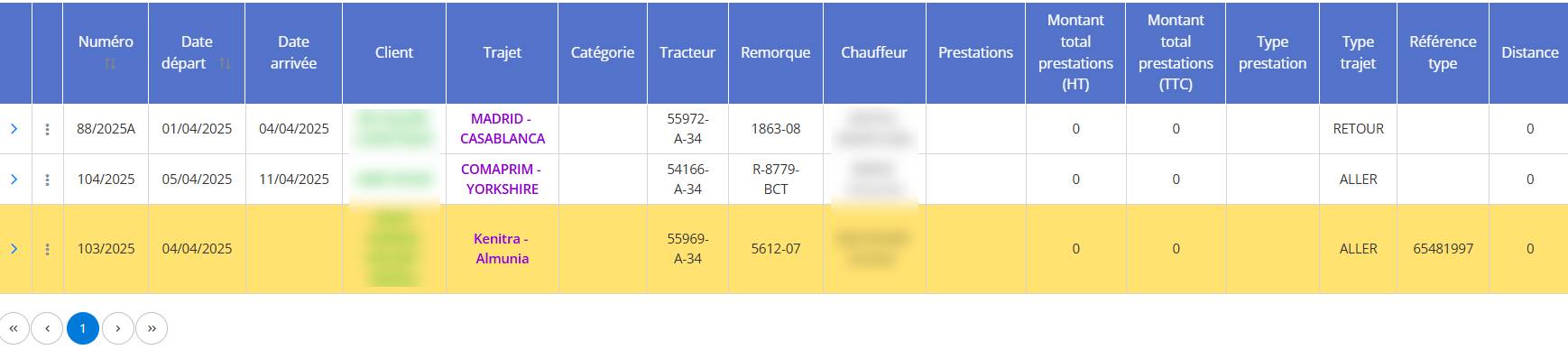
| Numéro | Numéro unique du voyage (ex : 88/2025A) pour l’identification rapide. |
| Date départ | Vehicle departure date for the trip. |
| Arrival date | Planned or actual date of arrival at destination. |
| Customer | Name of the customer who requested transport. |
| Road | Journey route (departure location → arrival location). |
| Category | Category of the type of transport or vehicle affected. |
| Tractor | Number of the tractor or motor vehicle used. |
| Trailer | Identification number of the attached trailer. |
| Driver | Name of driver assigned to the trip. |
| Services | Services provided during the trip (may be empty if there is no service entered). |
| Total amount of services (excluding tax) | Total associated services, excluding taxes. |
| Total amount of services (including tax) | Total associated services, all taxes included. |
| Type of service | Nature of the service (e.g. transport, delivery, etc.). |
| Type of journey | Indicates whether the trip is an “Outbound” or a “Return”. |
| Typical reference | Reference linked to the mission or purchase order. |
| Distance | Trip mileage (useful for bonuses or billing per km). |
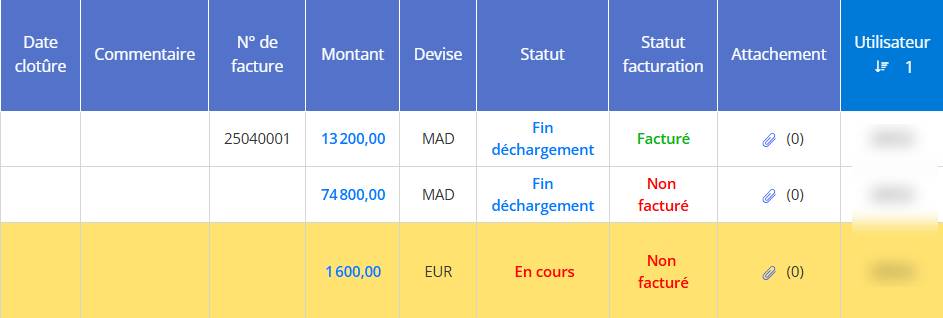
| Closing date | End or validation date of the trip. |
| How | Free area to add comments about the trip. |
| Invoice number | Invoice number generated following this trip. |
| Amount | Total amount charged for this trip. |
| Currency | Currency used (MAD, EUR, etc.). |
| Status | Progress status of the trip: “In progress”, “End of unloading”… |
| Billing status | Specifies whether the trip is “Charged” or “Not billed”. |
| Attachment | Number of attached files (e.g. delivery note, CMR, etc.). |
| User | User who created or modified the trip. |
Advantages of this interface:
-
Fast and intuitive readingthanks to the organization in columns.
-
Actions available directly from the line(edit, delete, print, send by email).
-
Compatible with Excel exportfor analyzes or reports.