

Module · TMS
Liste Factures
Liste Factures
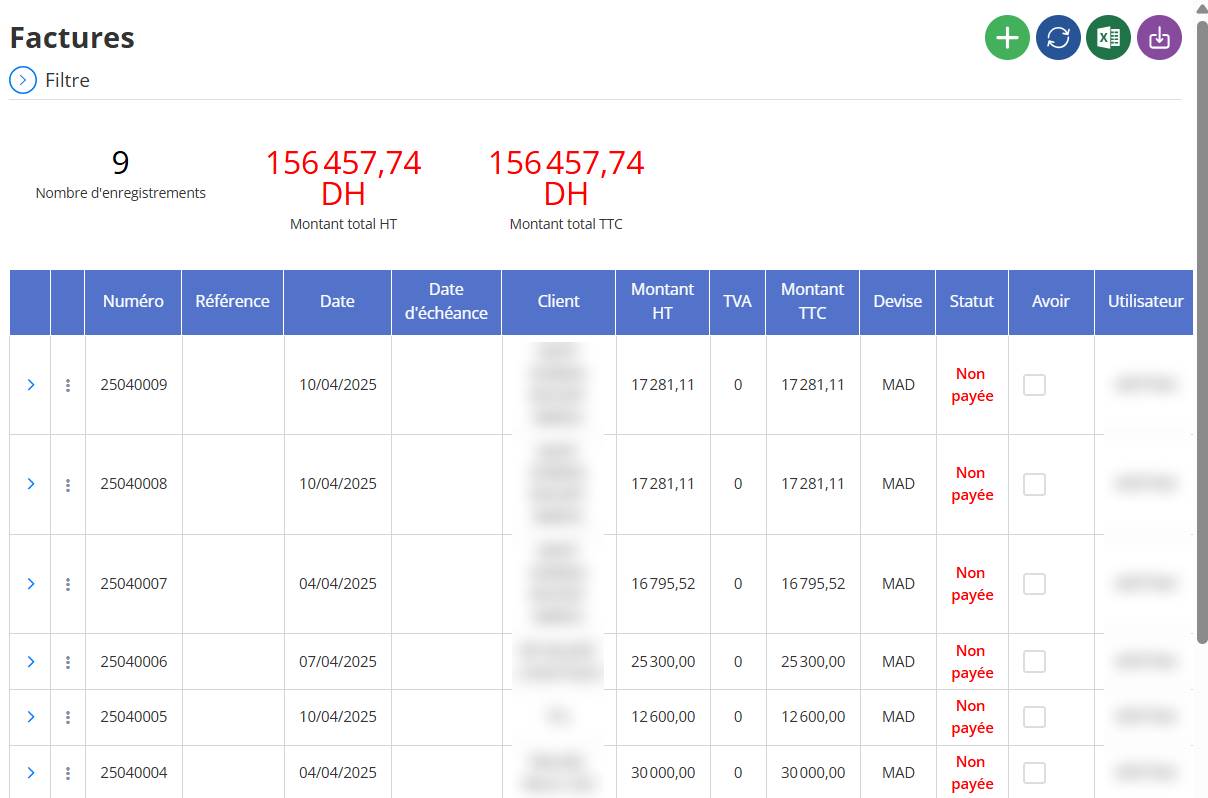
L’interfaceListe des facturespermet d’afficher de manière détailléetoutes les factures enregistréesdans le système. Elle offre une vision globale des facturations effectuées, ainsi qu’un accès rapide à toutes lesinformations essentiellespour le suivi, la consultation ou la gestion.
Objectif principal
Cette interface est conçue pour :
-
Visualiser l’historique de toutes les factures.
-
Consulter les détails de chaque facture.
-
Rechercher et filtrer les factures selon plusieurs critères.
-
Effectuer des actions : consultation, édition, suppression ou export.
Informations affichées pour chaque facture
Chaque ligne de la liste correspond à une facture et affiche les données suivantes :
| Champ | Description |
|---|---|
| Référence | Numéro unique de la facture |
| Date | Date de création de la facture |
| Client | Nom du client facturé |
| Montant HT / TTC | Montant total hors taxes et toutes taxes comprises |
| Mode de paiement | Méthode choisie (virement, espèce, etc.) |
| Statut | Statut actuel :Facturé, Annulé, Payé |
| Nombre de voyages liés | Nombre de voyages associés à la facture |
| Actions | Boutons permettant de : visualiser , modifier , supprimer |
Fonctions disponibles
Filtres de recherche
-
Filtrer pardate, client, statut, référence, etc.
-
Cela permet de retrouver facilement une facture spécifique ou de regrouper plusieurs factures selon un critère donné.
Voir les détails d’une facture
-
Cliquez sur l’icône de consultation (loupe ou œil)pour accéder à la fiche complète de la facture.

-
Vous y retrouverez : les voyages facturés, les montants, la devise, le compte bancaire, les conditions de paiement, etc.
Modifier une facture
-
Si le statut de la facture le permet (ex : non verrouillée), vous pouvez cliquer sur l’icône de modificationpour ajuster les informations.
Supprimer une facture
-
En cas d’erreur ou d’annulation, cliquez sur l’icône de suppressionpour effacer la facture (si les règles de suppression le permettent).
Remarques importantes
-
Les factures sont affichéesde la plus récente à la plus anciennepar défaut.
-
Il est possible d’exporterles listes enExcel ou PDFpour archivage ou analyse.
-
Unbadge ou couleurpeut indiquer visuellement le statut de la facture (ex : vert = payé, rouge = annulé).