

Module · Finance
Exportation Détaillée des Factures en Excel
Exportation Détaillée des Factures en Excel
L’Exportation détaillée des factures en Excelest une fonctionnalité avancée du module de gestion des factures, permettant aux utilisateurs de générer un fichier Excel contenant toutes les données relatives aux factures enregistrées dans le système. Cette option est particulièrement utile pour une analyse approfondie, un partage inter-départements, ou une utilisation dans des outils externes, offrant une vue complète et structurée des informations financières et administratives.
Fonctionnement
- Accès :Cliquez sur l’icône d’exportation détaillée(la deuxième icône Excel dans la barre d’outils.
- Processus :
- Sélection des Données :Par défaut, l’exportation détaillée inclut toutes les factures visibles dans le tableau, avec leurs informations complètes. Si un filtre est appliqué (par exemple, pour une période ou un client), seules les factures filtrées seront exportées.
- Inclusion des Détails :Contrairement à une exportation standard qui peut se limiter aux colonnes visibles (N° système, Numéro, Date, Client, Montant HT, TVA, Montant TTC, Période facturation, Statut, Utilisateur), l’exportation détaillée inclut des informations supplémentaires, telles que :
- Les lignes de détail de chaque facture (issues de la section "Détails" du formulaire d’ajout ou de modification), incluant Désignation, Quantité, Véhicule, PU HT, et Montant HT par ligne.
- Des champs supplémentaires potentiellement non visibles dans le tableau, comme les fichiers attachés (sous forme de noms ou liens), les numéros d’attestation, ou d’autres métadonnées.
- Génération du Fichier :Le système compile toutes ces données dans un fichier Excel (.xlsx), structuré avec des colonnes correspondant aux champs du tableau et des sections supplémentaires pour les détails.
- Téléchargement :Le fichier est téléchargé automatiquement sur l’ordinateur de l’utilisateur, généralement dans le dossier de téléchargements par défaut, avec un nom prédéfini (par exemple, "Factures_Detaillees_20250314.xlsx").
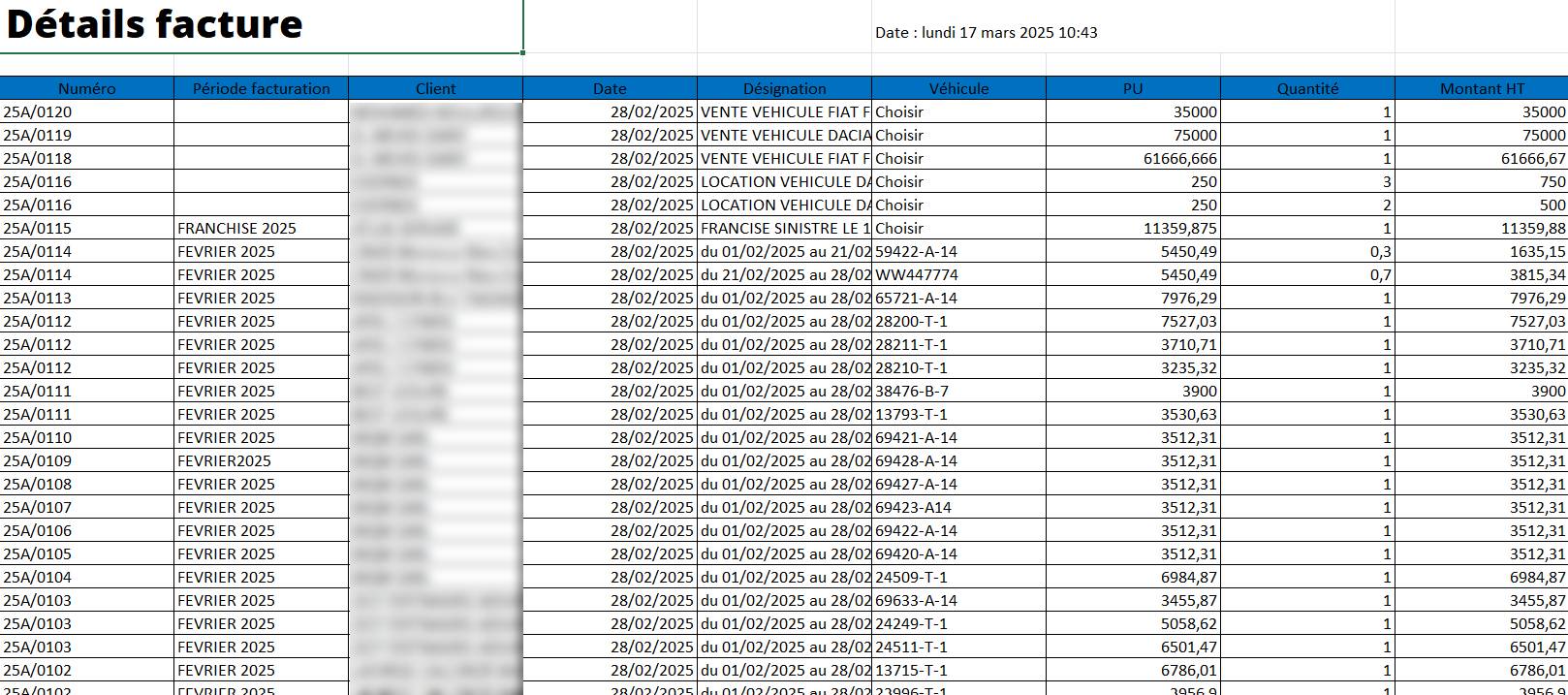
Résultat :L’utilisateur obtient un fichier Excel contenant une vue exhaustive des factures, incluant non seulement les informations générales (comme dans le tableau), mais aussi les détails granulaires de chaque facture.
Structure du Fichier Exporté
Le fichier Excel généré peut être structuré comme suit :
Informations Générales :
- Contient les colonnes du tableau principal : N° système, Numéro, Date, Client, Montant HT, TVA, Montant TTC, Période facturation, Statut, Utilisateur.
- Chaque ligne correspond à une facture.
Détails des Factures :
- Contient une ligne par élément de détail pour chaque facture, avec des colonnes comme : N° système (pour lier à la facture), Désignation, Quantité, Véhicule, PU HT, Montant HT.
- Permet une analyse approfondie des éléments facturés.
Avantages et Utilité
- Vue Complète :Fournit une exportation exhaustive, incluant les détails des lignes de facturation, ce qui est idéal pour une analyse granulaire.
- Analyse Approfondie :Permet d’utiliser les données dans Excel pour des calculs avancés (sommes, moyennes, tableaux croisés dynamiques) ou des visualisations (graphiques).
- Partage Inter-Départements :Facilite le partage avec d’autres équipes (comptabilité, direction) en fournissant toutes les informations nécessaires sans accès direct au système.
- Audit et Conformité :Utile pour les audits, car les détails des factures (comme les désignations et quantités) sont inclus, permettant une vérification complète.
- Flexibilité :Compatible avec les filtres, permettant d’exporter uniquement un sous-ensemble de données (par exemple, toutes les factures non payées d’un client).