Module · Finance
List of check books
List of check books
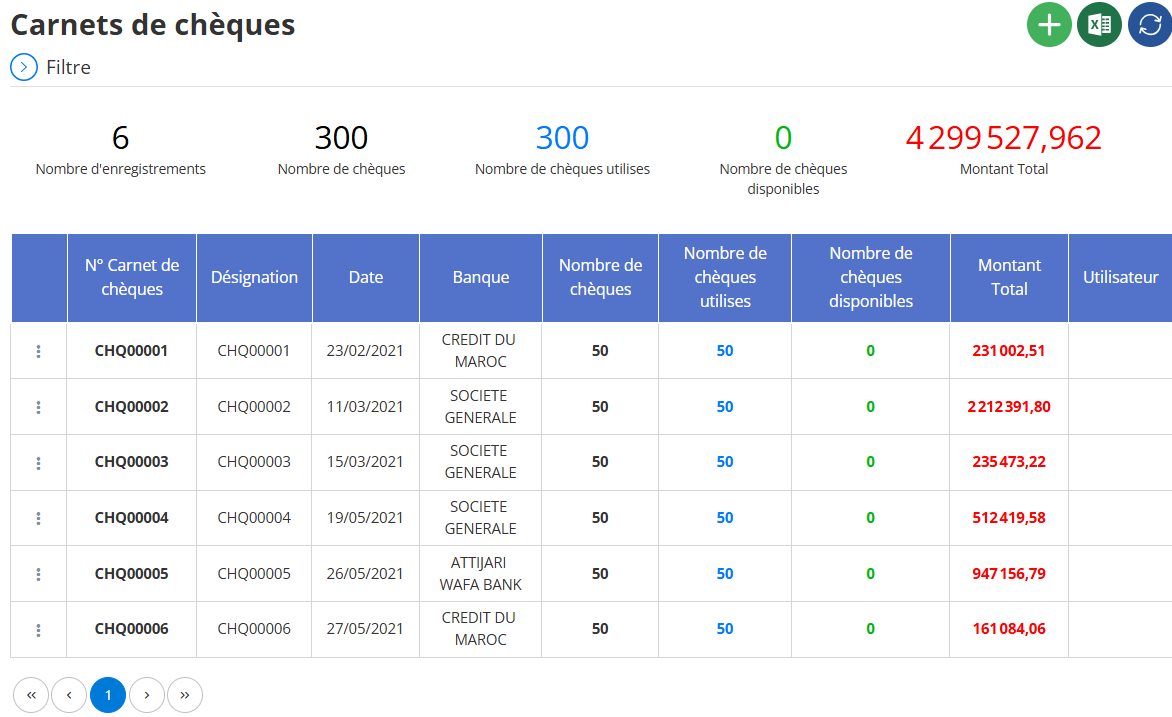
The Check List functionality is a key component of a financial management system, designed to comprehensively display all check books available in the system, providing an overview of associated transactions and allowing easy consultation. A scan of the provided interface, titled "Cheque Books", matches this description, showing a list of books with their details. Here is an exhaustive explanation of how it works, its components and its usefulness.
Understanding the Check List
The "Check List" allows users, such as accountants or financial managers, to view a complete view of registered check books, including their status (used, available), monetary value, and associated information such as bank and date of issue. This list is presented in tabular form, with details such as book number, date, bank, and number of checks, making it easy to track and manage. The interface includes filtering, exporting and refreshing options for flexible use.
Interface Description
The "Cheque books" interface presents a detailed table of books, with management options. Here are the main elements observed:
Header:The page is titled "Cheque Books", clearly indicating its check management function. On the right, a horizontal toolbar contains three icons:
- A green “+” icon to add a new checkbook.
- A blue “Excel” icon to export the data in Excel format.
- A blue refresh icon (circle with circular arrow) to update the list.
- Filter button:At the top left, a circular blue icon with a funnel ("Filter") opens a panel to apply search criteria, making it easier to customize the list.
Summary Statistics:Below the header, five statistics are displayed in blue boxes:
- Number of records:6, indicating the total number of notebooks listed.
- Number of checks:300, representing the total of checks in all books.
- Number of checks used:300, indicating that all checks have been used.
- Number of checks available:0, indicating that there are no more checks available.
- Total Amount:4,299,527.96 (in red, probably in dirhams, DH), representing the total sum of the amounts associated with the notebooks.
Table of Check Books:The main body is a table with a dark blue header row and several rows of data. The columns are:
- N° Carnet de chèques :Unique notebook identifier (for example, CHQ00001, CHQ00002).
- Designation :Description ou autre identifiant, ici identique au numéro de carnet dans tous les cas.
- Date :Date associated with the notebook (for example, 02/23/2021, 03/11/2021).
- Bank:Name of the associated bank (for example, CRÉDIT DU MAROC, SOCIÉTÉ GÉNÉRALE, ATTIJARI WAFA BANK).
- Number of checks:Total checks in the book, always 50 for each entry.
- Number of checks used:Number of checks already used, always 50 for each entry, indicating full usage.
- Number of checks available:Number of checks remaining, always 0, confirming that no checks are available.
- Total Amount:Total amount associated with the notebook (for example, 231,002.51 DH, 2,212,391.80 DH).
- User :Person who saved the notebook, empty in this example.
Paging:At the bottom of the table, a pagination control indicates that the user is on page 1 ("1" is highlighted in blue). Arrows to navigate to previous and next pages announce that more records may be available if the total exceeds the display limit per page.
Management features
The check list includes several actions, based on visible elements and standard practices:
View Details:
- All notebook information is displayed in the table, allowing easy consultation of numbers, dates, banks and amounts.
- Summary statistics provide a quick view of the overall status (for example, 0 checks available).
Data filtering:
- Use the “Filter” button to apply criteria, for example, to all notebooks issued in 2024 by a specific bank.
- Process: Fill in the fields in the filter panel, then apply.
- Result: The table displays only the notebooks matching the criteria.
Data export:
- Click the Excel icon to generate an Excel file containing the visible data.
- Result: Useful for external reports or analyses, with all table columns.
Data Refresh:
- Click the refresh icon to update the list, ensuring that the information displayed is the most recent.
Added New Notebooks:
- Click the "+" icon to open a form and add a new book, entering details like number, bank, and number of checks.
Advantages and usefulness
- Overall View:Summary statistics (number of checks, used, available, total amount) provide a quick view of the status of the books, facilitating decision-making.
- Traceability:Details like book number, bank and date ensure full transparency, essential for audits.
- Flexibility:Filtering and export options allow management adapted to specific needs, such as isolating notebooks from a bank or a period.
- Effective Management:Makes it easier to track check inventory and prepare financial reports, especially with pagination to manage large volumes.
- Error Prevention:By clearly displaying the status (0 available), it helps avoid the use of non-existent checks.

