

Module · Finance
Liste Factures
Liste Factures
LaListe des Facturesest une fonctionnalité centrale du module de gestion des factures, offrant une vue détaillée et organisée de toutes les factures enregistrées dans le système. Cette liste permet aux utilisateurs, tels que les comptables ou gestionnaires, de consulter, surveiller et analyser les transactions financières associées aux clients, facilitant ainsi le suivi des paiements et la gestion globale des créances.
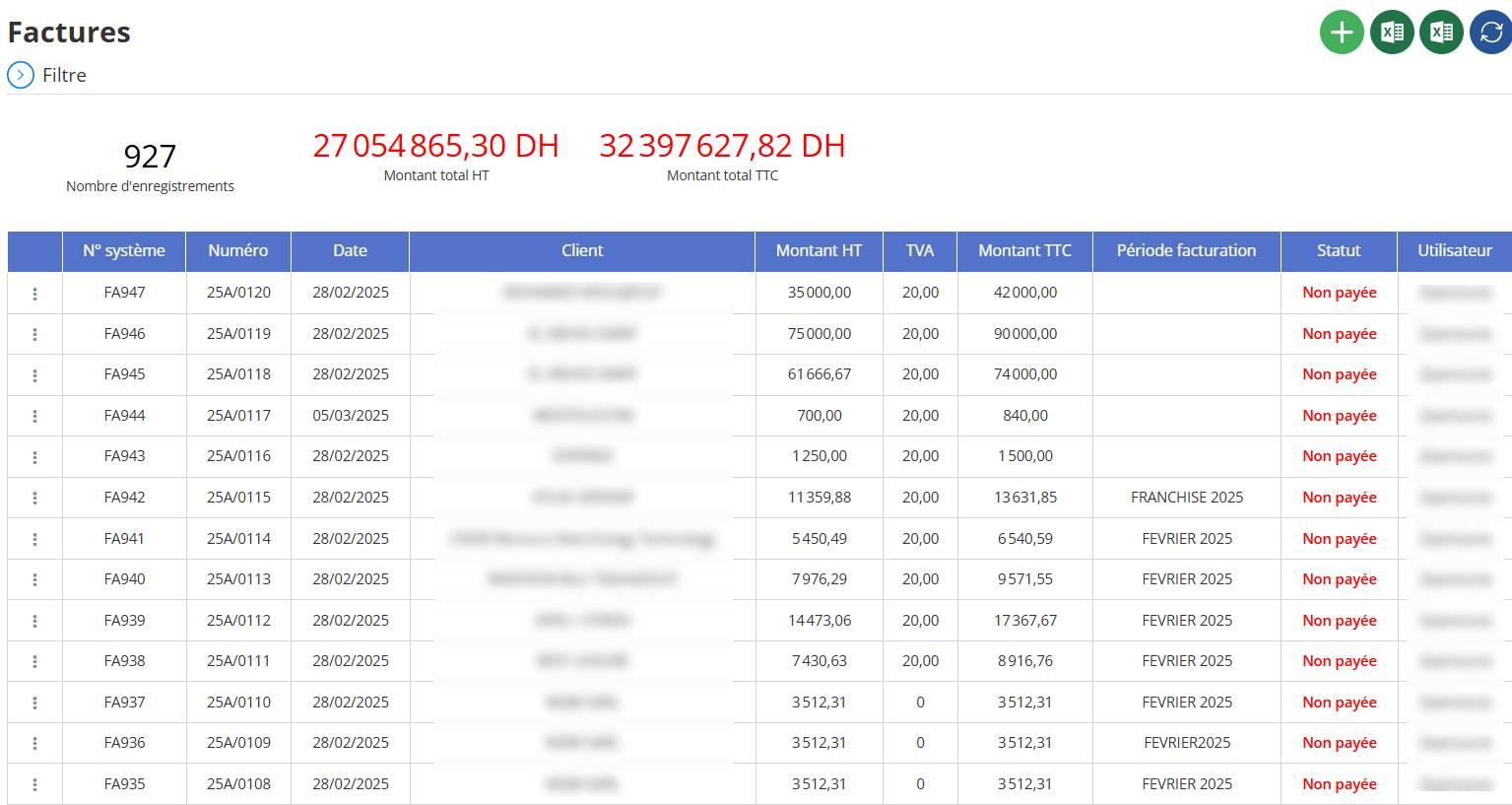
Structure et Composantes
L’en-tête de la liste inclut des statistiques globales, suivies d’un tableau détaillé avec plusieurs colonnes. Voici une description de chaque élément :
En-tête Statistique
- Nombre d’enregistrements :Indique le total des factures listées, ici927, reflétant le volume de transactions gérées.
- Montant total HT :Affiche la somme des montants hors taxes (HT) de toutes les factures visibles, ici27 054 865,30 DH(dirhams), représentant le total brut des ventes.
- Montant total TTC :Présente le montant total toutes taxes comprises (TTC), ici32 397 627,82 DH, incluant la TVA ou autres taxes, essentiel pour le suivi des paiements et les déclarations fiscales.
- Interprétation :La différence entre HT et TTC (environ 5 342 762,52 DH) correspond à la TVA totale, suggérant un taux fixe de 20 % dans cet exemple.
2. Tableau des Factures
Le tableau détaille chaque facture avec des colonnes spécifiques, permettant une consultation précise. Voici une description de chaque colonne :
N° système :
- Rôle :Identifiant unique généré par le système pour chaque facture.
- Exemple :FA947, FA946, FA945, etc.
- Fonction :Sert de référence interne pour identifier rapidement une facture dans le système.
Numéro :
- Rôle :Numéro de référence de la facture, souvent utilisé dans les échanges avec le client.
- Exemple :25A/0120, 25A/0119, etc.
- Fonction :Facilite le rapprochement avec les documents envoyés aux clients ou les systèmes externes.
Date :
- Rôle :Date d’émission de la facture.
- Exemple :28/02/2025, 05/03/2025.
- Fonction :Fournit une chronologie pour suivre les factures et leurs échéances.
Client :
- Rôle :Nom du client destinataire de la facture.
- Fonction :Identifie le débiteur, essentiel pour la gestion des relations commerciales et le recouvrement.
Montant HT :
- Rôle :Montant hors taxes de la facture.
- Exemple :35 000,00 DH, 75 000,00 DH, 700,00 DH, etc.
- Fonction :Représente le coût brut des biens ou services vendus, base pour le calcul des taxes.
TVA :
- Rôle :Montant de la taxe sur la valeur ajoutée appliquée.
- Exemple :20,00 DH (fixe dans cet extrait), suggérant un taux uniforme (par exemple, 20 %).
- Fonction :Permet de calculer et déclarer la taxe perçue auprès des autorités fiscales.
Montant TTC :
- Rôle :Montant total que le client doit payer, incluant la TVA.
- Exemple :42 000,00 DH, 90 000,00 DH, 840,00 DH, etc.
- Fonction :Indique le montant final attendu, clé pour le suivi des paiements.
Période facturation :
- Rôle :Période couverte par la facture.
- Exemple :FRANCHISE 2025, FEVRIER 2025.
- Fonction :Associe la facture à une période spécifique, utile pour les factures récurrentes ou saisonnières.
Statut :
- Rôle :État de paiement de la facture.
- Exemple :"Non payée" (affichée en rouge pour toutes les lignes visibles).
- Fonction :Permet d’identifier les factures en attente de règlement, facilitant les relances.
Utilisateur :
- Rôle :Personne ayant enregistré ou modifié la facture.
- Fonction :Assure la traçabilité et la responsabilité des entrées dans le système.
Fonctionnement
- Affichage :Toutes les factures enregistrées sont listées par défaut, avec la possibilité de faire défiler ou de paginer si le nombre total (927) dépasse la vue initiale.
- Mise à Jour :Les données sont actualisées dynamiquement, par exemple après l’ajout, la modification ou la suppression d’une facture.
- Interaction :Chaque ligne peut être sélectionnée via les trois points ("…") pour accéder à des actions comme modifier, dupliquer, supprimer ou imprimer.
Avantages et Utilité
- Vue Globale :Les totaux HT et TTC offrent une synthèse rapide des créances totales.
- Détail Précis :Chaque colonne fournit des informations spécifiques, facilitant l’audit et la gestion des ventes.
- Suivi des Paiements :Le statut "Non payée" en rouge aide à prioriser les relances clients.
- Traçabilité :Les champs N° système, Numéro, Date et Utilisateur assurent un suivi complet des transactions.
Bonnes Pratiques
- Vérification des Totaux :Comparez les montants HT, TVA et TTC pour détecter d’éventuelles incohérences.
- Utilisation du Filtre :Employez l’icône "Filtre" pour réduire la liste à des critères spécifiques (par exemple, une période ou un client).
- Mise à Jour Régulière :Rafraîchissez la liste (via l’icône circulaire) après des modifications pour garantir des données à jour.
- Exportation :Utilisez l’option "Excel" pour archiver ou analyser les données hors ligne.
Exemple d’Utilisation
Pour vérifier les factures non payées de février 2025 :
- Consultez la colonne "Période facturation" pour identifier les factures avec "FEVRIER 2025".
- Vérifiez la colonne "Statut" pour confirmer "Non payée" (par exemple, FA941 à FA937).
- Notez les montants TTC (par exemple, 6 540,59 DH pour FA941) pour un suivi financier.
Conclusion
LaListe des Facturesest un outil incontournable pour une gestion efficace des transactions clients, offrant une vue détaillée et personnalisable de toutes les factures enregistrées. Grâce à sa structure claire et ses fonctionnalités interactives, elle soutient la prise de décision et le suivi des paiements avec une précision remarquable.