

Module · Reporting
Encaissements Fournisseur
Encaissements Fournisseur
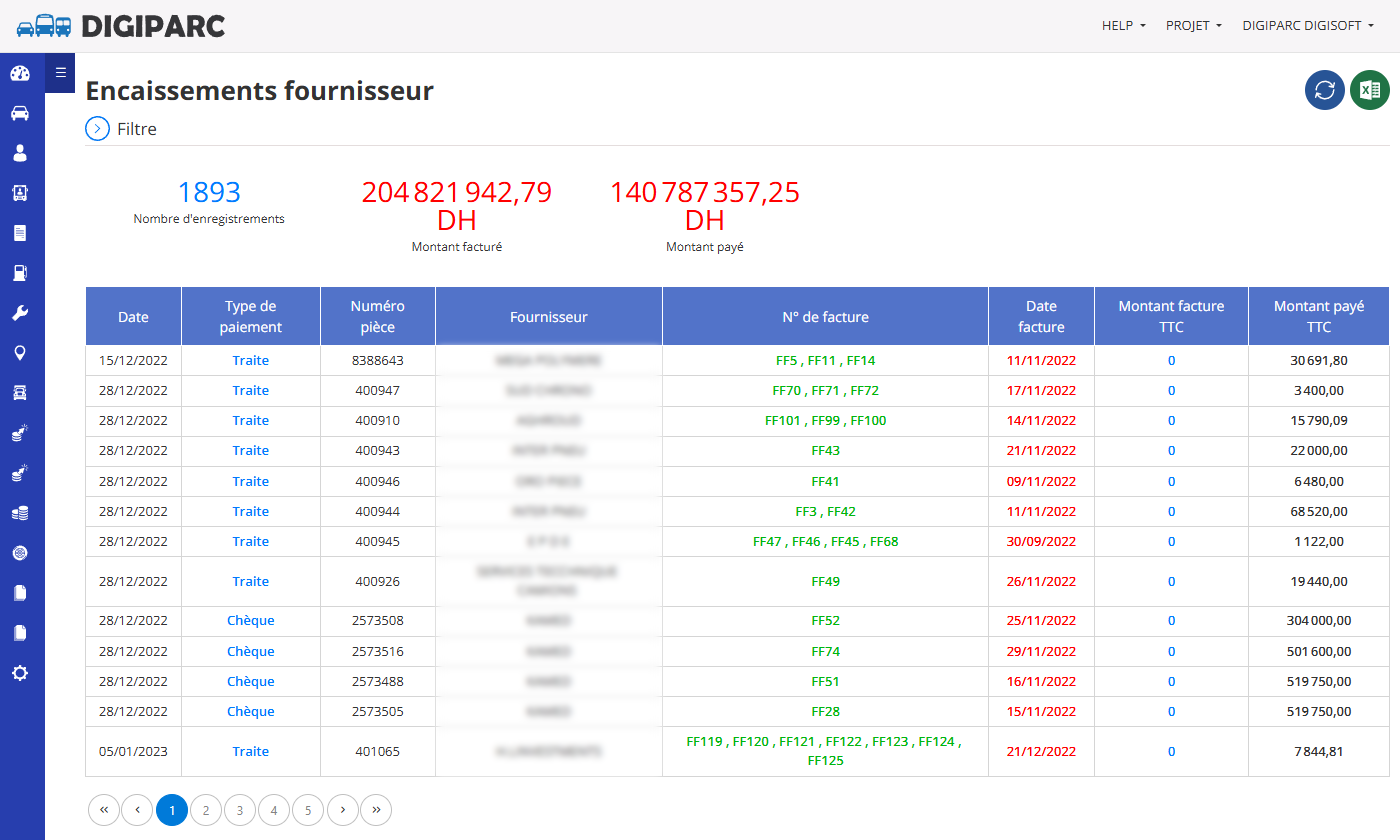
Ce rapport est conçu pour suivre les encaissements effectués auprès des fournisseurs. Il fournit une vue d'ensemble des paiements réalisés, permettant une gestion efficace des transactions financières avec les fournisseurs. Voici une explication des éléments principaux du rapport, y compris les titres des colonnes.
En-tête du Rapport
- Nom du Rapport: "Encaissements fournisseur" - Cela indique que le rapport est centré sur les paiements effectués aux fournisseurs.
- Nombre d'enregistrements: Par exemple, ici, il y a 1893 enregistrements, ce qui correspond au nombre total de lignes (transactions) dans le rapport.
- Montant facturé: Exprimé en DH (Dirhams), ici 20 482 1942,79 DH, représentant la somme totale des montants facturés par les fournisseurs.
- Montant payé: Également en DH, ici 14 078 7375,25 DH, correspondant à la somme totale des paiements effectués à ce jour.
Titres des Colonnes
Le tableau du rapport contient plusieurs colonnes qui structurent les informations sur les encaissements. Voici une description de chaque titre de colonne :
- Date: Cette colonne indique la date à laquelle la transaction ou l'enregistrement a été effectué. Elle permet de situer chaque opération dans le temps.
- Type de paiement: Cette colonne précise le mode de paiement utilisé pour régler le fournisseur, par exemple "Traite" ou "Chèque". Cela aide à identifier les méthodes de paiement privilégiées ou les variations dans les pratiques de règlement.
- Numéro: Cette colonne affiche un numéro unique associé à chaque transaction ou pièce comptable, permettant une identification rapide et un suivi précis de chaque opération.
- Fournisseur: Cette colonne contient le nom ou l'identifiant du fournisseur concerné par la transaction. Elle permet de savoir à qui le paiement a été effectué.
- N° de facture: Cette colonne répertorie les numéros des factures associées à chaque paiement. Elle sert à relier les paiements aux factures correspondantes émises par le fournisseur.
- Date facture: Cette colonne indique la date d'émission de la facture par le fournisseur. Elle permet de comparer la date de la facture avec la date de paiement pour évaluer les délais de règlement.
- Montant facture TTC: Cette colonne montre le montant total toutes taxes comprises (TTC) de la facture émise par le fournisseur. Elle reflète la somme initialement due.
- Montant payé TTC: Cette colonne indique le montant effectivement payé au fournisseur, également toutes taxes comprises (TTC). Elle permet de comparer le montant payé avec le montant facturé pour identifier d'éventuels écarts ou paiements partiels.
Navigation et Filtres
- Filtre: Un bouton "Filtre" est disponible pour affiner les données affichées, par exemple en sélectionnant une période spécifique, un fournisseur particulier ou un type de paiement.
- Pagination: Le rapport est paginé (par exemple, page 1 sur 5), permettant de naviguer facilement à travers les enregistrements si le nombre de lignes est important.
Valeur Ajoutée du Rapport
Ce rapport offre plusieurs avantages pour la gestion des relations avec les fournisseurs et le suivi financier :
- Visibilité sur les paiements: Il permet de voir en un coup d'œil les paiements effectués aux fournisseurs, avec des détails sur les montants facturés et payés, facilitant le suivi des règlements.
- Gestion des délais de paiement: En comparant la date de la facture et la date de paiement, il est possible d'évaluer les délais de règlement et d'identifier les retards éventuels, ce qui est crucial pour maintenir de bonnes relations avec les fournisseurs.
- Contrôle des écarts: La comparaison entre le "Montant facture TTC" et le "Montant payé TTC" permet de repérer rapidement les paiements partiels ou les factures non encore réglées, aidant à éviter les erreurs ou les oublis.
- Traçabilité des transactions: Grâce aux numéros d'enregistrement, de facture et aux informations sur le fournisseur, le rapport offre une traçabilité complète des opérations, utile pour les audits ou les vérifications comptables.
- Aide à la prise de décision: Les informations fournies (montants, types de paiement, fournisseurs) permettent de mieux planifier les flux de trésorerie, de prioriser les paiements ou de négocier avec les fournisseurs en cas de besoin.
- Synthèse financière: Les totaux en haut du rapport (montant facturé et montant payé) offrent une vue synthétique de l'état des règlements, utile pour des analyses financières rapides.
Conclusion
Le rapport "Encaissements fournisseur" est un outil essentiel pour les équipes financières et comptables. Il centralise les informations sur les paiements aux fournisseurs, améliore la transparence et facilite la gestion des flux financiers. En utilisant ce rapport, une entreprise peut optimiser ses processus de paiement, réduire les risques d'erreurs et entretenir des relations harmonieuses avec ses fournisseurs.