Module · Reporting
Détail Trajets
Détail Trajets
Introduction
Lerapport RT003 - Détail fiches des trajetsfournit un aperçu détaillé des trajets effectués par les véhicules de la flotte. Il permet d’analyser chaque déplacement en tenant compte des aspects logistiques, kilométriques, financiers et de facturation.
Explication des colonnes du tableau
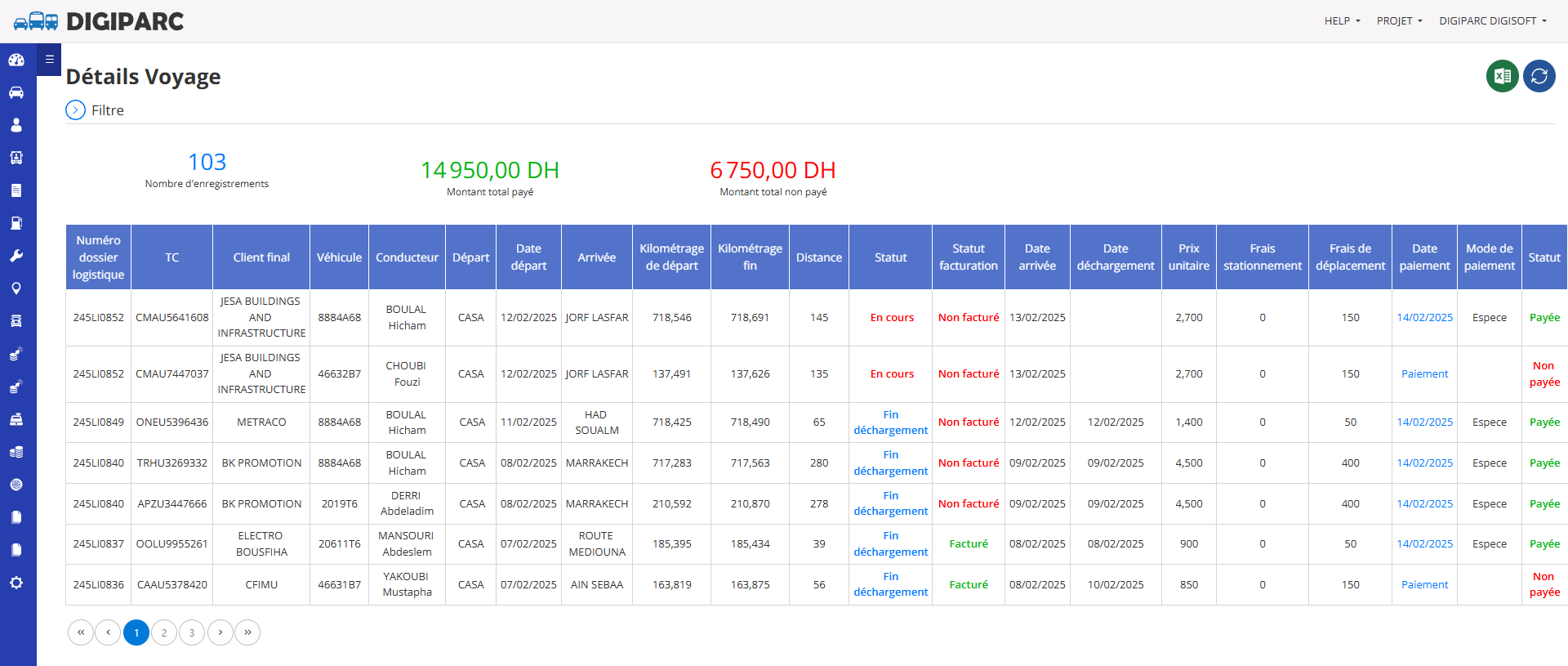
Numéro dossier logistique
- Identifiant unique du dossier logistique lié au trajet.
- Permet de tracer chaque opération de transport.
TC (Transporteur ou Référence de Trajet)
- Référence unique associée au transport ou au trajet.
- Utilisée pour identifier et suivre les voyages effectués.
Client final
- Nom du client bénéficiaire du service de transport.
- Permet de filtrer et d’analyser les trajets selon les clients.
Véhicule
- Identifiant ou numéro d’immatriculation du véhicule ayant effectué le trajet.
- Permet d’analyser l’utilisation des véhicules et leur performance.
Conducteur
- Nom du conducteur responsable du trajet.
- Permet d’assurer le suivi des affectations des conducteurs.
Départ
- Ville ou point de départ du trajet.
- Utilisé pour analyser l’origine des trajets et leur fréquence.
Date départ
- Date à laquelle le trajet a commencé.
- Permet d’analyser les horaires et l’optimisation des trajets.
Arrivée
- Ville ou destination finale du trajet.
- Permet de suivre les destinations les plus fréquentes.
Kilométrage de départ
- Indique le compteur kilométrique du véhicule au début du trajet.
- Utilisé pour mesurer la distance parcourue.
Kilométrage fin
- Indique le compteur kilométrique du véhicule à la fin du trajet.
- Permet de calculer les kilomètres réellement parcourus.
Distance
- Nombre total de kilomètres parcourus entre le départ et l’arrivée.
- Indicateur clé pour l’analyse des coûts et de la consommation de carburant.
Statut
- Indique l’état du trajet en cours ou terminé (ex. : "En cours", "Fin déchargement").
- Permet de suivre l’évolution des missions en temps réel.
Statut facturation
- Indique si le trajet a été facturé ou non.
- Permet de vérifier la correspondance entre trajets effectués et factures émises.
Date arrivée
- Date à laquelle le véhicule est arrivé à destination.
- Permet de mesurer les délais de transport.
Date déchargement
- Date à laquelle le déchargement des marchandises a été effectué.
- Permet de suivre la finalisation des opérations logistiques.
Prix unitaire
- Tarif appliqué par kilomètre ou par trajet.
- Permet de calculer les coûts de transport.
Frais stationnement
- Montant des frais de stationnement engagés lors du trajet.
- Indicateur pour le suivi des coûts annexes.
Frais de déplacement
- Montant des frais supplémentaires liés au trajet (hébergement, repas, péages, etc.).
- Permet d’optimiser la gestion des dépenses des conducteurs.
Date paiement
- Date à laquelle le paiement du trajet a été effectué.
- Permet de suivre le cycle de règlement des prestations.
Mode de paiement
- Moyen utilisé pour le paiement (espèces, virement, chèque, etc.).
- Permet d’analyser les tendances des transactions financières.
Statut
- Indique si le trajet a été payé ou non.
- Permet de suivre les encaissements et de relancer les paiements en attente.
Valeur ajoutée du rapport
Lerapport RT003 - Détail fiches des trajetsest un outil essentiel pour le suivi et l’optimisation des opérations de transport. Ses avantages incluent :
- Suivi détaillé des trajets: Permet une analyse complète des déplacements effectués par la flotte.
- Optimisation des coûts: Aide à identifier les postes de dépenses (carburant, stationnement, péages, etc.).
- Contrôle de facturation et de paiement: Permet de s’assurer que chaque trajet est bien facturé et payé.
- Gestion des performances des véhicules et conducteurs: Facilite l’évaluation de la rentabilité des trajets et l’affectation des ressources.
- Amélioration du service client: Permet de garantir la traçabilité et le respect des délais de livraison.
Conclusion
Lerapport RT003 - Détail fiches des trajetsest un outil stratégique pour les gestionnaires de flotte et les responsables logistiques. Il permet un suivi précis des trajets effectués et une meilleure maîtrise des coûts et de la facturation.

