Module · Admin
Thumbnail Management
Thumbnail Management
Le module de gestion des vignettes propose une solution complète pour organiser et actualiser les informations liées aux vignettes des véhicules. Conçu pour offrir une utilisation fluide et intuitive, ce système garantit une administration efficace, en phase avec les besoins des entreprises modernes.
Grâce à ce module, les utilisateurs peuvent structurer et centraliser toutes les données essentielles relatives aux vignettes. Qu’il s’agisse de détailler les informations sur les nouvelles acquisitions ou d’assurer la mise à jour régulière des données existantes, le système permet de maintenir une base d’informations toujours précise et fiable. Il contribue également à supprimer les enregistrements devenus obsolètes, optimisant ainsi la pertinence des données disponibles.
Ce processus rigoureux assure une parfaite conformité aux réglementations en vigueur, tout en simplifiant les démarches administratives. Les utilisateurs bénéficient d’un accès rapide et organisé aux informations nécessaires, ce qui leur permet de gérer efficacement les échéances ou de planifier les renouvellements en toute sérénité.
Avec une organisation optimisée et des données constamment actualisées, ce module devient un outil essentiel pour une gestion proactive des vignettes, contribuant à renforcer la transparence et à garantir un suivi précis au service des objectifs de l’organisation.
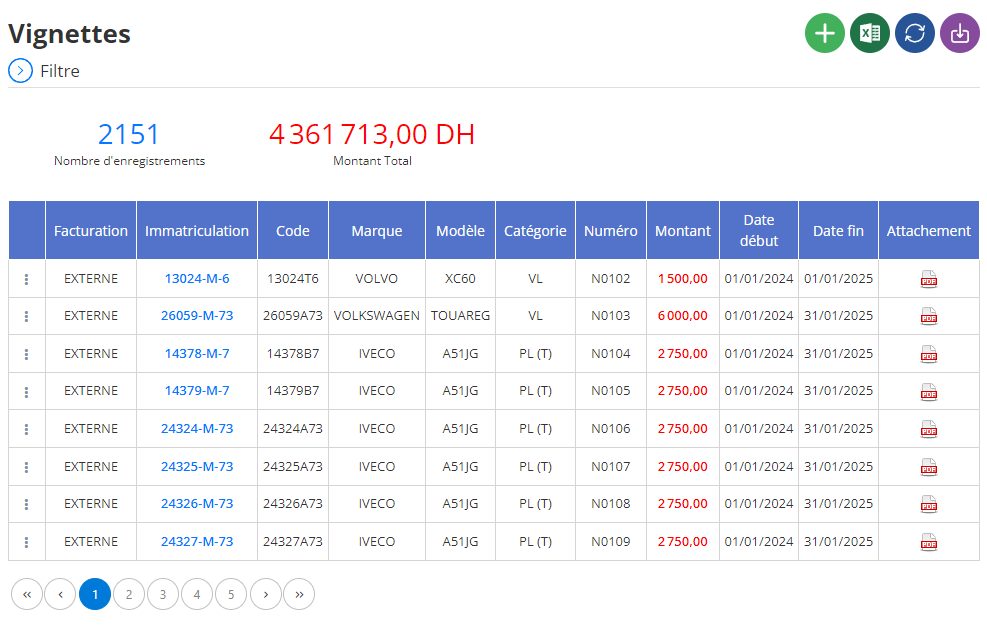
Ajout d’une vignette fiscale
L’interface d’ajout d’une vignette fiscale permet de centraliser et d’enregistrer toutes les informations essentielles liées aux taxes annuelles pour chaque véhicule de votre flotte. Cet outil garantit un suivi rigoureux des obligations fiscales, tout en simplifiant leur gestion grâce à une structure claire et intuitive.
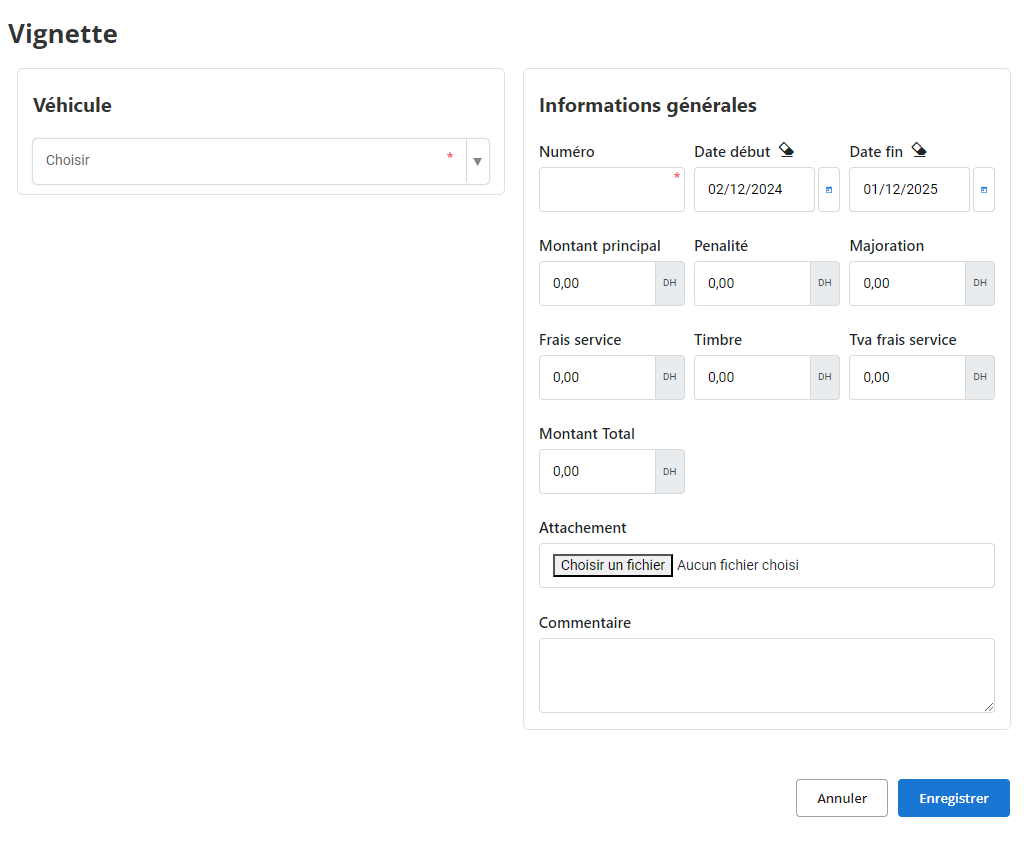
-
Véhicule concerné:Sélectionnez le véhicule dans la liste déroulante. Chaque vignette fiscale doit être associée à un véhicule spécifique, ce qui facilite la gestion et le suivi des paiements obligatoires.
-
Numéro de la vignette:Indiquez le numéro unique attribué à la vignette. Ce numéro est essentiel pour une identification rapide et pour toute vérification ultérieure auprès des autorités fiscales.
-
Dates de début et de fin de validité
- Date de début: Saisissez la date à laquelle la vignette prend effet.
- Date de fin: Indiquez la date de fin de validité. Ces informations garantissent que chaque véhicule est couvert pour l’année fiscale en cours et évitent tout manquement légal.
-
Montant principal:Entrez le montant de base de la vignette fiscale. Cela représente la somme initiale due pour l’enregistrement du véhicule auprès des services fiscaux.
-
Pénalités et majorations
- Pénalités: Ce champ permet de saisir les frais supplémentaires appliqués en cas de retard dans le paiement de la vignette.
- Majoration: Si des ajustements ou augmentations spécifiques sont appliqués au montant principal, ils peuvent être enregistrés ici.
-
Frais annexes
- Frais de service: Indiquez les coûts additionnels liés au traitement administratif ou à l’émission de la vignette.
- Timbre fiscal: Si un timbre fiscal est requis pour compléter la procédure, ce montant peut être saisi dans ce champ.
- TVA sur les frais de service: Permet d’enregistrer la taxe sur la valeur ajoutée applicable aux frais de service.
-
Montant total:Ce champ calcule automatiquement (ou est renseigné manuellement) la somme totale à payer, en tenant compte du montant principal, des pénalités, des majorations et des frais annexes.
-
Attachement:Joignez les documents pertinents, tels que des copies des reçus, des justificatifs de paiement, ou tout autre document lié à la vignette fiscale. Cela garantit une traçabilité complète et simplifie les démarches administratives ultérieures.
-
Commentaire:Un espace est dédié aux observations ou notes spécifiques concernant la vignette. Par exemple, vous pouvez y mentionner des retards éventuels, des remises obtenues ou des points à surveiller pour le prochain renouvellement.
Cet outil offre ainsi un gain de temps précieux tout en assurant une gestion efficace et conforme des obligations fiscales des véhicules.
Modification d'une vignette fiscale
La modification des informations relatives à une vignette fiscale est une étape clé pour garantir l’exactitude des données administratives et fiscales de votre flotte de véhicules. Cette opération permet d’ajuster les informations, de corriger d’éventuelles erreurs ou de mettre à jour les données en fonction des changements survenus.
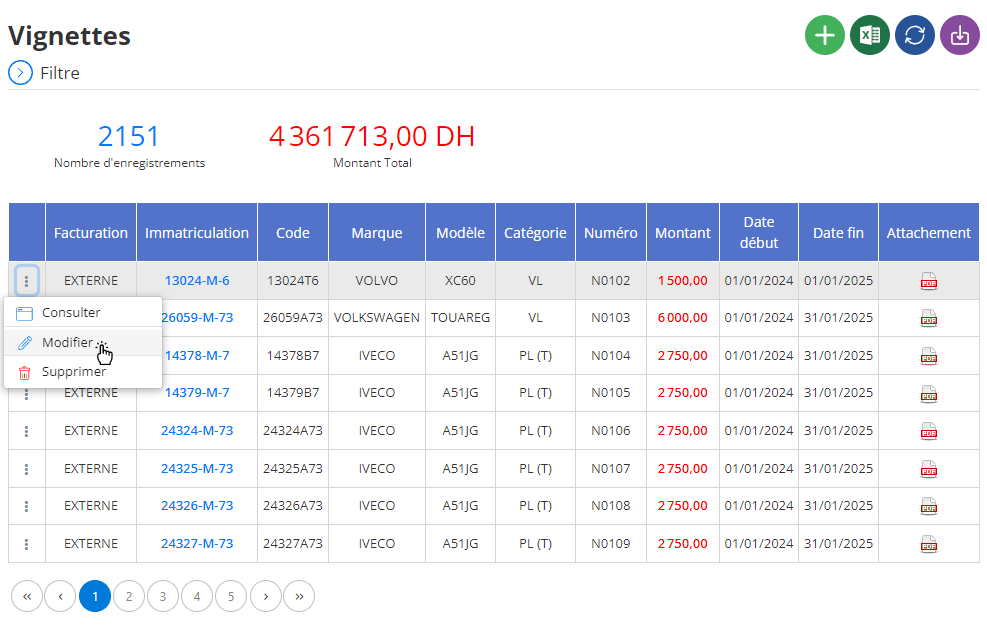
Accédez à la section dédiée aux vignettes fiscales dans le logiciel de gestion. Cette section regroupe toutes les vignettes enregistrées, organisées pour une recherche et une consultation rapide.
Dans l’interface de modification, vous avez la possibilité d’ajuster plusieurs éléments essentiels :
- Dates de validité: Si les périodes de début ou de fin de validité ont changé, modifiez-les pour garantir une conformité fiscale à jour.
- Montant principal: Ajustez le montant de base si une erreur a été constatée ou si un ajustement a été effectué.
- Pénalités et majorations: Mettez à jour ces champs en cas de frais additionnels appliqués pour retard ou autres motifs.
- Frais annexes: Ajoutez ou modifiez les frais de service, timbres fiscaux, ou TVA si nécessaire.
- Documents joints: Remplacez ou ajoutez des pièces justificatives, comme des reçus ou des certificats mis à jour.
- Commentaire: Complétez les observations ou remarques spécifiques liées à cette vignette pour documenter toute modification.
Une fois les mises à jour effectuées, cliquez sur"Enregistrer"pour valider les modifications. Cette action sauvegarde les nouvelles données dans le système, assurant leur disponibilité pour les consultations ultérieures.
La mise à jour des informations liées à une vignette fiscale est bien plus qu’une simple formalité : elle contribue à une gestion efficace et responsable des obligations fiscales de votre flotte.
Suppression d'une vignette fiscale
Pour supprimer une vignette fiscale enregistrée dans le système, commencez par accéder à la liste des vignettes disponibles. Utilisez les options de recherche pour repérer la vignette à supprimer, en vous basant sur le numéro de la vignette, le véhicule associé ou encore les dates de validité. Une fois la vignette identifiée, sélectionnez-la et initiez le processus de suppression en cliquant sur l'option dédiée.
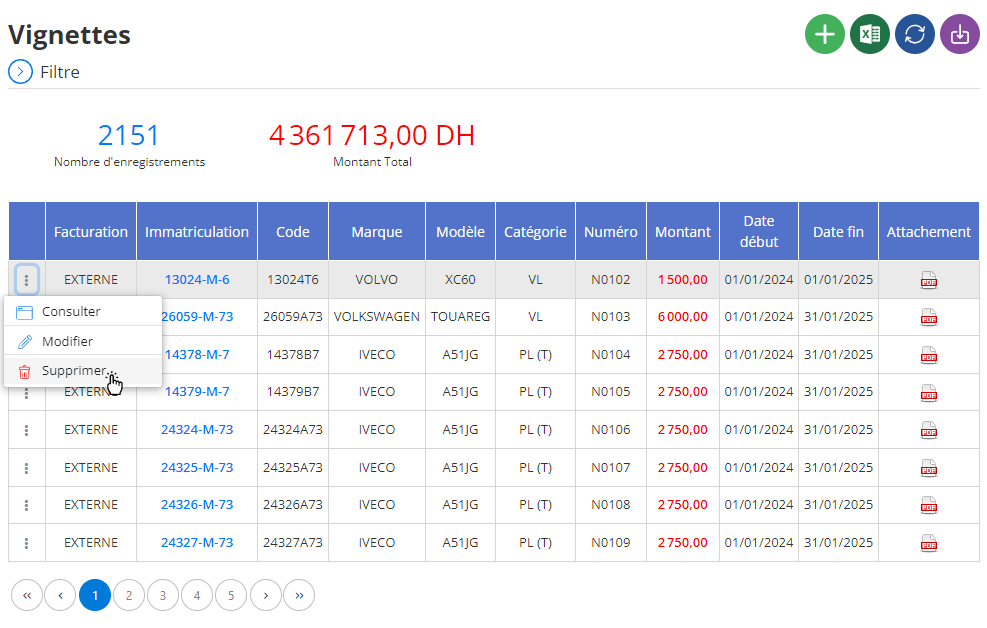
Une fenêtre de confirmation s’affichera pour valider l’action. Il est important de noter que la suppression d’une vignette est une opération définitive. Une fois supprimée, toutes les données associées à cette vignette, comme les montants réglés ou les éventuelles pénalités, seront perdues de manière irréversible. Cette étape doit donc être effectuée avec attention pour éviter toute suppression accidentelle de données importantes.
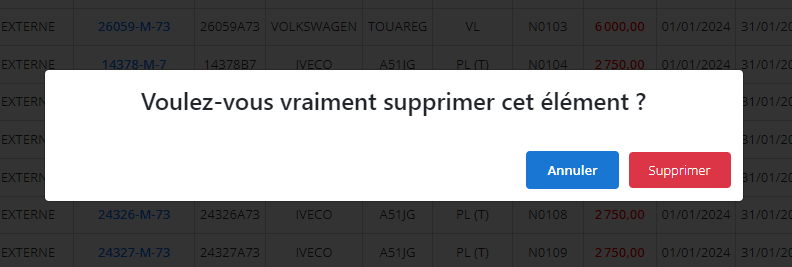
Avant de valider la suppression, il est recommandé de vérifier que la vignette n’est plus nécessaire, que ce soit pour des audits ou pour toute autre consultation ultérieure. Si les informations associées à la vignette peuvent être utiles à des fins administratives ou pour des bilans financiers, envisagez de les archiver au préalable. Cette précaution garantit que seules les vignettes obsolètes ou non pertinentes sont définitivement supprimées du système, tout en préservant les données utiles pour un éventuel besoin futur.
Consultation d'une vignette fiscale
L'interface de consultation d'une vignette fiscale permet d'accéder à toutes les informations enregistrées concernant une vignette associée à un véhicule. Cet outil offre une vue détaillée des données essentielles relatives à la vignette, facilitant ainsi leur accès et leur gestion pour un suivi administratif efficace.
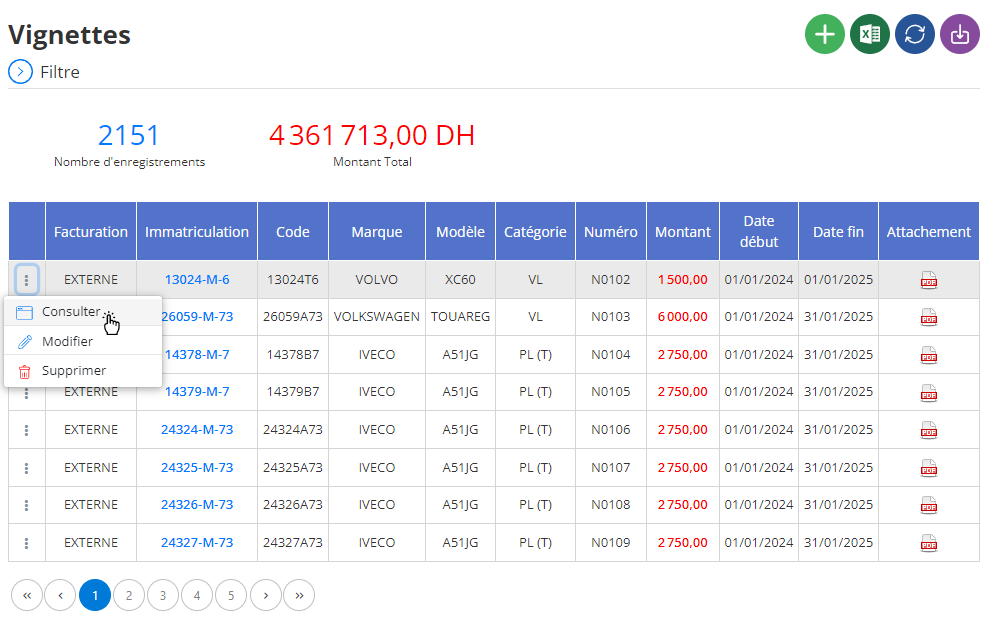
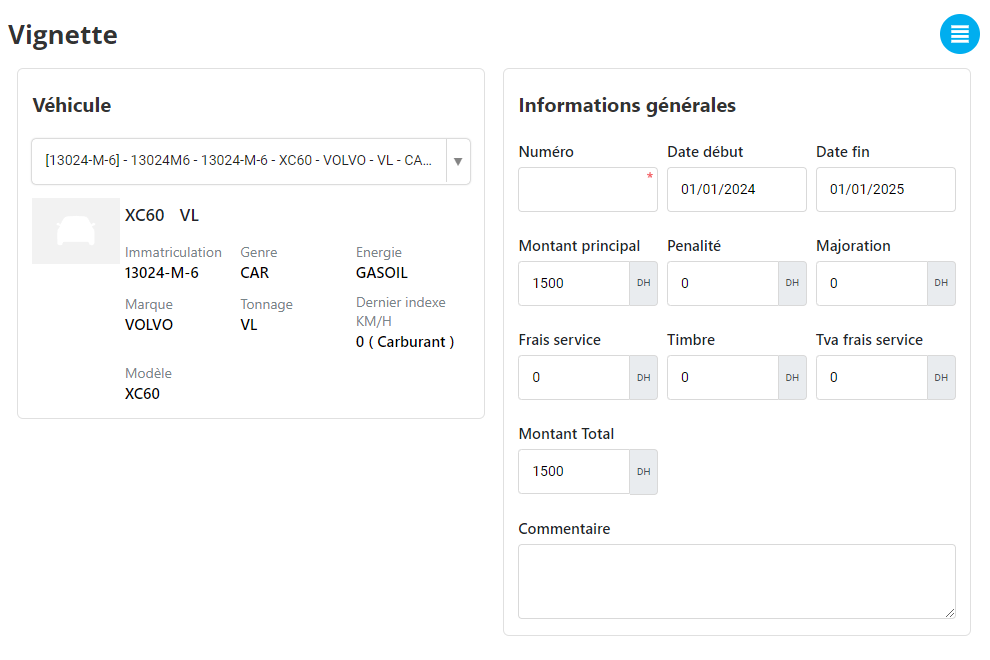
Lorsque vous sélectionnez une vignette spécifique, tous les détails enregistrés s'affichent à l’écran. Voici les principales informations disponibles :
-
Véhicule concerné :Affichage des informations relatives au véhicule associé, telles que le modèle et le numéro d’immatriculation. Cela permet d’identifier rapidement le véhicule lié à la vignette.
-
Numéro de la vignette :Une référence unique attribuée à chaque vignette pour faciliter son identification et son suivi.
-
Date de début et de fin de validité :Ces dates précisent la période pendant laquelle la vignette est valable, permettant ainsi de vérifier si elle est encore en cours de validité ou expirée.
-
Montant principal et frais annexes :Les détails financiers tels que le montant principal de la vignette, ainsi que les éventuelles pénalités, majorations ou frais de service applicables, sont clairement indiqués.
-
Documents attachés :Si des documents relatifs à la vignette ont été joints (comme une copie de la vignette ou des justificatifs de paiement), ils sont accessibles directement depuis cette interface. Cela garantit une traçabilité et un accès centralisé aux pièces justificatives.
-
Commentaires :Cette section contient les observations ou remarques spécifiques concernant la vignette. Cela peut inclure des informations complémentaires sur son émission, son utilisation ou des détails administratifs importants.
En centralisant ces informations, l’interface de consultation simplifie le suivi des vignettes fiscales. Elle permet une gestion optimisée et une vérification rapide des données nécessaires, contribuant à une meilleure organisation des dossiers administratifs.

