La gestion des sinistres est facilitée par les outils d'importation en masse et d'exportation des données, qui permettent une centralisation et une exploitation optimales des informations relatives aux incidents impliquant les véhicules d’une flotte.
L'importation en masse offre une solution rapide et efficace pour intégrer plusieurs dossiers de sinistres dans le système à l’aide d’un fichier préformaté. Cette fonctionnalité simplifie le processus d’ajout, réduit les erreurs liées à la saisie manuelle et assure une mise à jour précise et cohérente des données. Elle est particulièrement adaptée aux entreprises gérant un volume élevé d’incidents, leur permettant de maintenir une base de données complète et actualisée pour un suivi optimal.
L'exportation des données, quant à elle, regroupe toutes les informations clés des sinistres enregistrés, comme les détails des véhicules impliqués, les types d’incidents, les coûts associés et les niveaux de responsabilité. Les fichiers générés, disponibles en formats standards tels que CSV ou Excel, offrent une vue d’ensemble centralisée pour analyser les tendances, évaluer les risques et prendre des décisions stratégiques. Ces données peuvent être partagées avec différentes parties prenantes, comme les gestionnaires de flotte ou les assureurs, pour améliorer la gestion des risques et optimiser les processus de résolution des sinistres.
En combinant ces fonctionnalités, les entreprises bénéficient d’un outil puissant pour gérer de manière proactive et efficace les sinistres, tout en garantissant la précision, la transparence et la traçabilité des informations.
Importation en masse des sinistres
L'importation en masse des sinistres permet d'ajouter plusieurs dossiers de sinistres dans le système en une seule opération à l’aide d’un fichier préformaté. Cette fonctionnalité est idéale pour les entreprises qui souhaitent gérer efficacement un grand volume d’incidents tout en garantissant la cohérence et la précision des informations.
Grâce à cette méthode, les utilisateurs peuvent économiser du temps, réduire les erreurs de saisie manuelle et maintenir une base de données actualisée pour un suivi optimal des sinistres.
Étape 1 : Télécharger et préparer le fichier modèle
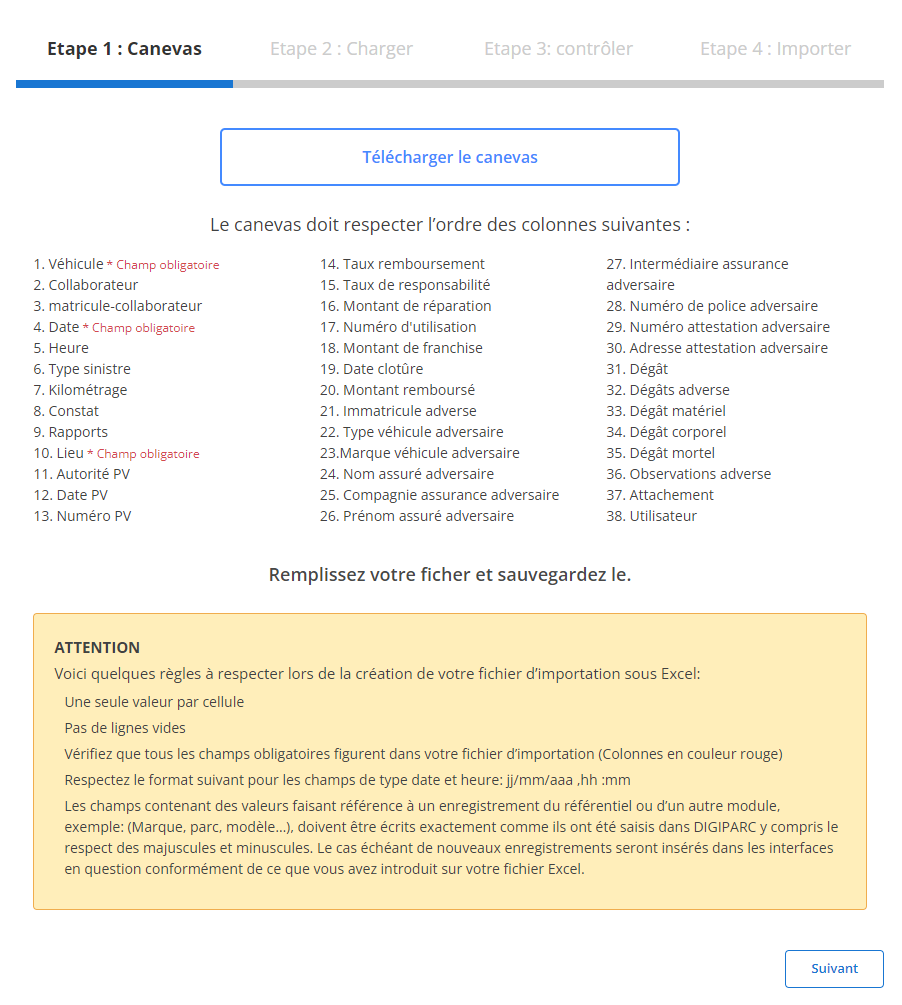
Avant de commencer, vous devez télécharger un fichier modèle spécifiquement conçu pour faciliter l’importation des sinistres. Ce fichier contient des colonnes prédéfinies correspondant aux informations nécessaires.
-
Téléchargez le modèle:
Le fichier modèle est accessible via l’interface utilisateur. Il inclut toutes les colonnes indispensables à l'importation des sinistres.
-
Respectez l’ordre des colonnes:
Les champsobligatoirespour chaque ligne sont :
-
Préparez votre fichier:
- Veillez à ce qu'il n’y ait qu’une seule valeur par cellule.
- Remplissez tous les champs obligatoires pour éviter les erreurs.
- Assurez-vous que les dates respectent le format attendu (jj/mm/aaaa).
- Vérifiez qu’aucune ligne vide n'est présente au milieu du fichier.
Étape 2 : Charger le fichier des sinistres
Une fois le fichier correctement préparé, suivez les étapes ci-dessous pour le charger dans le système.
-
Sélectionnez le fichier:
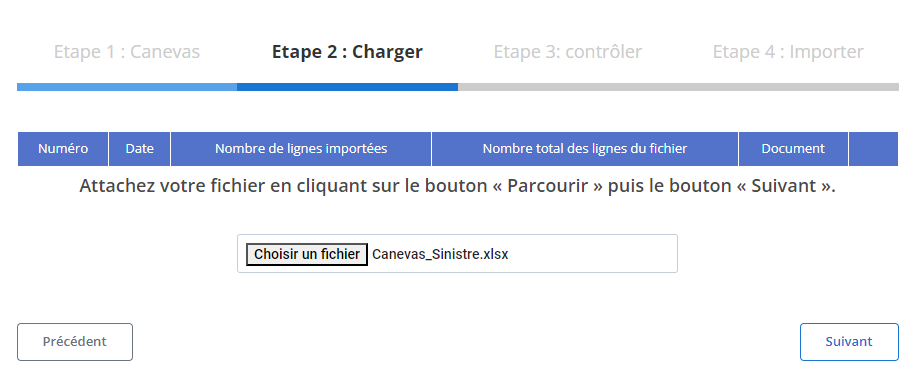
Cliquez sur le bouton"Parcourir"pour localiser le fichier sur votre ordinateur, puis sélectionnez-le.
-
Lancez le chargement:
Une fois le fichier sélectionné, cliquez sur"Suivant"pour démarrer l’analyse du fichier. Le système vérifiera les données et préparera une vue récapitulative.
-
Vérifiez le récapitulatif des données:
- Un tableau récapitulatif s'affichera, montrant le nombre total de lignes dans le fichier ainsi que celles prêtes pour l'importation.
- Examinez le contenu pour vous assurer qu’aucune erreur majeure n’est présente avant de poursuivre.
Étape 3 : Vérification des données importées
Après le chargement, un tableau détaillé des données importées sera affiché. C’est ici que vous pouvez examiner les informations et corriger les éventuelles erreurs.
Étape 4 : Finaliser l'importation des sinistres
Une fois les données vérifiées, terminez le processus d'importation.
-
Cliquez sur "Importer":
Validez pour ajouter définitivement les sinistres au système.
-
Confirmation d'importation:
Un message confirmera que l'importation a été réalisée avec succès et que les sinistres ont été ajoutés dans la base de données.
Cette méthode permet de gérer efficacement les sinistres en respectant les standards requis pour une gestion optimisée des risques au sein de l’entreprise.
Exportation des données de sinistres
L’exportation des données liées aux sinistres constitue un élément crucial pour une gestion proactive et efficace des incidents impliquant les véhicules d’une flotte. En regroupant l’ensemble des informations sur les sinistres enregistrés, tels que les détails des véhicules concernés, les types d’incidents, les coûts associés et les niveaux de responsabilité, ce processus permet de disposer d’une vision claire et centralisée. Les données, exportées dans des formats accessibles comme CSV ou Excel, facilitent le suivi, l’analyse et la prise de décisions stratégiques en matière de gestion des risques.
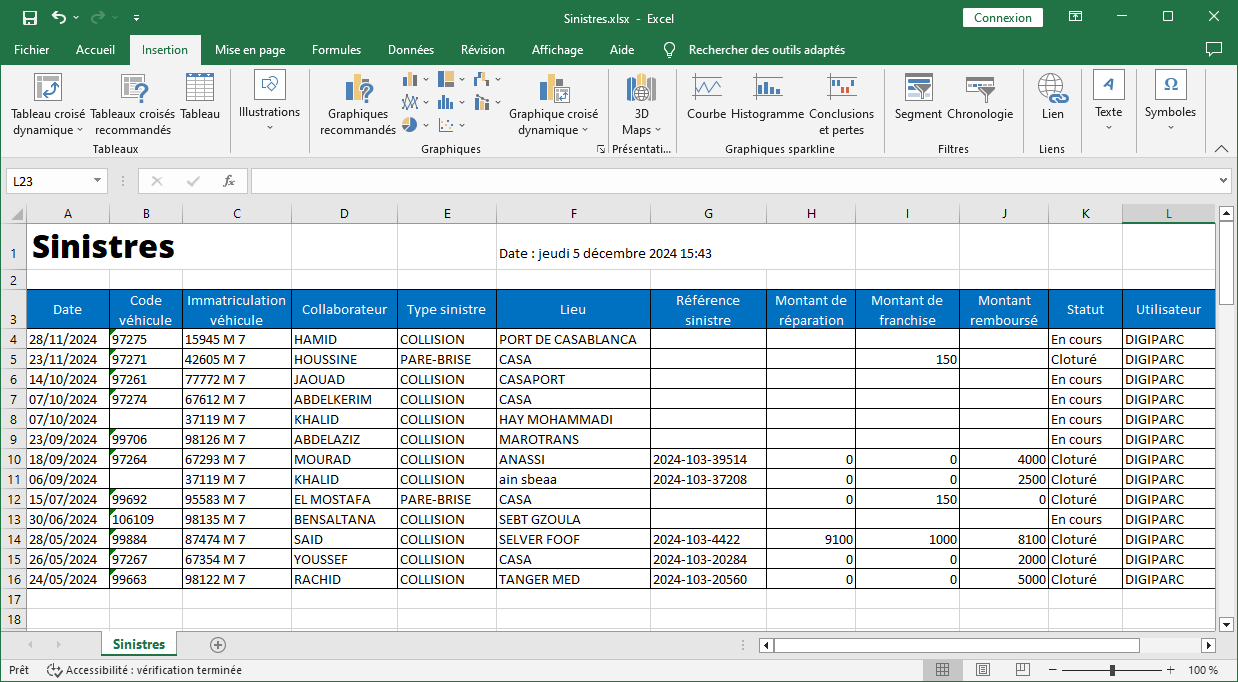
L’exportation inclut des champs précis et détaillés pour une analyse approfondie des sinistres, notamment :
-
Date: Indique le moment exact où l’incident a eu lieu, permettant de situer les sinistres dans le temps pour une meilleure organisation.
-
Code véhicule: Fournit une référence unique au véhicule impliqué, facilitant la traçabilité et le croisement des données avec d’autres bases.
-
Immatriculation véhicule: Identifie clairement le véhicule concerné, renforçant la précision des données et l’attribution des responsabilités.
-
Collaborateur: Mentionne le nom de la personne liée à l’incident, offrant une meilleure visibilité sur les cas récurrents ou les besoins en formation des conducteurs.
-
Type sinistre: Catégorise l’incident (collision, vol, dommages matériels, etc.), permettant une classification et une analyse spécifique selon la nature des sinistres.
-
Kilométrage: Indique le kilométrage du véhicule au moment de l’incident, utile pour évaluer l’usure ou la fréquence des incidents en fonction de l’utilisation.
-
Lieu: Fournit des détails sur l’endroit où l’incident s’est produit, utile pour détecter les zones à risque.
-
Référence sinistre: Un identifiant unique pour chaque sinistre, garantissant une traçabilité complète.
-
Montant de réparation: Précise le coût total des réparations nécessaires, fournissant une base pour l’analyse des dépenses.
-
Montant de franchise: Détaille la part du coût supportée par l’entreprise, permettant de calculer les dépenses nettes.
-
Montant remboursé: Indique la somme couverte par l’assurance, essentielle pour évaluer la performance des contrats en cours.
-
Taux de responsabilité: Mentionne le pourcentage de responsabilité attribué à l’entreprise ou au collaborateur, facilitant la répartition des responsabilités.
-
Statut: Spécifie si le dossier du sinistre est "ouvert", "clos" ou en cours de traitement, offrant une vue d’ensemble sur l’état d’avancement des démarches.
-
Utilisateur: Identifie la personne ayant enregistré ou mis à jour les informations, renforçant la traçabilité des données.
La centralisation et l’analyse des données exportées permettent une gestion plus rigoureuse et proactive des sinistres. En identifiant les causes récurrentes et les comportements à risque, il est possible de mettre en œuvre des actions correctives, telles que des programmes de sensibilisation ou des ajustements dans la politique d’utilisation des véhicules. De plus, cette approche offre une base solide pour négocier de meilleures conditions avec les assureurs, tout en optimisant les coûts liés aux sinistres.
En conclusion, l’exportation des données de sinistres s’impose comme un levier essentiel pour améliorer la gestion des risques, renforcer la transparence et garantir une maîtrise totale des impacts financiers et opérationnels des incidents.

