

Module · Admin
Insurance List
Insurance List
This section provides a detailed and complete presentation of the insurance associated with the vehicles in the fleet, centralizing all the information necessary for effective administrative and financial monitoring. Thanks to a clear and methodical organization, this module offers users increased visibility on the guarantees in place, the costs incurred, and upcoming deadlines.
By grouping essential data in a structured format, the system allows proactive management of insurance contracts, thus reducing the risks linked to oversights or non-compliance. This overview also facilitates comparisons, helping managers identify the policies best suited to the specific needs of their fleet and optimize allocated budgets.
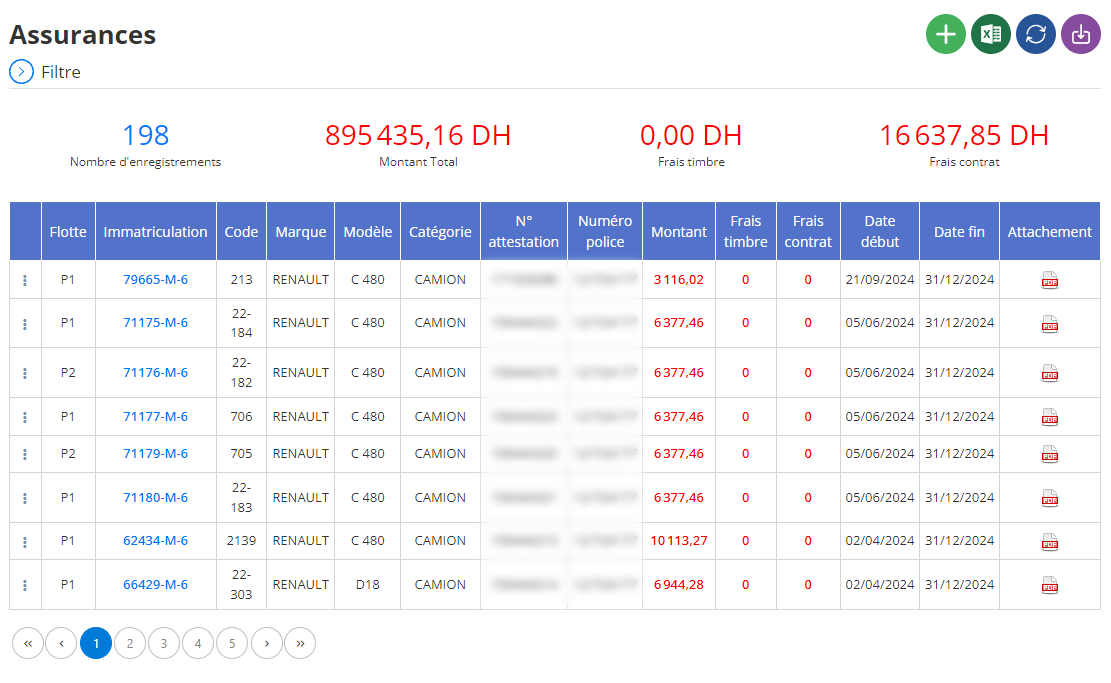
Display of training courses in list
Insurance information is presented in tabular form in the main interface, with a structure allowing for smooth navigation and intuitive management. Each row represents a specific insurance, while each column details a key aspect of the registration:
- Fleet:Identifies the vehicle group to which the insurance is attached. This allows contracts to be easily segmented based on operational fleet subdivisions.
- Registration:Enters the license plate of the insured vehicle, ensuring rapid and accurate identification in the system.
- Code:Provides a unique identifier for each contract, allowing simplified management, especially in large fleets where multiple policies can coexist.
- Brand:Specifies the brand of vehicle concerned by the insurance, useful for analyzes of trends or insurance strategies depending on the manufacturer.
- Model:Indicates the vehicle model, providing an additional level of detail to differentiate coverages.
- Category:Définit le type de véhicule (par exemple, utilitaire, berline, ou camion). Cette information permet d’aligner les choix d’assurance avec les besoins spécifiques de chaque catégorie.
- N° Attestation :Contient le numéro d’attestation fourni par l’assureur, garantissant une traçabilité administrative fiable.
- Numéro Police :Indique le numéro de la police d’assurance, facilitant les vérifications et les échanges avec les compagnies d’assurance.
- Type of Insurance:Spécifie la nature de la couverture (responsabilité civile, tous risques, etc.), offrant une vue claire sur l’étendue des garanties pour chaque véhicule.
- Amount :Shows the total cost of the policy, a key metric for analyzing expenses and making comparisons between different contracts.
- Stamp Fees:Indicates associated taxes and fees, allowing transparent monitoring of additional charges linked to contracts.
- Contract Fees:Mentions specific administrative or management fees charged by the insurer, for a complete assessment of costs.
- Start Date:Specifies the effective date of the contract, essential for planning renewals and tracking coverage periods.
- End Date:Indicates the policy expiration date, allowing managers to anticipate renewals or possible terminations.
- User:Designates the person or employee responsible for the use of the vehicle, facilitating the attribution of responsibilities in the event of an accident.
- Attachment:This column allows you to attach related documents, such as copies of contracts, certificates or proof of payment, for efficient centralization of archives.
Thanks to this structured and detailed table, managers can have an overview of all current contracts, identify imminent renewals and track the costs associated with each vehicle. This simplified organization not only helps reduce administrative errors, but also improves negotiation with insurance companies thanks to a clear understanding of needs and expenses.
By integrating transparency, accessibility and precision, this system becomes a strategic tool to optimize insurance management, strengthen regulatory compliance and guarantee coverage adapted to each vehicle in the fleet.