

Module · Admin
Import/Export Assurances
Import/Export Assurances
L'exportation des données des cartes grises et l'importation en masse des assurances offrent aux gestionnaires de flottes une solution complète et efficace pour la gestion des informations administratives et financières liées à leurs véhicules.
L'exportation des données des cartes grises permet de regrouper toutes les informations essentielles concernant l'immatriculation, les coûts associés et l'utilisation des véhicules dans un fichier consolidé au format CSV ou Excel. Cette fonctionnalité simplifie l'analyse, le partage et la gestion des données, tout en assurant la conformité avec les exigences légales. Elle favorise une gestion proactive et structurée de la flotte, tout en facilitant la collaboration avec les parties prenantes internes et externes, telles que les responsables d'assurance, les partenaires externes et les auditeurs.
En parallèle, l'importation en masse des assurances permet d'ajouter rapidement plusieurs enregistrements d'assurance dans le système à l'aide d'un fichier préformaté. Cette méthode réduit le temps de saisie manuelle et minimise les risques d'erreurs, tout en garantissant une mise à jour rapide et précise des contrats d'assurance. Elle permet aux gestionnaires de se concentrer sur des tâches à plus forte valeur ajoutée, tout en assurant une gestion cohérente et conforme des polices d'assurance.
En combinant ces deux fonctionnalités, les gestionnaires de flottes bénéficient d'un outil puissant pour optimiser la gestion administrative, financière et réglementaire de leurs véhicules, tout en améliorant la transparence et la collaboration entre les parties prenantes.
Importation en masse des assurances
L'importation d’assurances en masse offre aux utilisateurs une méthode efficace pour ajouter plusieurs enregistrements d’assurance simultanément dans le système, en utilisant un fichier préformaté. Cette fonctionnalité est particulièrement avantageuse pour les entreprises ou gestionnaires de flottes qui administrent un grand nombre de véhicules et souhaitent simplifier ce processus de manière rapide et fiable.
En téléchargeant un fichier contenant toutes les informations nécessaires pour chaque contrat d'assurance, cette option réduit considérablement le temps requis pour la saisie manuelle et minimise les erreurs. Elle garantit également une mise à jour rapide et précise des données, permettant aux gestionnaires de se concentrer sur des tâches à plus forte valeur ajoutée tout en assurant une gestion rigoureuse et complète des polices d’assurance.
Cette méthode d'importation, simple à utiliser, garantit la cohérence et la conformité des données avec les normes du système, favorisant ainsi une gestion optimisée des contrats d’assurance.
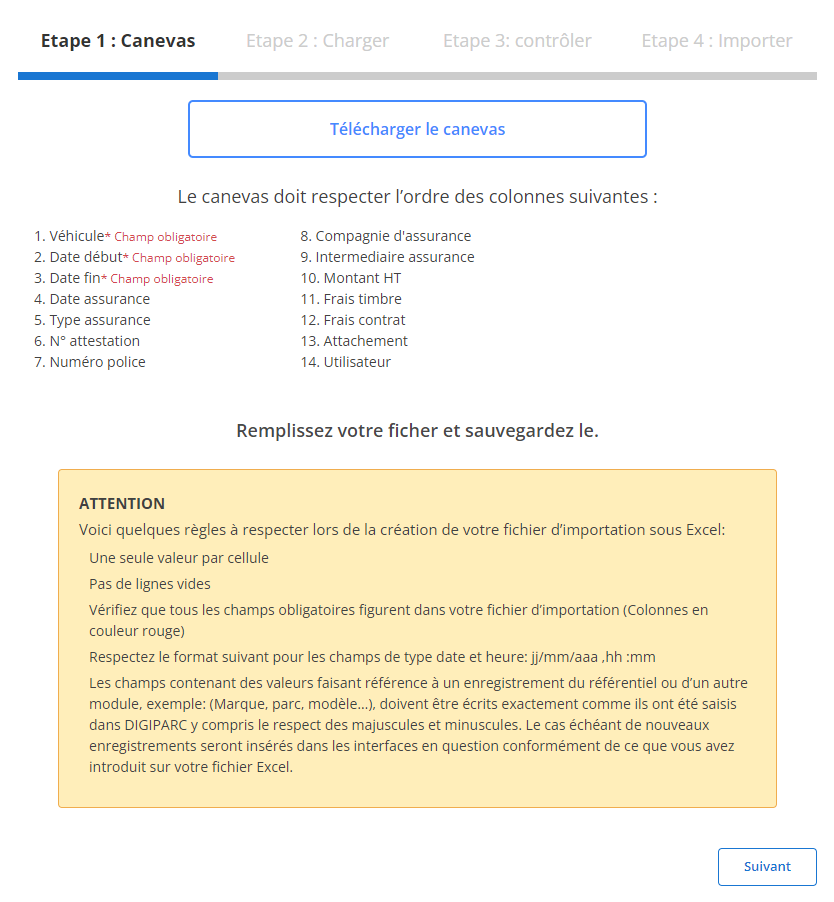
Étape 1 : Télécharger et préparer le fichier modèle
Avant de commencer l'importation, vous devez télécharger un fichier modèle spécialement conçu pour cette tâche. Ce fichier contient des colonnes prédéfinies qui doivent être respectées pour garantir une importation fluide et sans erreur.
-
Téléchargez le modèle:
Accessible directement via l'interface, ce fichier inclut des colonnes obligatoires et optionnelles, organisées dans un ordre précis.
-
Respectez les exigences des colonnes:
Les champs suivants sont obligatoires pour chaque ligne :
- Véhicule(obligatoire)
- Date début(obligatoire)
- Date fin(obligatoire)
-
Préparez votre fichier:
- Assurez-vous qu'il n'y ait qu'une seule valeur par cellule.
- Évitez les lignes vides au milieu du fichier.
- Vérifiez que les dates respectent le format requis (jj/mm/aaaa).
- Complétez tous les champs obligatoires pour éviter des erreurs d'importation.
Étape 2 : Charger le fichier des assurances
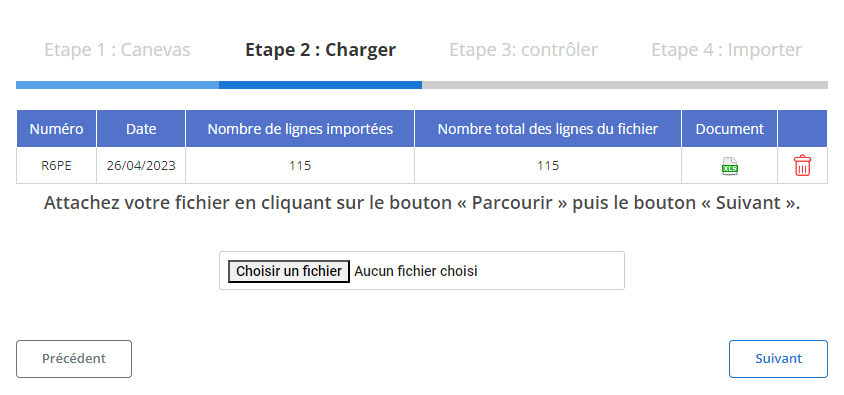
Une fois le fichier correctement préparé, vous pouvez procéder à son chargement dans le système :
-
Sélectionnez le fichier:
Cliquez sur le bouton "Parcourir" pour localiser le fichier sur votre appareil, puis sélectionnez-le.
-
Lancez le processus d'importation:
Après la sélection, cliquez sur "Suivant" pour démarrer le chargement des données. Le système analysera les informations contenues dans le fichier et affichera un récapitulatif.
-
Vérifiez le récapitulatif des données:
- Nombre total de lignes dans le fichier.
- Nombre de lignes prêtes à être importées.
- Nombre de lignes comportant des erreurs à corriger.
Étape 3 : Vérification des données importées
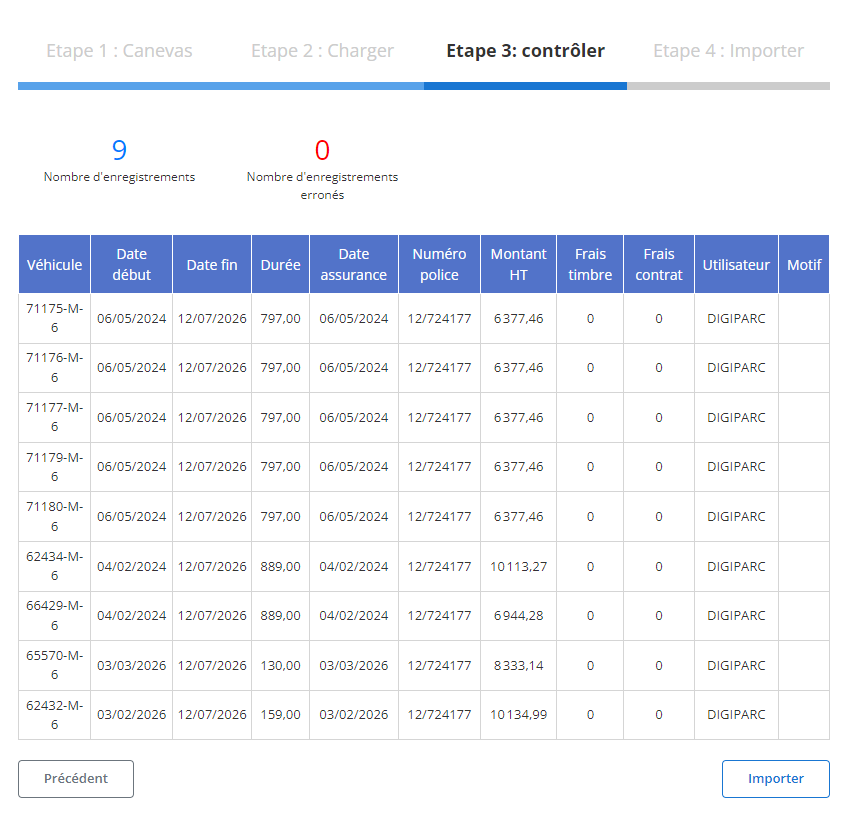
Avant de finaliser l'importation, un tableau récapitulatif affiche les données extraites pour validation.
-
Contrôlez les erreurs signalées:
- Les erreurs telles que des champs manquants (par exemple, "Véhicule" ou "Date début") ou des formats incorrects seront mises en évidence.
- Vous pourrez modifier ou compléter les données directement.
-
Validez les enregistrements corrects:
Les lignes sans erreur seront identifiées comme prêtes pour l'importation.
Étape 4 : Finaliser l'importation des assurances
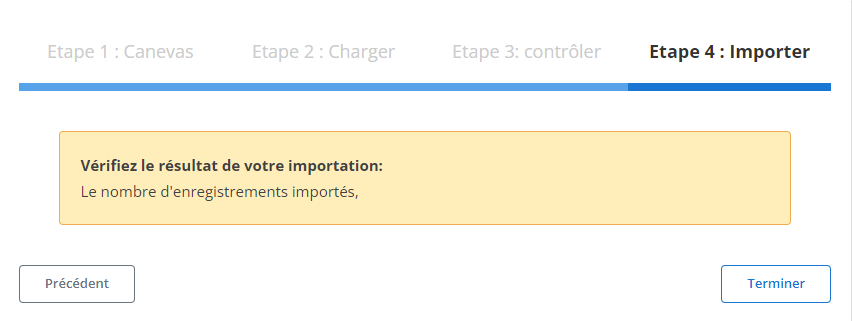
Une fois la vérification terminée, vous pouvez finaliser le processus d'importation.
-
Cliquez sur "Importer":
Cette action validera les données et enregistrera les contrats dans le système.
-
Confirmation d'importation:
Un message s’affichera pour indiquer le succès de l'opération, précisant que toutes les lignes conformes ont été correctement ajoutées.
Ce processus structuré permet aux gestionnaires de gagner du temps et de réduire considérablement les erreurs lors de l’importation en masse des assurances. Grâce à cette méthode, les informations sont intégrées de manière précise et cohérente, assurant une gestion efficace des polices d’assurance et un suivi rigoureux des échéances et coûts associés.
Exportation des données des cartes grises
L'exportation des données relatives aux cartes grises est un outil stratégique qui permet de regrouper toutes les informations essentielles liées à la gestion des véhicules d'une flotte dans un fichier consolidé. Ce fichier, disponible dans des formats standard comme CSV ou Excel, offre une vue d’ensemble des données administratives et financières, facilitant ainsi leur analyse, leur partage et leur exploitation.
Grâce à ce mécanisme, les gestionnaires de flotte et les équipes administratives peuvent suivre en détail les immatriculations, les coûts associés, ainsi que l’utilisation de chaque véhicule. Cette fonctionnalité favorise une gestion proactive et structurée, tout en assurant la conformité avec les exigences légales et réglementaires en vigueur.
L’exportation des données joue également un rôle clé dans la collaboration entre les différentes parties prenantes. Elle permet un partage fluide des informations avec les responsables internes, les prestataires d’assurance, les partenaires externes ou encore les auditeurs. Cette transparence facilite les processus décisionnels, qu’il s’agisse d’optimiser les coûts, de planifier des renouvellements, ou d’anticiper les besoins futurs de la flotte.
Enfin, cette exportation contribue à améliorer la qualité des audits internes et externes, en offrant une traçabilité complète des informations relatives aux véhicules. Elle simplifie la gestion quotidienne tout en garantissant une visibilité optimale sur les aspects financiers, administratifs et opérationnels de la flotte.
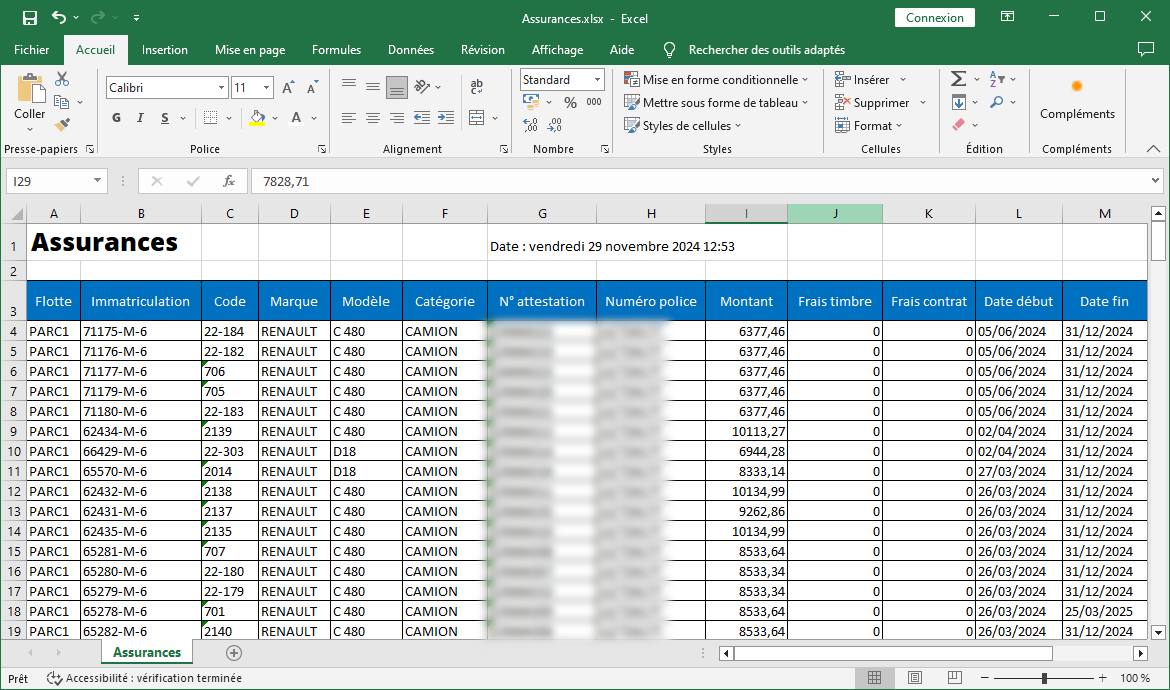
Les informations exportées incluent
Les colonnes incluses dans l’exportation sont conçues pour fournir une vue claire et détaillée de chaque aspect de la gestion des cartes grises :
-
Flotte: Identifie le groupe ou la catégorie de la flotte à laquelle appartient le véhicule, permettant une classification précise pour une gestion segmentée.
-
Immatriculation: Enregistre le numéro d'immatriculation de chaque véhicule, garantissant une identification unique et facilitant la gestion administrative.
-
Code: Référence interne associée au véhicule, utilisée pour simplifier le suivi et renforcer la précision des données.
-
Marque: Indique la marque du véhicule (ex. : Toyota, Ford), permettant une analyse de la répartition des constructeurs au sein de la flotte.
-
Modèle: Spécifie le modèle du véhicule, apportant un niveau de détail supplémentaire utile pour l’analyse des performances et des coûts.
-
Catégorie: Désigne la catégorie du véhicule (berline, SUV, utilitaire, etc.), offrant une perspective sur la composition de la flotte.
-
N° Attestation: Le numéro de l’attestation d’assurance liée au véhicule, essentiel pour vérifier la couverture et la conformité réglementaire.
-
Numéro Police: Identifie la police d’assurance associée, simplifiant les démarches en cas de sinistre ou de renouvellement de contrat.
-
Montant: Correspond au coût total d’acquisition ou d’exploitation du véhicule, permettant une analyse budgétaire approfondie.
-
Frais de Timbre: Enregistre les frais de timbre associés à la carte grise, pour un suivi précis des dépenses administratives.
-
Frais de Contrat: Inclut les coûts liés à la gestion ou au renouvellement du contrat d'assurance ou de maintenance.
-
Date Début: Mentionne la date à laquelle le véhicule a été mis en service ou intégré dans la flotte.
-
Date Fin: Spécifie la date de fin d’utilisation ou de contrat pour le véhicule, permettant un suivi du cycle de vie.
-
Utilisateur: Identifie l’utilisateur ou le conducteur principal du véhicule, garantissant une traçabilité claire de son usage.
En conclusion, l’exportation des données des cartes grises représente une solution incontournable pour les entreprises cherchant à rationaliser la gestion de leur flotte. Elle combine clarté, précision, et flexibilité, offrant aux responsables un outil puissant pour surveiller, analyser, et améliorer la performance de leurs ressources automobiles.