

Module · Admin
Telescopic List
Telescopic List
This section offers a complete and detailed presentation of telescopic authorizations, an essential element for efficient and compliant management of specialized vehicles. By providing users with a clear and structured interface, the system guarantees an exhaustive overview of all active authorizations, allowing rigorous monitoring and optimized management.
Each telescopic authorization is enriched with relevant information, ranging from its identification number to its financial data and its validity dates, thus offering total transparency. This tool makes it much easier for fleet managers to make informed decisions, ensuring that all relevant vehicles are compliant with regulations and able to operate safely.
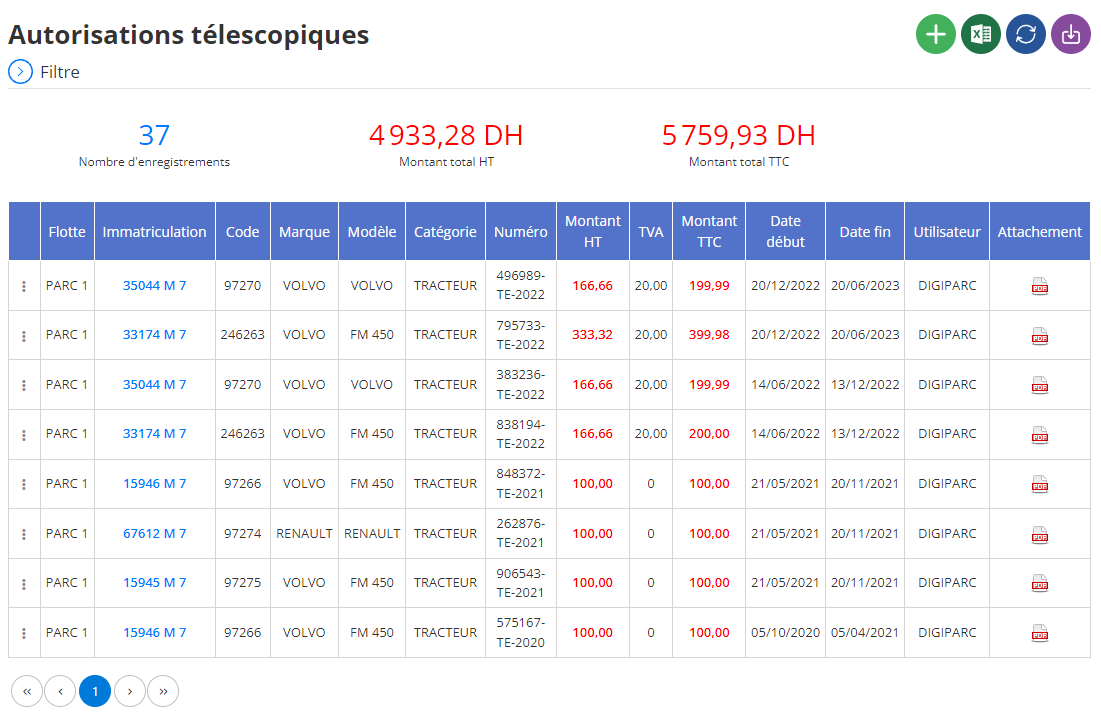
Presentation of telescopic authorizations in table
The data relating to telescopic authorizations is organized in the form of a dynamic and easy to interpret table. Each row represents a unique permission, and the columns provide essential information:
- Fleet:Lists the groups of vehicles concerned, allowing global and hierarchical management of authorizations within each fleet.
- Registration:Identifies the specific vehicle using its registration number, guaranteeing precise and immediate traceability.
- Code:Assigns a unique identifier to each authorization, essential to avoid confusion and ensure smooth management.
- Brand:Mentions the vehicle manufacturer, an important detail for segmenting the data according to the most common suppliers or models.
- Model:Specifies the exact model of the vehicle equipped with the telescopic clearance, providing a detailed technical view.
- Category:Classe les véhicules selon leur type, comme les grues, les chariots élévateurs ou autres équipements spécialisés, pour une gestion ciblée et adaptée.
- Numéro :Renseigne le numéro de l’autorisation, un identifiant indispensable pour suivre les documents administratifs et opérationnels liés.
- Montant HT :Indique le coût hors taxes associé à l’obtention ou au renouvellement de l’autorisation.
- VAT:Specifies the amount of applicable tax, useful for precise financial and tax management.
- Amount including tax:Provides the total cost including taxes, allowing complete visibility of expenses.
- Start Date:Displays the activation date of the authorization, allowing rigorous monitoring of validity periods.
- End Date:Indicates the authorization validity deadline, helping managers to anticipate renewals and avoid any interruption of use.
- User:Identifies the person responsible for the authorization or vehicle, for clarity of responsibilities.
- Attachment:Offers the ability to add linked files, such as certificates, regulatory supporting documents or administrative documents, for complete centralization of information.
The integration of telescopic authorizations in a dedicated module allows the company to maintain a high level of compliance, while optimizing the administrative and financial management of specialized vehicles. By providing a detailed and accessible overview, this module significantly simplifies the work of fleet managers, reducing the risks of errors and delays in renewals.
With a clear, intuitive and comprehensive interface, this system not only guarantees security and efficiency of operations, but also smoother management and increased transparency, thus contributing to the overall success of the company.