Module · Admin
Insurance Management
Insurance Management
The insurance management module offers a structured and reliable solution for administering all information relating to vehicle insurance contracts. Thanks to this platform, users can centralize and organize essential data efficiently, ensuring a clear and detailed overview of the coverages in place.
This system helps document important information for each insurance, such as contract start and end dates, insurance companies, types of coverage, and specific conditions associated with each policy. It helps organizations keep their database up to date by quickly integrating renewals, contract updates or provider changes.
By providing easy access to the necessary information, this solution guarantees rigorous monitoring of deadlines, making it possible to anticipate renewals or quickly identify policies to be updated. In the event of a disaster, it also ensures rapid access to relevant data for smooth and responsive management.
With this module, users can streamline their administrative procedures, limit the risk of errors and ensure compliance with legal obligations. Insurance management thus becomes a simpler, organized process and totally adapted to the needs of a modern organization.
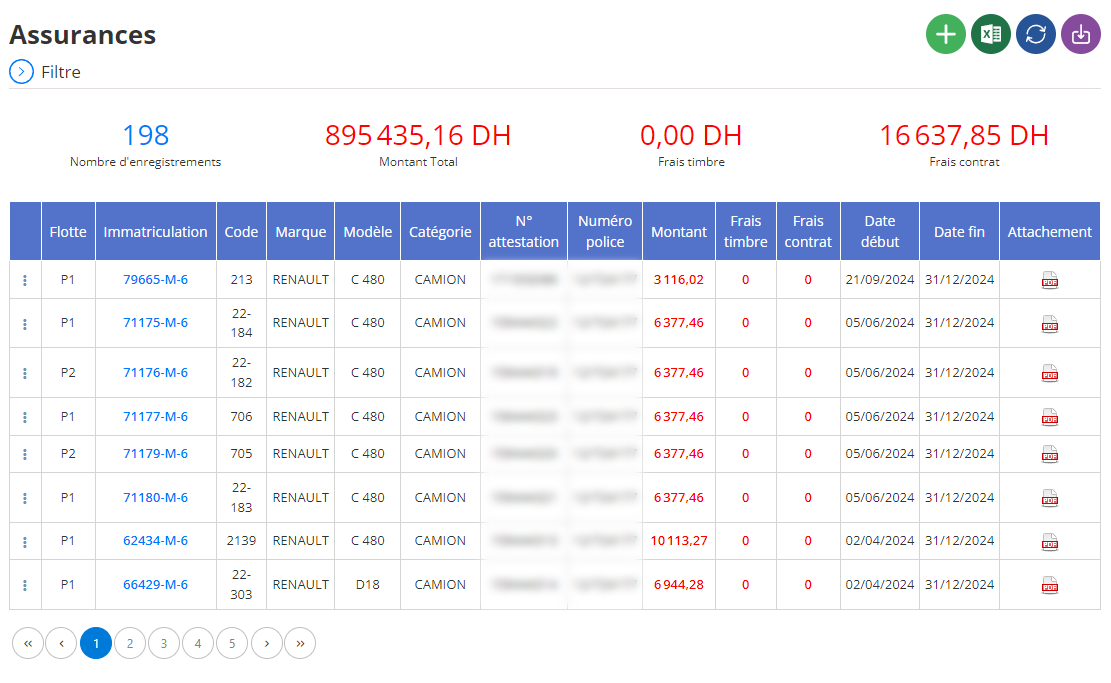
Adding new insurance
This interface is designed to allow detailed entry of the information necessary for registering vehicle insurance. The objective is to centralize and efficiently organize all data relating to each insurance contract, in order to guarantee optimal management of the company's risks and legal obligations.
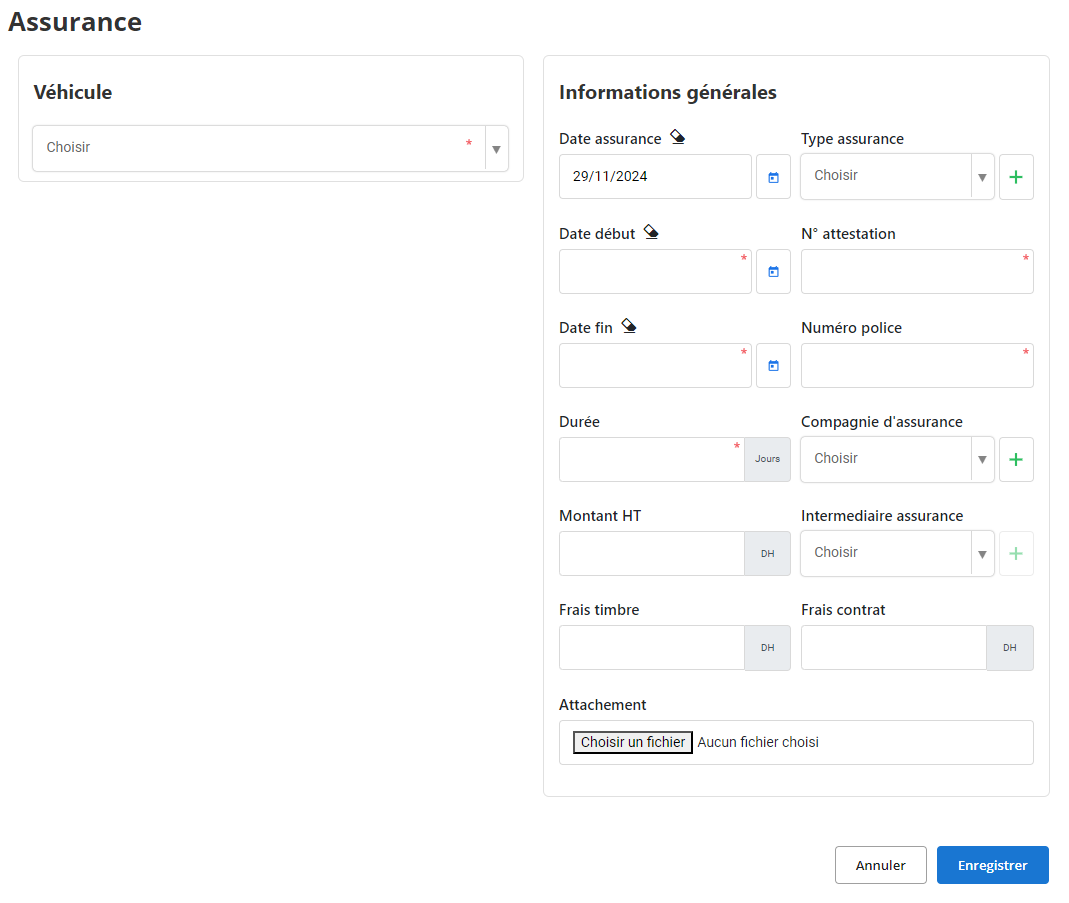
vehicle: Select the vehicle concerned from the drop-down list. This step is essential to associate the insurance with the corresponding vehicle and to facilitate its monitoring as part of vehicle fleet management.
Insurance date: Indicate the date on which the insurance was taken out. This information makes it possible to establish a precise contract history for each vehicle.
Type of insurance: Choose the type of coverage from the options provided (for example:Civil Liability, All Risks, Collision). If necessary, use the “+” button to add a new type. This field allows you to categorize contracts and clarify their scope.
Certificate number and policy number: Fill in the specific numbers of the certificate and the insurance contract. These identifiers are essential for any administrative or legal verification and must be correctly recorded to avoid any ambiguity.
Start and end dates: Specify the validity period of the insurance by filling in the fieldsStart dateAndEnd date. This helps plan renewals and ensure the vehicle is still covered.
Duration: Enter the total duration of the contract in days. This information is useful for evaluating the frequency of renewals and for managing deadlines.
Insurance company: Select the insurer from the drop-down list, or add a new company using the “+” button. This ensures that all partner companies are correctly referenced in the system.
Insurance intermediary: Choose the broker or intermediary who managed the contract. If this intermediary is not yet registered, you can add it via the “+” button.
Amount excluding tax: Indicate the amount excluding taxes of the insurance contract. This information allows for accurate cost tracking and facilitates overall financial management.
Stamp Fees and Contract Fees:Enter any additional costs related to the contract, such as stamp duty and other administrative costs. This ensures a complete view of associated expenses.
Attached documents: Add important supporting documents, such as copies of the contract, certificate or receipts. This feature ensures centralized and rapid access to essential documents when needed.
How: This free space is dedicated to specific observations on the contract, such as particular clauses or additional information to note for future monitoring.
Thanks to this interface, managers can structure all the data necessary for rigorous administration of insurance contracts. By centralizing information and ensuring complete traceability, this solution simplifies the management of deadlines, optimizes expense monitoring and reduces the risk of error or omission.
By using this tool, the company ensures increased compliance and responsiveness to contractual obligations, while streamlining processes related to the coverage of its assets.
Modification of insurance
To update insurance information, first navigate to the insurance section of the system. Use the search filters to precisely identify the insurance to modify. You can carry out this search by filtering by the vehicle concerned, the policy number, the date of subscription or any other relevant criterion. Once the insurance is located, select the option“To modify”to open the update interface.
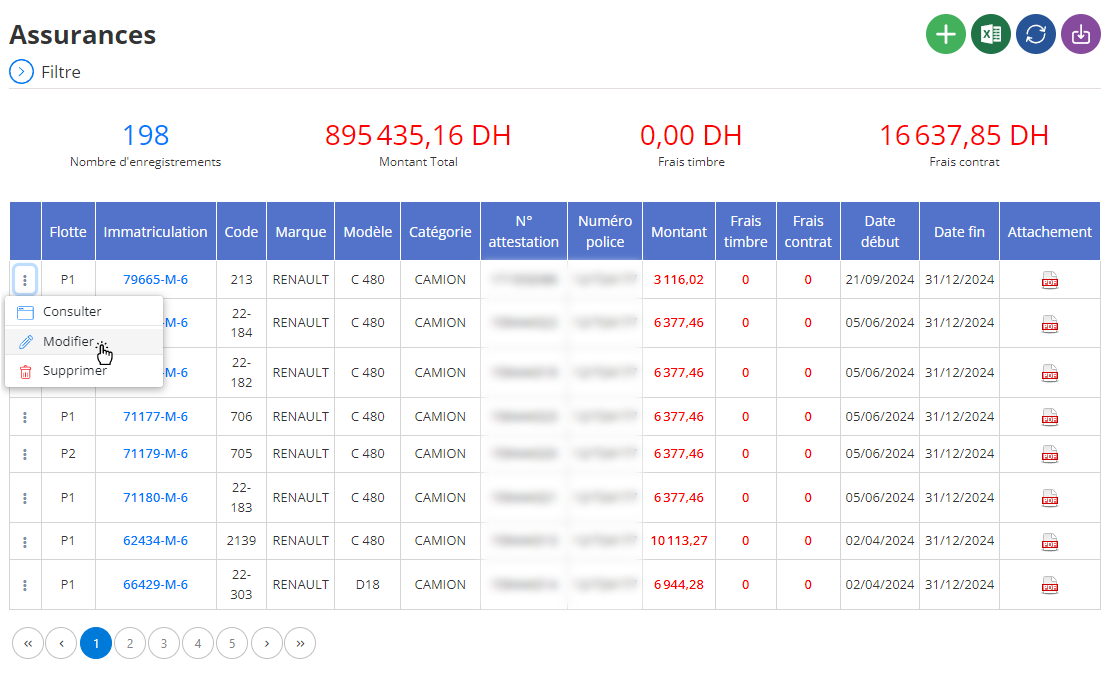
In the modification space, you will be able to adjust various essential elements relating to insurance. These fields include:
- Vehicle concerned: Verify or update the vehicle associated with the insurance to avoid any misunderstandings or errors in attribution.
- Start and end dates: Change the insurance validity period if adjustments are necessary (for example, renewal or early termination).
- Type of insurance: Update the type of coverage (Civil Liability, All Risks, etc.) to reflect the changes made to the contract.
- Policy number and certificate number: Correct or complete these fields if errors were detected or if data is missing.
- Insurance company and intermediary: Update insurer or broker information if any changes have occurred.
- Amount excluding tax and associated costs: Adjust costs if necessary, taking care to verify that the amounts indicated accurately reflect the current terms of the contract.
- Attached documents: Add or replace attached files (for example, an updated certification or a revised copy of the contract) to maintain full traceability.
- How: Take advantage of this space to indicate any specific changes, such as the reasons for the modification or clarifications on particular clauses.
Once all information has been reviewed and updated, click“Save”to validate the changes. This process ensures that changed data is integrated into the system and a clear history is maintained.
With constantly updated information, managers can better anticipate future needs, optimize insurance contracts and ensure that all company vehicles are covered in accordance with operational and legal requirements.
Removal of insurance
To remove an insurance from the database, start by accessing the insurance section in the system. From this interface, use the available search tools to precisely locate the insurance to be deleted. You can filter the results by the vehicle concerned, the start or end date of the contract, the policy number or even the insurance company. Once the insurance has been identified, select it and click on the option“DELETE”to initiate the process.
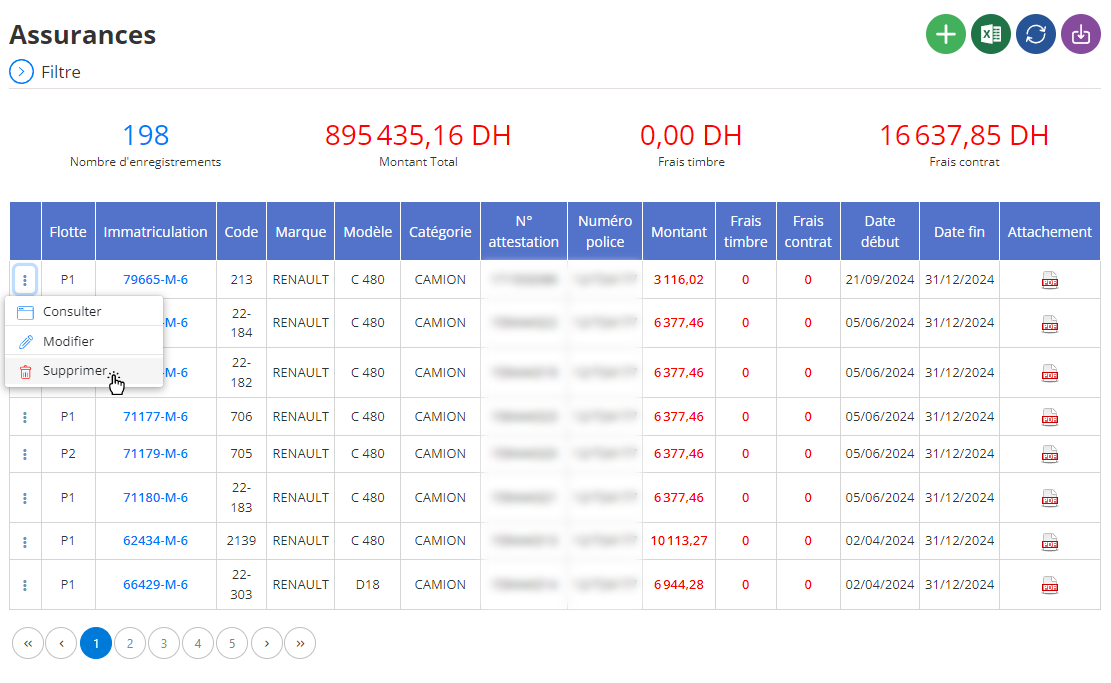
When deleting, a confirmation window will be displayed asking you to validate this action. It is crucial to note that removing insurance is a definitive and irreversible operation. This means that all associated data, such as contract details, attached documents (such as attestations or certificates) and financial information, will be permanently deleted.
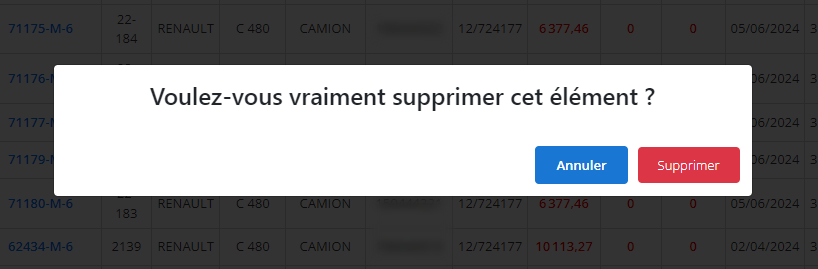
Once the deletion is validated, the system automatically updates the database to reflect these changes. However, it is advisable to carry out a regular review of the remaining data to ensure that the database is always complete and up to date.
Removing obsolete or irrelevant insurance helps maintain efficient and orderly management of insurance contracts. It also makes it possible to optimize visibility on current commitments and facilitate audits or strategic analyzes by eliminating superfluous information.
With a well-maintained management system, fleet managers can focus on strategic decisions, such as negotiating new contracts or optimizing overall costs, while ensuring adequate coverage for all vehicles.
Insurance consultation
The insurance consultation interface provides access to all recorded information regarding vehicle-related insurance contracts. This tool provides a comprehensive and detailed view of essential data, ensuring accurate and efficient management of insurance policies.
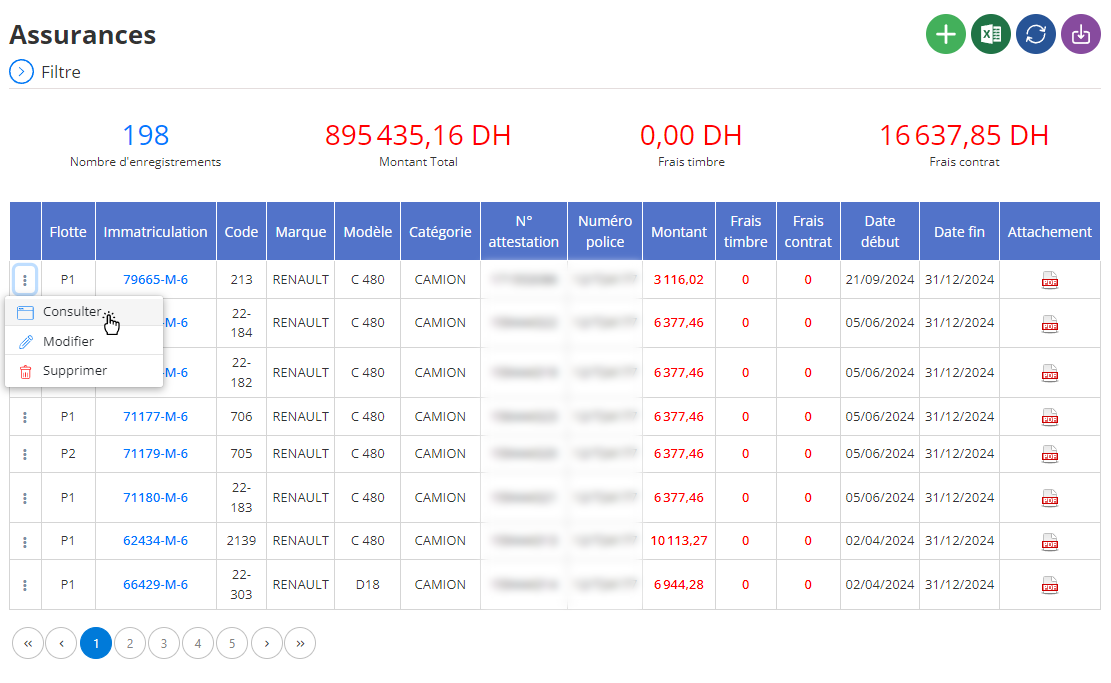
When you select a specific insurance in the system, all related information is displayed in an organized and clear manner, allowing you to check, analyze or update this data. Here are the elements generally consultable:
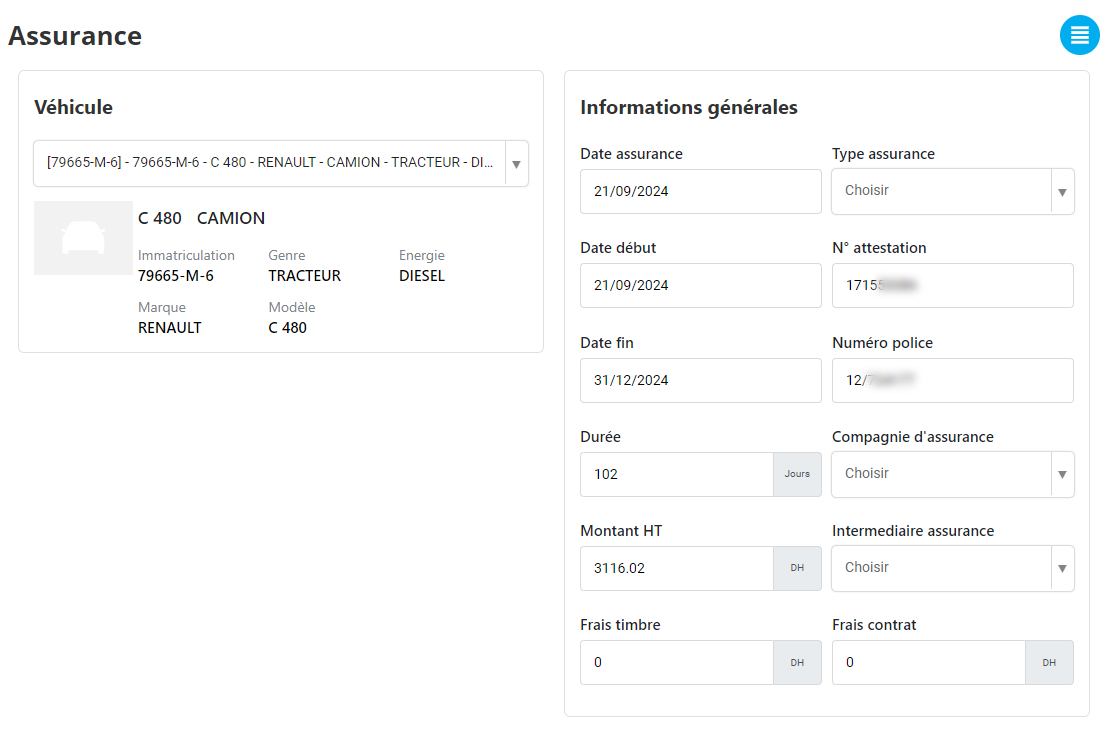
-
Vehicle concerned:This section displays information such as model, registration, or other details of the vehicle associated with the insurance. This makes it easier to quickly identify covered vehicles.
-
Type of insurance:This field specifies the nature of the insurance (for example: civil liability, all risks, or intermediate insurance). This helps to immediately understand the extent of coverage for each vehicle.
-
Start and end date of contract:The exact dates of entry into force and expiration of the contract are displayed. This information helps ensure that the vehicle is currently covered and anticipates any necessary renewals or adjustments.
-
Policy number and insurance company information:The policy number, as well as the name and contact details of the insurance company, can be viewed. This data facilitates administrative procedures or direct contacts with the insurer if necessary.
-
Amount excluding tax and associated costs:The amounts relating to insurance, including the cost of the contract, stamp charges or any other additional costs, are available to allow clear cost management.
-
Contract duration:This section shows the total duration of insurance validity in days, providing a quick view of the coverage period.
-
Insurance intermediary:Where applicable, information concerning the intermediary or broker who helped take out the insurance is accessible, allowing simplified monitoring in the event of complaints or renewals.
-
Attached documents:All relevant documents, such as insurance certificates, certificates, or specific contract clauses, are available for download. This guarantees traceability and immediate access to supporting documents.
-
Comments:This section offers a space dedicated to internal comments or notes. For example, you can record information about negotiations with the insurer, specific adjustments or reminders regarding the future management of the contract.
Rigorous insurance management allows fleet managers to guarantee the legal compliance of vehicles while optimizing resources. This constitutes an essential pillar to ensure the security, continuity and efficiency of company operations.

