

Module · Admin
Import/Export Assurances
Import/Export Assurances
L'importation en masse et l'exportation des données des assurances internationales offrent des outils puissants pour centraliser et gérer efficacement les informations relatives aux polices d’assurance des véhicules.
L'importation en masse permet d’ajouter rapidement plusieurs enregistrements d’assurances dans le système grâce à un fichier préformaté. Cette méthode réduit considérablement le temps de saisie manuelle, minimise les erreurs et assure une mise à jour précise des données. Idéale pour les entreprises ou organisations gérant de nombreuses polices, cette fonctionnalité garantit une intégration fluide et rapide tout en permettant aux gestionnaires de se concentrer sur des activités à forte valeur ajoutée.
L'exportation des données d’assurances internationales permet, quant à elle, de centraliser toutes les informations clés, telles que les compagnies d’assurance, les numéros de police, les montants financiers et les périodes de validité, dans un fichier structuré. Disponible en formats standards comme CSV ou Excel, ce fichier facilite l’analyse, le suivi et le partage des informations avec les parties prenantes, telles que les gestionnaires de flotte, les services de comptabilité ou les auditeurs. Cette capacité d’extraction contribue à une prise de décision éclairée et à une gestion proactive des risques.
En combinant ces deux fonctionnalités, les gestionnaires bénéficient d’une solution complète pour suivre, analyser et mettre à jour les informations relatives aux assurances internationales, tout en garantissant une conformité et une transparence accrues.
Importation en masse des assurances internationales
L'importation en masse des assurances internationales permet aux utilisateurs d’ajouter rapidement plusieurs enregistrements d’assurance dans le système à l’aide d’un fichier préformaté. Cette fonctionnalité est idéale pour les entreprises ou organisations qui gèrent de nombreuses polices d’assurance et souhaitent les intégrer avec rapidité et précision.
En offrant la possibilité de télécharger un fichier contenant toutes les informations nécessaires sur chaque assurance, cette méthode simplifie considérablement le processus d’ajout. Elle réduit le temps passé à la saisie manuelle et assure une mise à jour rapide et fiable du registre des assurances. Cela permet aux gestionnaires de se concentrer sur des tâches plus stratégiques tout en garantissant la mise à jour et l'exactitude des informations dans le système.
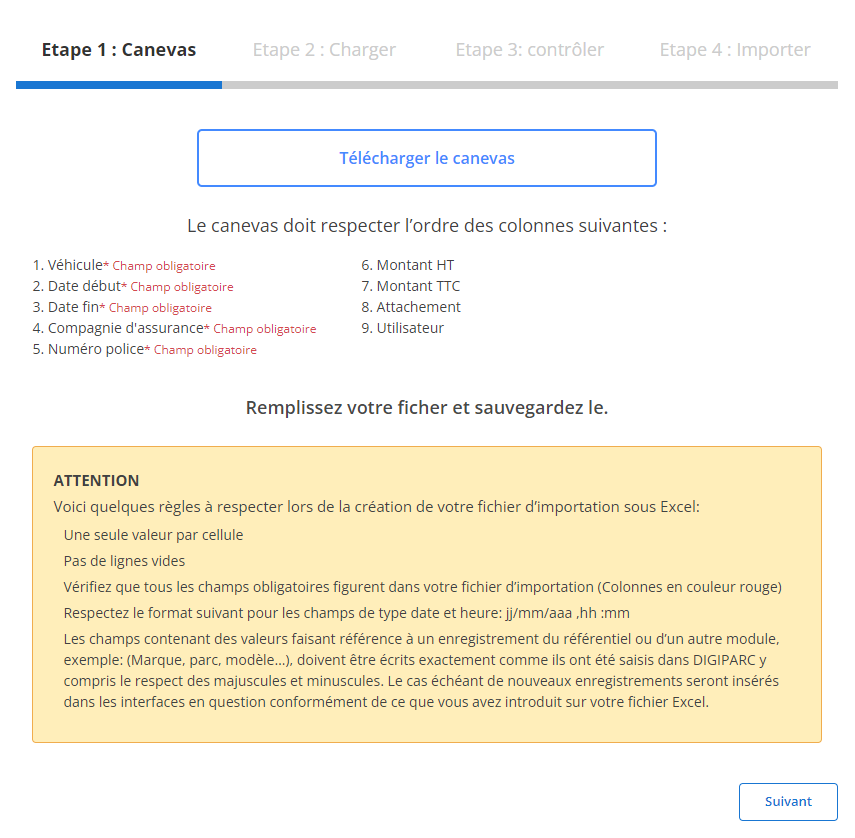
Étape 1 : Télécharger et préparer le fichier modèle
Avant de commencer l'importation, vous devez télécharger un fichier modèle conçu pour cette tâche. Ce fichier contient des colonnes prédéfinies qu'il est essentiel de remplir correctement pour éviter des erreurs d’importation.
-
Téléchargez le modèle:
Le fichier modèle est accessible via l’interface utilisateur. Il contient des colonnes indispensables à l’importation, chacune correspondant à une donnée spécifique.
-
Respectez l’ordre des colonnes:
Les champs obligatoires dans chaque ligne sont :
- Véhicule
- Date début
- Date fin
- Compagnie d'assurance
- Numéro police
-
Préparez votre fichier:
- Assurez-vous qu’il n’y ait qu’une seule valeur par cellule.
- Évitez les lignes vides au milieu du fichier.
- Respectez le format attendu pour les dates (jj/mm/aaaa).
- Remplissez tous les champs obligatoires pour éviter les erreurs de validation.
Étape 2 : Charger le fichier des assurances internationales
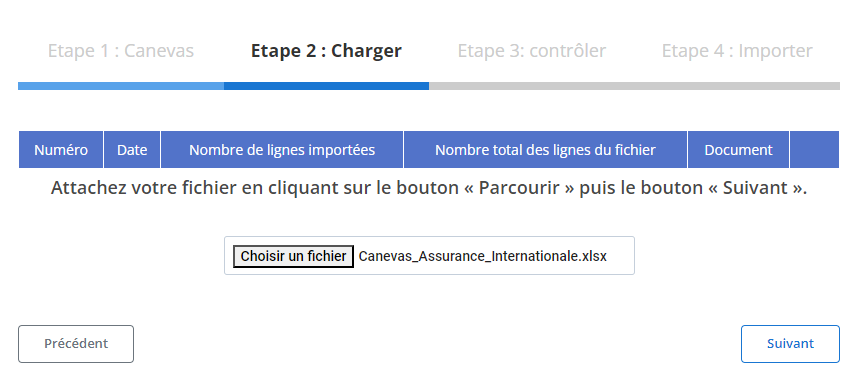
Une fois le fichier correctement préparé, vous pouvez passer à l’étape suivante : le chargement dans le système.
-
Sélectionnez le fichier:
Cliquez sur le bouton"Parcourir"pour localiser le fichier sur votre ordinateur et sélectionnez-le.
-
Lancez le chargement:
Une fois le fichier sélectionné, cliquez sur"Suivant"pour démarrer le processus de chargement. Le système analysera le fichier pour préparer les données en vue d’une vérification finale.
-
Vérifiez le récapitulatif des données:
- Un récapitulatif affichera le nombre total de lignes dans le fichier ainsi que le nombre de lignes prêtes pour l’importation.
- Ce résumé vous permet de vérifier rapidement le contenu du fichier avant de poursuivre.
Étape 3 : Vérification des données importées
Après le chargement, un tableau récapitulatif contenant les enregistrements issus du fichier sera affiché. À ce stade, il est crucial de valider les données.
-
Contrôle des erreurs:
Le système mettra en évidence les erreurs éventuelles, comme des champs manquants ou des formats incorrects (par exemple, une date mal saisie ou un numéro de police absent).
-
Validation des enregistrements corrects:
Les lignes sans erreur seront marquées comme prêtes pour l’importation. Vous pourrez vérifier des informations clés telles que :
- Véhicule
- Compagnie d'assurance
- Numéro police
- Dates de début et de fin
- Montants HT, TVA, TTC
- AttachementetUtilisateur
Étape 4 : Finaliser l'importation des assurances internationales
Une fois les données vérifiées et corrigées, vous pouvez finaliser l’importation des enregistrements.
-
Cliquez sur "Importer":
Validez l’opération pour ajouter les données dans la base de données.
-
Confirmation d'importation:
Un message de confirmation s’affichera pour indiquer que l’importation a été réalisée avec succès et que tous les enregistrements ont été correctement ajoutés.
En intégrant ces informations de manière cohérente et précise, ce système optimise la gestion des assurances internationales pour répondre aux besoins des entreprises modernes.
Exportation des données d’assurance internationale
L'exportation des données d'assurance internationale est un processus indispensable pour une gestion fluide et efficace des informations relatives aux couvertures d’assurance des véhicules. Elle permet de centraliser et d’organiser toutes les données pertinentes, telles que les compagnies d’assurance, les numéros de police, les montants financiers, ainsi que les périodes de validité. Les fichiers exportés, généralement au format CSV ou Excel, se révèlent essentiels pour une analyse approfondie, une communication claire entre les parties prenantes, et une prise de décision éclairée en matière de gestion des risques.
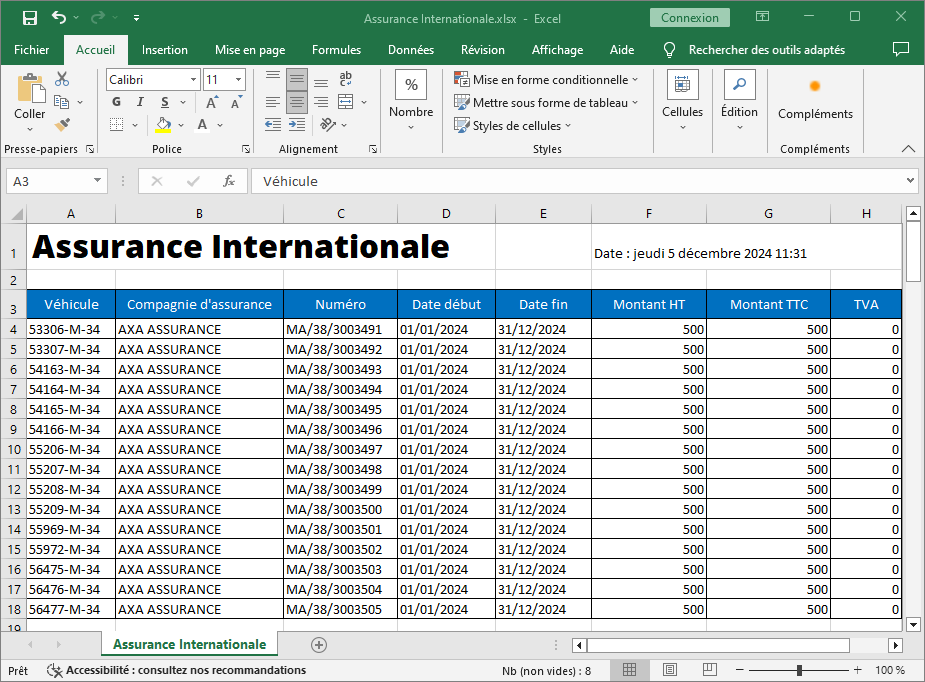
L’exportation des données d’assurance internationale inclut les éléments suivants pour une gestion détaillée et efficace :
-
Véhicule: Identifie clairement le véhicule couvert par la police d’assurance, facilitant la gestion et l’association des polices à chaque membre de la flotte.
-
Compagnie d’assurance: Mentionne le nom de la compagnie fournissant la couverture, permettant un suivi précis des partenaires d’assurance et une évaluation de leurs performances.
-
Numéro: Ce champ indique le numéro unique de la police d’assurance, garantissant une traçabilité rapide et simplifiée de chaque contrat.
-
Date Début: Spécifie la date d’entrée en vigueur de l’assurance, permettant de suivre l’activation des couvertures.
-
Date Fin: Indique la date d’expiration de la police, essentielle pour anticiper les renouvellements et éviter les périodes sans couverture.
-
Montant HT: Reflète le coût net de la police d’assurance, permettant un suivi précis des dépenses.
-
Montant TTC: Mentionne le montant total de l’assurance, incluant les taxes, pour une gestion financière globale.
-
TVA: Décompose la taxe sur la valeur ajoutée applicable, offrant une transparence complète sur les coûts.
L’organisation et l’exportation des données d’assurance internationale contribuent à une maîtrise accrue des processus liés à la gestion des risques. Elles permettent aux gestionnaires de rester informés des échéances critiques et de prendre des mesures proactives pour garantir une couverture continue. Les entreprises peuvent également utiliser ces données pour identifier les écarts de performance entre les assureurs, réduire les coûts inutiles et améliorer leur stratégie d’assurance à l’international.
En rendant ces informations disponibles sous un format clair et standardisé, cette démarche renforce la collaboration entre les départements internes, les partenaires externes et les régulateurs. Cela se traduit par une gestion optimisée des ressources et une protection accrue contre les risques imprévus, soutenant ainsi les objectifs stratégiques de l’entreprise.