Module · Admin
Notebook management
Notebook management
The metrological notebook administration module constitutes an advanced solution for centralizing and structuring data relating to measuring equipment. By combining ease of use and efficiency, this system guarantees rigorous monitoring of essential information, promoting exemplary traceability in all processes.
Thanks to this module, users can organize in detail the information in metrological notebooks, including the characteristics of the equipment, their calibration dates, the results of the checks carried out, as well as the recommended maintenance intervals. This clear structuring makes it possible to visualize at a glance the compliance status of each device and to identify the actions to be taken.
By integrating features to document interventions, audits or recalibrations, the module ensures that each step is accurately recorded, ensuring full transparency and compliance with regulatory requirements. This approach helps reduce the risk of error, while facilitating internal audits or external inspections.
With an interface designed for intuitive use, this system provides quick access to critical information and simplifies routine operations. It thus becomes an essential tool for optimizing the management of metrological notebooks, by strengthening the reliability of data and supporting continuous improvement efforts within the organization.
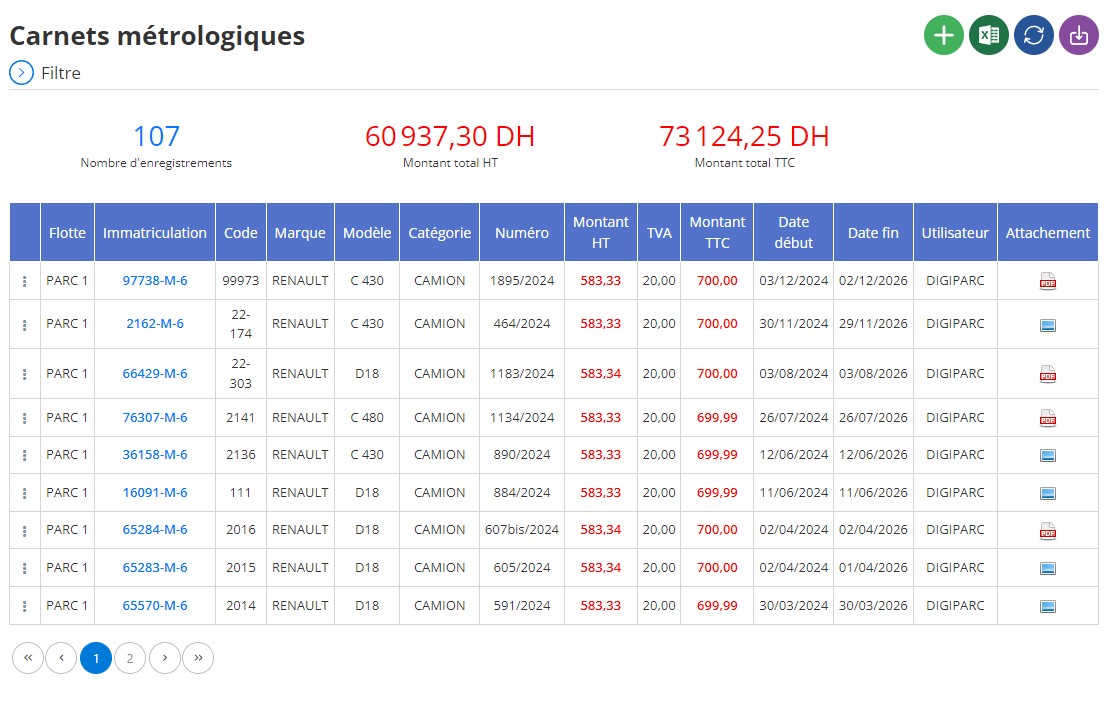
Addition of a new metrological notebook
The interface dedicated to adding a metrological notebook allows you to provide all the information necessary to ensure the metrological monitoring of vehicles. This functionality is essential for maintaining equipment compliance, planning maintenance operations, and guaranteeing precise management of associated costs.
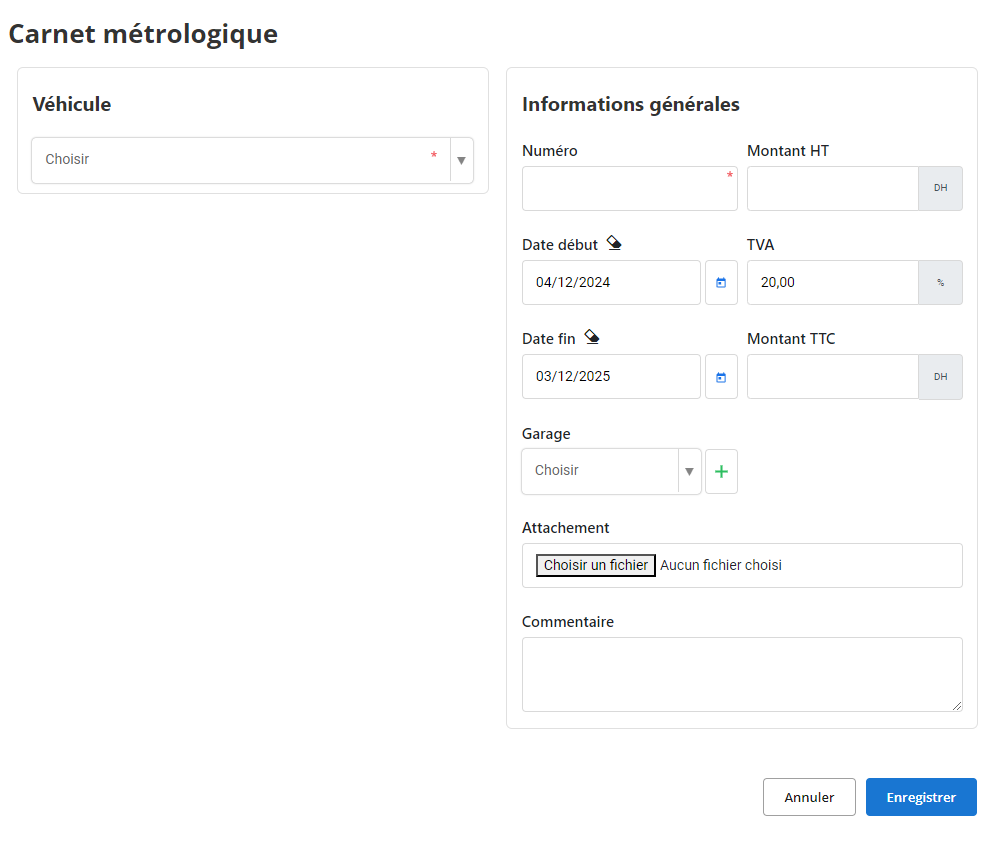
Vehicle information:The first step is to select the vehicle in question from a drop-down list. This makes it possible to associate the log directly with a specific vehicle, thus facilitating traceability and centralization of data. This choice is crucial to ensure that the metrological data corresponds to the correct vehicle in the fleet.
General notebook details: The notebook number must be entered to uniquely identify each entry in the database. This reference is useful for quickly finding the notebook in the event of a check or audit.
Then, the amounts associated with the notebook must be indicated:
- Amount excluding tax (excluding taxes): Allows you to document costs without including VAT.
- VAT: The applicable percentage is entered to automatically calculate taxes.
- Amount including tax (All taxes included): This field often fills automatically based on previous data, but it can be adjusted if necessary.
Validity period:The fields ofstart dateAndend dateare used to indicate the period during which the metrological notebook is valid. This information makes it possible to plan periodic checks and ensure that the notebook is renewed before it expires.
Associated garage: The notebook must also specify the garage or workshop responsible for carrying out the metrological services. This field can include predefined options or allow adding a new garage via a dedicated button, ensuring a constantly up-to-date database of service providers.
Attachment and comments: The interface allows you to attach associated documents, such as invoices, technical reports or certificates of conformity. This ensures that all relevant information is centralized and easily accessible when needed.
A comment field is available to add specific observations. This may include additional details on the intervention, notes concerning future recommendations, or even general remarks to enrich the sheet.
By structuring the information in detail, the addition of a metrological logbook becomes a key step to guarantee rigorous monitoring of vehicles. This approach helps to optimize fleet management, reduce the risks linked to non-compliance, and facilitate the planning of maintenance operations.
Modification of a metrological notebook
To update the information contained in a metrological notebook, it is essential to first access the section dedicated to metrological notebooks in the system. You can use the built-in search tools to quickly find the notebook in question. These filters allow you to sort the data by logbook number, vehicle concerned, associated garage, or even validity period. Once identified, select the “Edit” option to open the update interface.
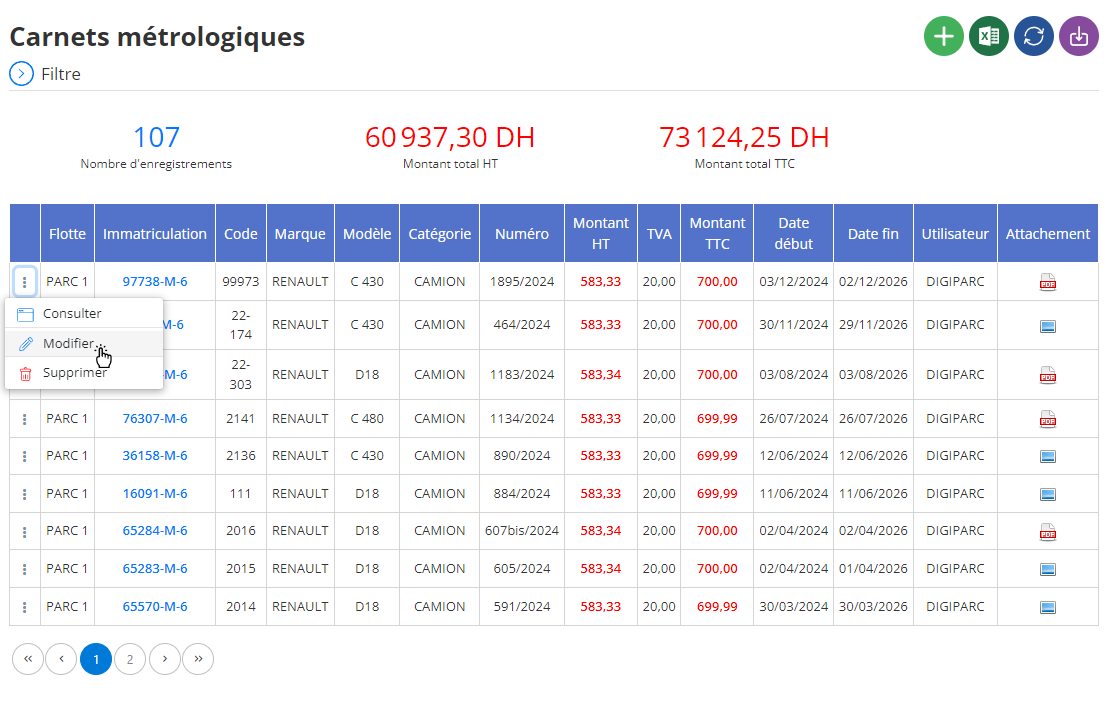
In this interface, you have the possibility to correct or adjust essential information linked to the metrological notebook. Among the modifiable elements, we find in particular:
- The associated vehicle: You can choose another vehicle if an error was made during the initial creation of the logbook.
- Notebook numbers: If a reference change is necessary for better organization or compliance, this field can be updated.
- Financial amounts: The fields linked to the amount excluding tax, VAT, and amount including tax can be adjusted to reflect actual or corrected costs.
Adjustment of dates and service provider: The validity period is another key aspect that can be changed. If an extension of the validity period is required or the original dates were incorrect, you can adjust thestart dateand theend dateof the notebook.
In addition, the associated garage or workshop may be modified, whether to reflect a change of service provider or to correct an erroneous selection.
Managing attachments and comments: You can also add, replace or delete documents attached to the notebook. This may include corrected invoices, updated technical reports, or revised certificates of conformity. A comment field is available to record any additional information or justification for the modifications made. This helps ensure clear traceability of updates and adds relevant context for future users.
Modification of a metrological book must be carried out with care and precision. Up-to-date and accurate data not only ensures optimal fleet management, but it also helps prevent administrative errors, reduce the risk of non-compliance, and maintain a reliable history of interventions carried out. These adjustments provide managers with a clear, up-to-date view, essential for making informed decisions regarding fleet maintenance, costs, and compliance.
Deleting a metrological notebook
To delete a metrological notebook saved in the system, first access the list of available notebooks. Use the search options to locate the relevant logbook by filtering by number, associated vehicle, or other relevant information. Once the notebook is identified, select it, then click on the “Delete” option to initiate the process.
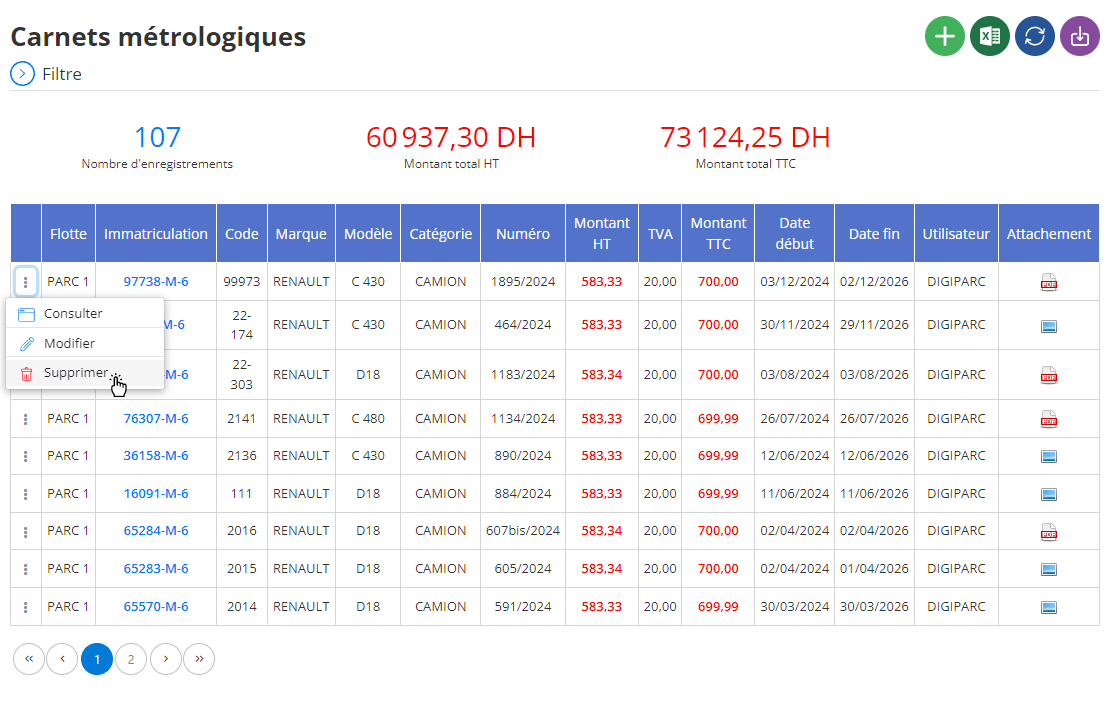
Before finalizing the deletion, a confirmation window will be displayed asking you to validate this operation. It is important to note that this action isdefinitive and irreversible. Once deleted, all data linked to this logbook, such as vehicle information, financial amounts, or attached documents, will be permanently erased.
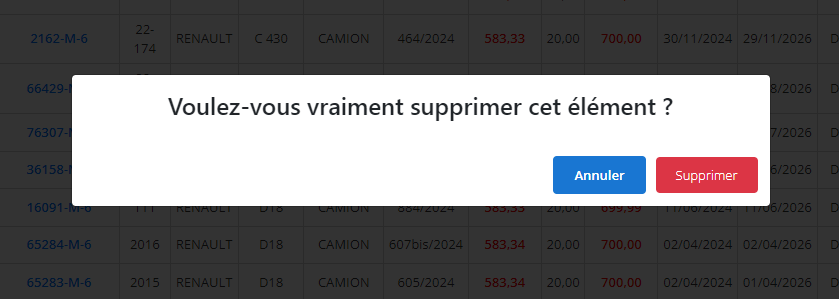
Before confirming the deletion, it is recommended to carefully verify that the operation is necessary and that no essential information is likely to be lost. If this data is likely to be useful for future analyses, audits, or administrative monitoring, it is wise to archive the relevant information before proceeding. This may include downloading attachments or saving financial details.
The deletion of a metrological notebook must be considered with caution, especially in contexts where the information recorded could be used for assessments, regulatory monitoring, or cost assessments. Deleting an outdated or irrelevant notebook helps maintain an organized and lean database, but it is crucial to ensure that no important information is inadvertently eliminated.
By applying this approach carefully, you guarantee rigorous management of metrological notebooks, while preserving the quality and reliability of the data recorded in the system.
Consultation of a metrological notebook
The interface for consulting a metrological notebook allows access to all the information recorded concerning a vehicle and its metrological monitoring. This tool offers a detailed and centralized view of essential data, guaranteeing rigorous and simplified management of notebooks.
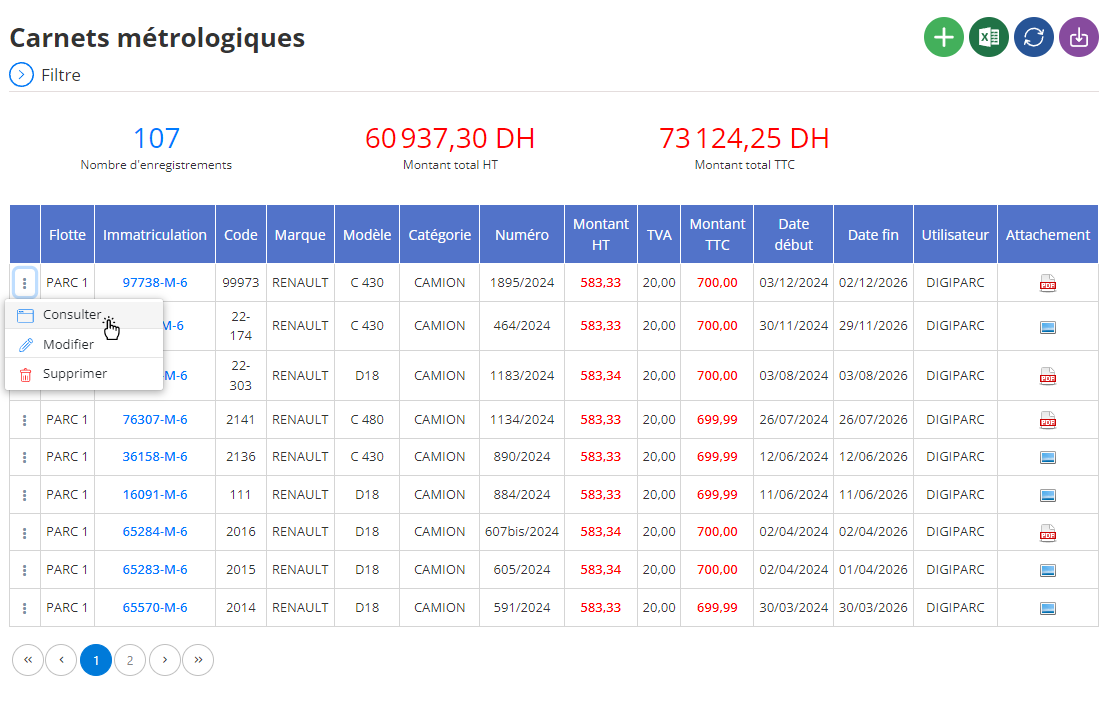
By selecting a specific notebook, all recorded data is clearly displayed on the screen. You can consult:
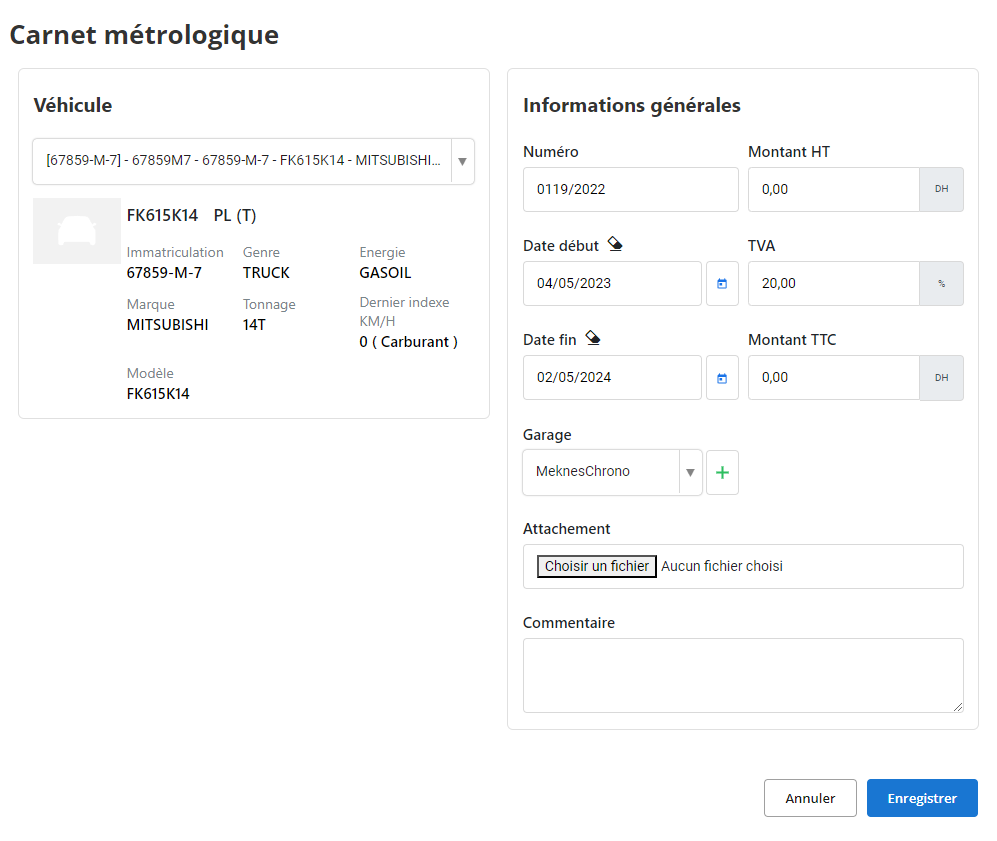
Vehicle concerned: The name or reference of the vehicle associated with the logbook is displayed. This information makes it possible to quickly identify the vehicle being monitored within the framework of the metrological logbook.
Validity period: The start and end dates of the validity of the notebook are indicated. This information helps ensure that monitoring is up to date and complies with requirements.
Financial details: The amounts provided, in particular the amount excluding tax, the VAT rate applied, and the total amount including tax, are available. This provides transparency on the costs associated with metrological monitoring.
Garage: The name of the garage or service provider who carried out the operations linked to the log is displayed. This guarantees complete traceability of stakeholders.
Attached documents: Attachments, such as invoices, certificates or technical reports, are accessible directly from the interface. These documents contribute to documented and organized management of the notebook.
Comments: This section contains notes or observations specific to the logbook, such as recommendations on future vehicle maintenance or notes relating to detected anomalies.
Thanks to this consultation interface, it becomes possible to quickly find and use all the metrological data associated with a vehicle. The centralization of information facilitates administrative, technical and financial monitoring, while ensuring proactive management of vehicles and compliance requirements. This comprehensive view helps maintain efficient and structured management of metrological notebooks in the organization.

