

Module · Admin
Filtrage Vignettes
Filtrage Vignettes
La gestion des vignettes constitue un élément clé pour assurer la conformité réglementaire des véhicules au sein d’une entreprise. Pour répondre aux besoins de suivi précis et d’organisation efficace, un système de filtrage avancé a été mis en place. Ce dispositif permet une recherche rapide et structurée des informations liées aux vignettes, tout en simplifiant les tâches administratives des gestionnaires.
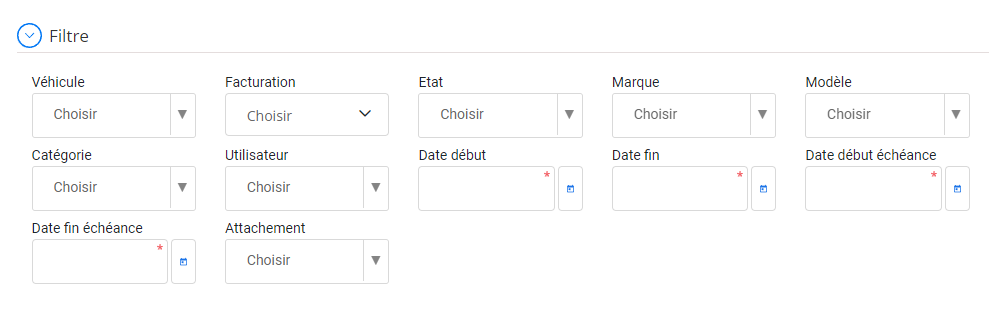
Filtrage avancé des formations
Voici une présentation détaillée des critères de filtrage disponibles pour optimiser la gestion des vignettes :
Véhicule: Grâce à ce filtre, vous pouvez rechercher une vignette en fonction d’un véhicule spécifique. Cette fonctionnalité permet de suivre facilement la situation de chaque véhicule, en visualisant rapidement les informations essentielles liées à sa vignette, comme le type, la validité ou le statut de renouvellement.
Flotte: Ce critère regroupe les vignettes des véhicules selon leur appartenance à une flotte particulière. Les gestionnaires peuvent ainsi obtenir une vue d’ensemble organisée, facilitant la planification et le contrôle administratif des véhicules à l’échelle de toute la flotte.
État: Le filtre "État" offre la possibilité de classer les vignettes selon leur statut actuel : valide, expirée, en attente de renouvellement ou non-conforme. Cet outil est indispensable pour prioriser les actions à entreprendre, notamment le renouvellement des vignettes expirées.
Marque et Modèle: Ces filtres permettent de trier les vignettes selon les caractéristiques techniques des véhicules. Cette option est particulièrement utile pour les entreprises gérant un parc diversifié, en facilitant l’analyse des besoins selon la marque ou le modèle des véhicules concernés.
Catégorie: Avec ce filtre, vous pouvez regrouper les vignettes par catégorie de véhicules, comme les utilitaires, les poids lourds, ou les voitures de service. Cela simplifie la gestion des obligations spécifiques liées à chaque type de véhicule et permet d’avoir une vue segmentée des documents administratifs.
Utilisateur: Ce critère permet d’identifier les vignettes associées à un utilisateur ou conducteur en particulier. Idéal pour le suivi personnalisé, il garantit que chaque utilisateur dispose des documents nécessaires pour le véhicule qui lui est attribué.
Date début et Date fin: En définissant une plage de dates, vous pouvez limiter les résultats aux vignettes émises ou mises à jour dans une période spécifique. Ce critère est utile pour analyser les renouvellements récents ou planifier les prochaines échéances administratives.
Date début échéance et Date fin échéance: Un outil indispensable pour une gestion proactive, ce filtre permet d’identifier les vignettes qui approchent de leur date d’expiration. Il aide les gestionnaires à planifier les renouvellements à temps, évitant ainsi les pénalités ou interruptions d’usage des véhicules.
Attachement: Ce filtre centralise les documents associés aux vignettes, tels que les justificatifs ou copies numérisées. Il garantit une gestion documentaire ordonnée et un accès rapide aux pièces nécessaires en cas de contrôle ou de vérification.
Avec ce système de filtrage avancé, la gestion des vignettes devient simple, rapide et efficace. Les responsables peuvent anticiper les échéances, éviter les oublis et maintenir une conformité totale vis-à-vis des obligations légales.
Grâce à une interface intuitive et des critères de recherche adaptés, ce dispositif offre une vue d’ensemble claire et personnalisée, permettant de gérer chaque aspect des vignettes de manière fluide. Ce système constitue un atout stratégique pour toute entreprise souhaitant rationaliser ses processus administratifs et garantir une gestion conforme et proactive de ses véhicules.