

Module · Admin
Liste Vignettes
Liste Vignettes
Cette section offre une présentation détaillée et structurée des vignettes liées aux véhicules enregistrés dans le système. En regroupant l’ensemble des informations pertinentes, ce module permet aux utilisateurs de suivre et gérer efficacement la conformité fiscale des véhicules, tout en optimisant le suivi des coûts associés.
Avec un affichage clair et intuitif, les utilisateurs peuvent aisément repérer les vignettes actives, identifier les échéances à venir, et vérifier les détails essentiels pour chaque véhicule de la flotte. Cette centralisation des données simplifie les démarches administratives et aide à prévenir les oublis ou les irrégularités, contribuant ainsi à un suivi rigoureux et conforme aux réglementations en vigueur.
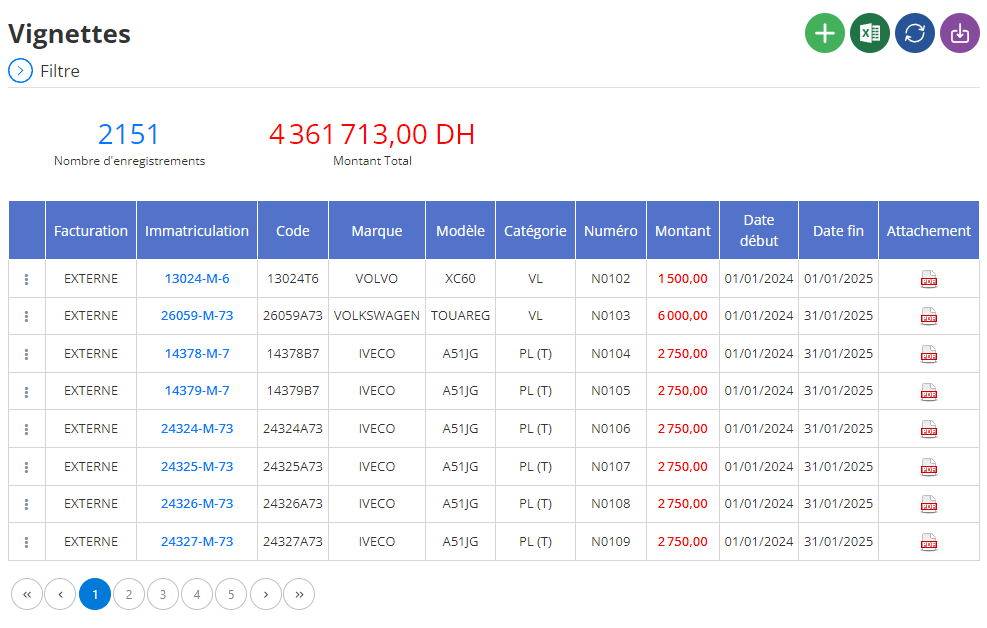
Affichage des formations en liste
Les informations sur les vignettes sont présentées sous forme de tableau au sein de l’interface principale, assurant une lisibilité optimale et un accès rapide aux données clés. Chaque ligne représente une vignette spécifique, tandis que les colonnes fournissent des informations précises pour une gestion optimale :
- Flotte :Désigne la catégorie ou le groupe de véhicules auxquels la vignette est associée, facilitant le suivi et la gestion segmentée.
- Immatriculation :Affiche la plaque d’immatriculation du véhicule concerné, assurant une identification rapide et fiable.
- Code :Fournit un identifiant interne unique pour chaque vignette, utile pour le suivi et la gestion dans les grandes flottes.
- Marque :Mentionne le constructeur du véhicule, un élément clé pour analyser et regrouper les données en fonction des fabricants.
- Modèle :Indique le modèle précis du véhicule, permettant une différenciation claire entre les véhicules d’une même marque.
- Catégorie :Spécifie le type de véhicule (par exemple, utilitaire, berline, ou poids lourd), un critère important pour adapter les obligations fiscales en fonction de chaque catégorie.
- Numéro :Contient le numéro unique de la vignette, garantissant une traçabilité et une vérification simplifiées.
- Montant :Affiche le coût de la vignette, permettant un suivi précis des dépenses fiscales associées à chaque véhicule.
- Date de Début :Renseigne la date à partir de laquelle la vignette est valide, facilitant la gestion des périodes de couverture fiscale.
- Date de Fin :Indique la date d’expiration de la vignette, essentielle pour anticiper les renouvellements et éviter les pénalités.
- Utilisateur :Précise le collaborateur ou la personne responsable de l’utilisation du véhicule, permettant un suivi des responsabilités.
- Attachement :Permet de joindre des documents associés à la vignette, tels que des copies numériques, des reçus ou des justificatifs de paiement, pour une centralisation efficace des archives.
L’affichage détaillé et organisé des vignettes sous forme de tableau offre une vue d’ensemble indispensable pour les gestionnaires. Il facilite non seulement le suivi des véhicules conformes, mais aussi l’identification des vignettes expirées ou manquantes. Ce système contribue à une gestion proactive en permettant de planifier les renouvellements à temps, tout en contrôlant efficacement les dépenses fiscales.
En intégrant des informations fiables et accessibles, cette solution simplifie les opérations administratives et garantit une conformité continue avec les obligations fiscales en vigueur. Elle devient ainsi un outil essentiel pour toute organisation cherchant à gérer sa flotte de manière transparente, efficace et conforme.