

Module · Admin
Import/Export Jaugeage
Import/Export Jaugeage
L'importation en masse et l'exportation des données des certificats de jaugeage sont des fonctionnalités essentielles pour une gestion efficace et centralisée des vérifications des équipements.
L'importation en masse permet d'ajouter rapidement plusieurs certificats de jaugeage dans le système en utilisant un fichier préformaté. Cette méthode simplifie considérablement le processus d'intégration, réduisant le temps de saisie manuelle et garantissant une mise à jour rapide et précise des certificats. Elle est particulièrement utile pour les entreprises ou organisations gérant un grand nombre de certificats, leur permettant de se concentrer sur des tâches stratégiques tout en assurant une gestion continue et fiable des données.
L'exportation des données, quant à elle, génère un fichier structuré contenant toutes les informations clés relatives aux certificats de jaugeage, telles que les détails des véhicules, les montants associés, et les dates d'émission et de validité. Ce fichier, souvent disponible en formats CSV ou Excel, permet une gestion simplifiée des opérations et une analyse approfondie des certificats. Il aide à garantir la conformité avec les normes en vigueur tout en facilitant le suivi et l'audit des certificats de jaugeage.
En combinant ces deux fonctionnalités, les gestionnaires peuvent optimiser la gestion et l’analyse des certificats de jaugeage, assurant ainsi une traçabilité complète et une conformité optimale des équipements.
Importation en masse des certificats de jaugeage
L'importation en masse des certificats de jaugeage permet aux utilisateurs d’ajouter rapidement plusieurs certificats à la fois dans le système, en utilisant un fichier préformaté. Cette fonctionnalité est particulièrement utile pour les entreprises ou organisations qui gèrent un grand nombre de certificats et souhaitent les intégrer sans erreurs et dans les plus brefs délais.
En permettant de télécharger un fichier contenant toutes les informations nécessaires pour chaque certificat, cette méthode simplifie considérablement le processus d’ajout. Elle réduit le temps consacré à la saisie manuelle des données et assure une mise à jour rapide et précise des certificats de jaugeage. Cela permet aux gestionnaires de se concentrer sur des tâches à plus forte valeur ajoutée tout en garantissant une mise à jour continue et fiable du système.
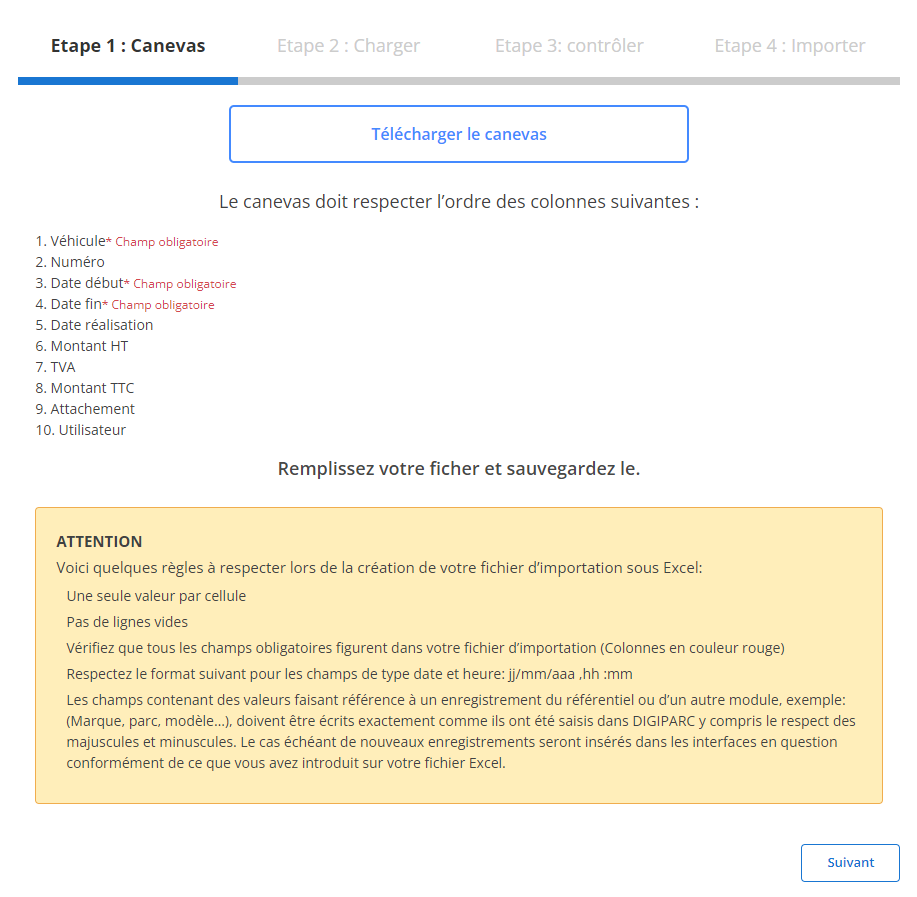
Étape 1 : Télécharger et préparer le fichier modèle
Avant de commencer l'importation, vous devez télécharger un fichier modèle spécifique à cette tâche. Ce fichier contient des colonnes prédéfinies qu'il est important de remplir correctement pour garantir une importation sans erreur.
-
Téléchargez le modèle:
Le fichier modèle est facilement accessible via l'interface. Il contient des colonnes indispensables à l’importation, et chaque colonne doit être remplie dans un ordre précis.
-
Respectez l'ordre des colonnes:
Les champs obligatoires dans chaque ligne sont :
- Véhicule
- Date début
- Date fin
-
Préparez votre fichier:
- Assurez-vous qu'il n’y ait qu’une seule valeur par cellule.
- Évitez les lignes vides au milieu du fichier pour éviter des erreurs.
- Vérifiez que les dates respectent le format attendu (jj/mm/aaaa).
- Remplissez correctement les champs obligatoires pour chaque ligne.
Étape 2 : Charger le fichier des certificats de jaugeage
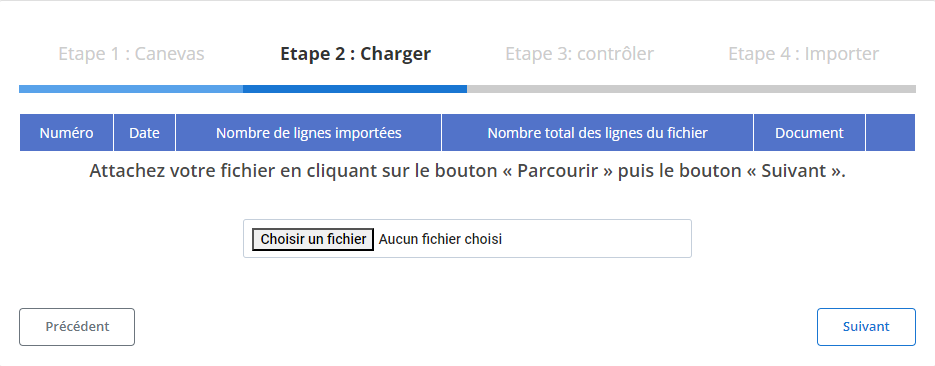
Une fois le fichier préparé, il est temps de le charger dans le système.
-
Sélectionnez le fichier:
Cliquez sur le bouton "Parcourir" pour localiser le fichier modèle sur votre ordinateur et sélectionnez-le.
-
Lancez le chargement:
Une fois le fichier sélectionné, cliquez sur "Suivant" pour démarrer le processus de chargement des données. Le système analysera le fichier et préparera les informations pour une vérification finale.
-
Vérifiez le récapitulatif des données:
- Un récapitulatif s’affichera avec le nombre total de lignes du fichier et le nombre de lignes prêtes pour l’importation.
- Ce récapitulatif vous permet de vérifier rapidement si les données sont conformes avant de passer à l’étape suivante.
Étape 3 : Vérification des données importées
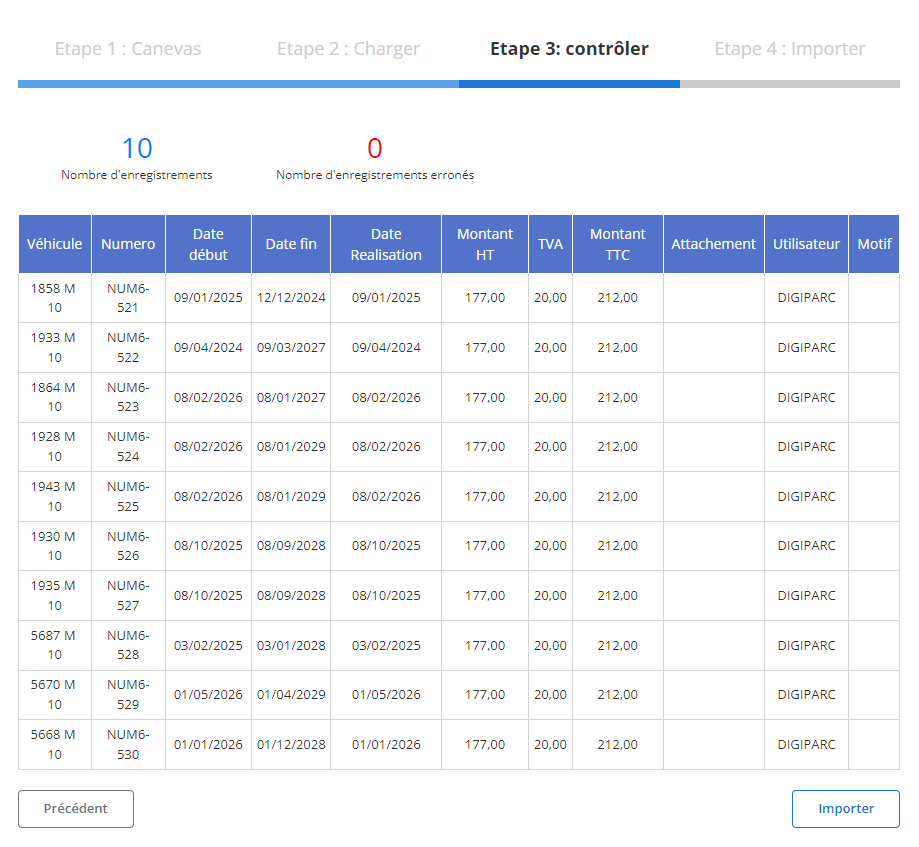
Après le chargement du fichier, un tableau récapitulatif des enregistrements sera affiché. À ce stade, il est crucial de vérifier que toutes les données sont conformes avant de les importer définitivement.
-
Contrôle des erreurs:
Le système mettra en évidence toute erreur potentielle, comme des champs manquants dans les colonnes obligatoires ou des formats incorrects. Par exemple, si un véhicule ou une date est manquant(e), cela sera signalé.
-
Validation des enregistrements corrects:
Les lignes sans erreur seront mises en évidence et marquées comme prêtes pour l’importation. Vous pouvez ainsi examiner chaque ligne pour vous assurer de la conformité des informations suivantes :
- Véhicule
- Date débutetDate fin
- Date réalisation
- Montant HT, TVA, etMontant TTC
- AttachementetUtilisateur
Étape 4 : Finaliser l'importation des certificats de jaugeage
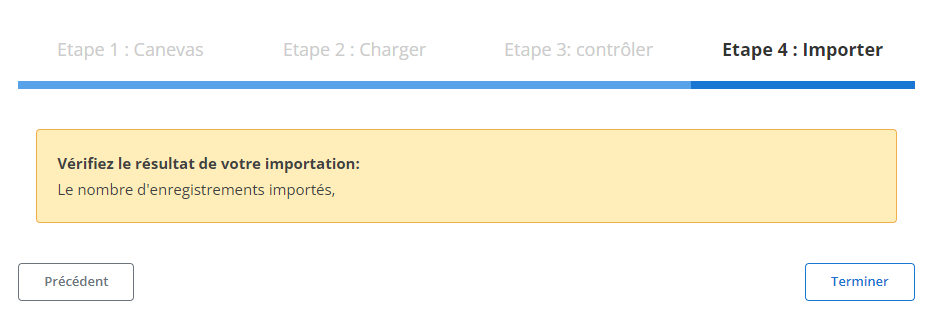
Une fois les données vérifiées et corrigées, vous pouvez procéder à l'importation définitive des certificats dans le système.
-
Cliquez sur "Importer":
Cela permettra de valider l’ajout des enregistrements dans la base de données du système.
-
Confirmation de l'importation:
Un message de confirmation s'affichera pour vous indiquer que l’importation a été réalisée avec succès et que tous les certificats ont été correctement ajoutés.
Ce processus d'importation structuré permet aux responsables de gagner du temps et de réduire les risques d'erreurs lors de l'ajout en masse des certificats de jaugeage. Grâce à cette méthode, les données sont intégrées de manière précise et cohérente, garantissant ainsi un suivi optimal et une gestion fluide des certificats au sein de l'entreprise.
Exportation des données des certificats de jaugeage
L'exportation des certificats de jaugeage constitue un outil essentiel pour la gestion et le suivi des vérifications des équipements. Ce processus permet de créer un fichier structuré regroupant toutes les informations nécessaires relatives aux certificats émis, notamment les détails des véhicules, des montants associés, et des dates d'émission et de validité. Ce fichier, souvent exporté sous des formats standards comme CSV ou Excel, facilite la gestion des opérations et permet une analyse approfondie des certificats de jaugeage pour garantir la conformité avec les normes en vigueur.
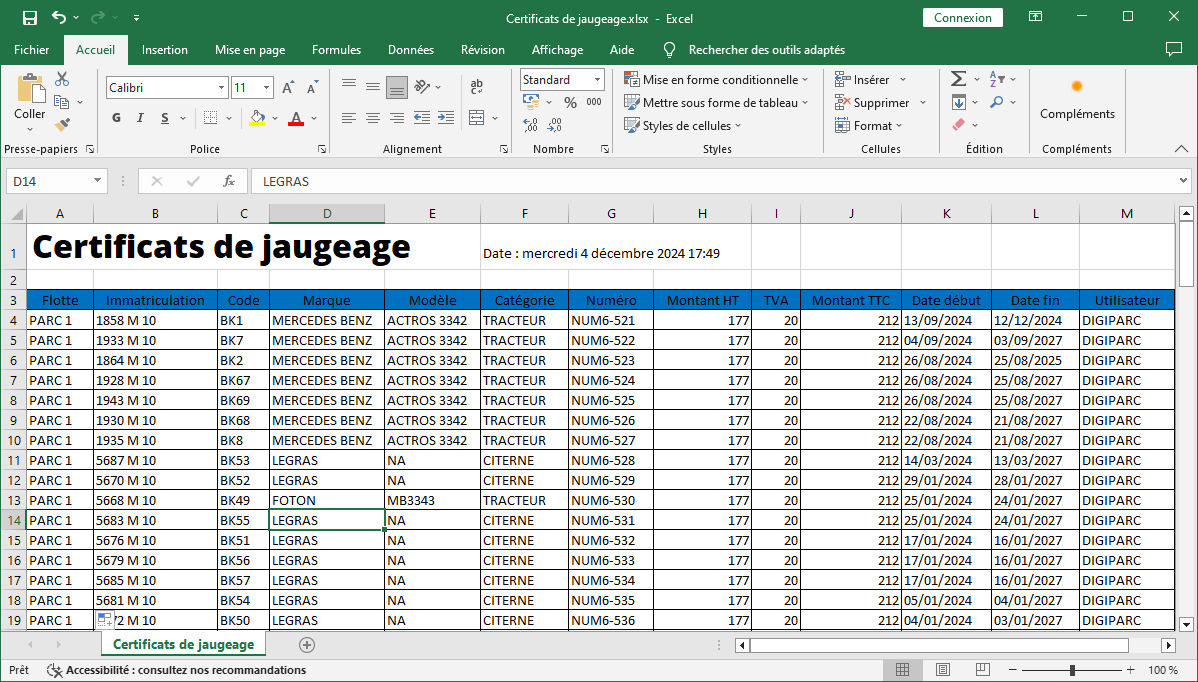
L'exportation des données comprend plusieurs champs clés qui permettent une vue d'ensemble claire et détaillée des certificats de jaugeage associés à chaque véhicule ou équipement. Ces données incluent :
-
Flotte: Indique la division ou le groupe de véhicules auxquels appartiennent les équipements, facilitant ainsi la gestion par catégorie ou groupe opérationnel.
-
Immatriculation: Cette colonne liste l'immatriculation du véhicule ou de l'équipement, offrant une identification unique et facilitant le suivi précis des certifications de chaque unité.
-
Code: Le code attribué à chaque certificat de jaugeage permet une référence rapide et une recherche simplifiée des informations dans le système.
-
Marque: La marque du véhicule ou de l'équipement est précisée ici, permettant de connaître l'origine de l'appareil et de vérifier les normes spécifiques à chaque fabricant.
-
Modèle: Le modèle de l’équipement est mentionné pour offrir une vue complète des spécifications techniques, ce qui peut être utile pour des vérifications ou des audits.
-
Catégorie: Cette catégorie classe l'équipement ou le véhicule selon son usage ou son type, facilitant ainsi la gestion en fonction de la classification des ressources.
-
Numéro: Le numéro unique du certificat de jaugeage est indiqué pour assurer une traçabilité précise des documents et des contrôles réalisés.
-
Montant HT, TVA, Montant TTC: Ces informations financières détaillent les montants relatifs à chaque certificat, y compris le prix hors taxes, la TVA appliquée et le montant total TTC, permettant une gestion financière claire et un suivi des coûts associés.
-
Date Début et Date Fin: Les dates d'émission et de validité du certificat sont incluses, fournissant une vue sur la durée de validité et permettant de planifier les renouvellements ou les vérifications futures.
-
Utilisateur: Cette colonne mentionne l’utilisateur responsable de l'équipement ou du véhicule, facilitant ainsi la gestion des ressources et la traçabilité des certificats.
L’exportation des certificats de jaugeage permet non seulement de centraliser les données pour un suivi rigoureux, mais elle assure également une gestion proactive des vérifications des équipements. En rendant ces informations accessibles et organisées, cette fonctionnalité soutient la prise de décision stratégique, qu’il s’agisse de planifier les contrôles futurs, d’évaluer les coûts associés, ou de garantir la conformité avec les réglementations en vigueur. Les responsables peuvent ainsi s’assurer que tous les équipements sont correctement certifiés, minimisant les risques de non-conformité et optimisant l’utilisation des ressources au sein de l’entreprise.