Module · Admin
Import/Export Cartes
Import/Export Cartes
L'importation et l'exportation des données de formation permettent une gestion optimisée et simplifiée des programmes de formation au sein du système.
L'importation en masse des formations via un fichier préformaté est une fonctionnalité particulièrement utile pour les entreprises ou les établissements qui gèrent un grand nombre de formations. Elle permet d'ajouter rapidement plusieurs formations à la fois, en évitant les erreurs et en réduisant le temps consacré à l'entrée manuelle de données. Grâce à cette méthode, les gestionnaires peuvent mettre à jour facilement le catalogue de formations disponibles, garantissant ainsi une offre actualisée et cohérente.
De l'autre côté, l'exportation des données permet de générer un fichier contenant toutes les informations sur les formations, telles que les détails des programmes, les collaborateurs formés et les résultats des évaluations. Ce fichier, généralement au format CSV ou Excel, offre une vue d'ensemble complète des formations et de leurs impacts. Il peut être partagé avec les parties prenantes, comme les responsables RH ou les auditeurs, pour faciliter les analyses, les rapports et la prise de décision stratégique.
Ces deux fonctionnalités combinées simplifient le processus de gestion des formations, permettent une mise à jour rapide et assurent une meilleure transparence dans le suivi des compétences au sein de l'organisation. Elles favorisent ainsi une gestion efficace et une communication fluide entre les différents acteurs impliqués.
Importation en masse des cartes grises
L'importation de cartes grises en masse offre une méthode efficace pour intégrer plusieurs enregistrements simultanément dans le système, en utilisant un fichier préformaté. Cette fonctionnalité est particulièrement utile pour les entreprises ou administrations gérant un grand volume de véhicules et souhaitant automatiser et simplifier ce processus.
En permettant de télécharger un fichier contenant les informations nécessaires pour chaque carte grise, cette option optimise le temps de gestion, élimine les erreurs manuelles et garantit une mise à jour rapide et précise des données relatives aux véhicules. Les gestionnaires peuvent ainsi se concentrer sur des tâches plus stratégiques tout en assurant une gestion cohérente et actualisée des informations.
Cette fonctionnalité, simple d’utilisation, garantit une saisie conforme aux normes du système et une gestion optimisée de l’ensemble des données liées aux cartes grises.
Étape 1 : Télécharger et préparer le fichier modèle
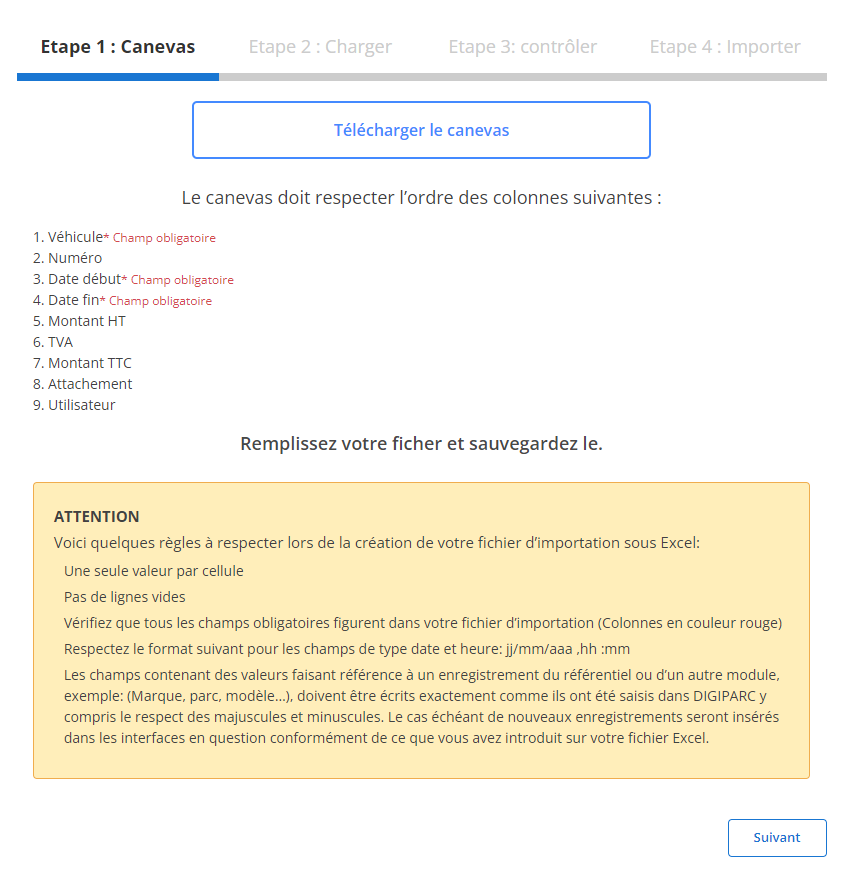
Avant de commencer l'importation, vous devez télécharger et remplir un fichier modèle conçu pour cette tâche. Ce fichier inclut des colonnes prédéfinies qui doivent être complétées avec soin pour garantir un processus fluide.
-
Téléchargez le fichier modèle:
Accessible via l’interface, ce fichier contient des colonnes obligatoires et optionnelles, présentées dans un ordre précis.
-
Respectez les exigences des colonnes:
Les champs suivants sont obligatoires pour chaque ligne :
- Véhicule(obligatoire)
- Date début(obligatoire)
- Date fin(obligatoire)
-
Préparez votre fichier:
- Veillez à ce qu'il n'y ait qu’une seule valeur par cellule.
- Évitez les lignes vides au milieu du fichier.
- Assurez-vous que les dates respectent le format attendu (jj/mm/aaaa).
- Vérifiez que tous les champs obligatoires sont remplis pour éviter des erreurs d'importation.
Étape 2 : Charger le fichier des cartes grises
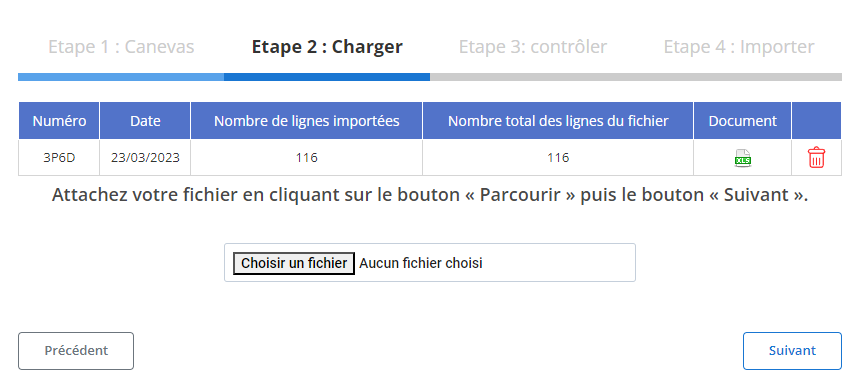
Une fois le fichier préparé, passez à son chargement dans le système :
-
Sélectionnez le fichier:
Cliquez sur le bouton "Parcourir" pour localiser le fichier sur votre appareil.
-
Lancez le processus d'importation:
Après avoir sélectionné le fichier, cliquez sur "Suivant". Le système analysera les données et affichera un récapitulatif des enregistrements.
Étape 3 : Vérification des données importées
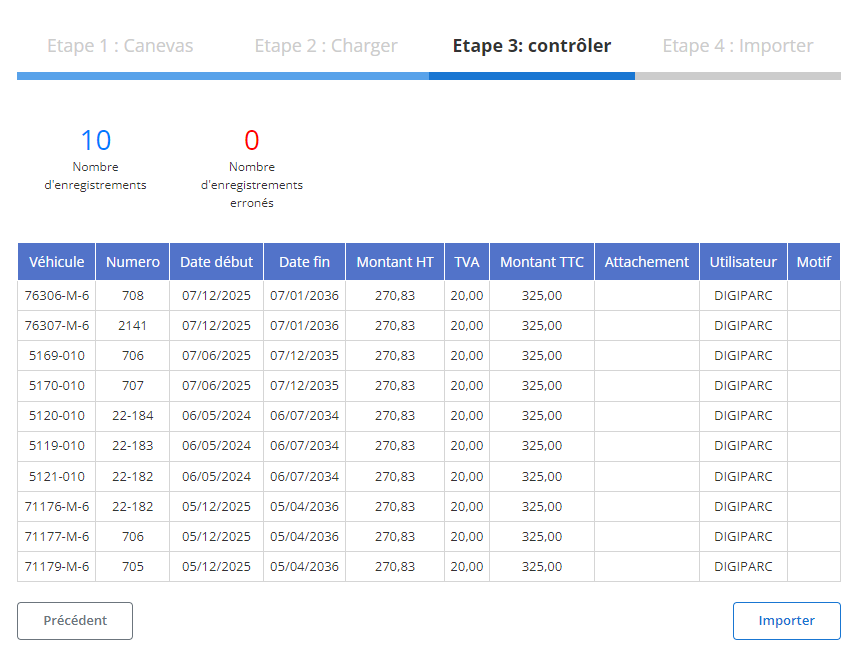
Avant de finaliser l'importation, un tableau récapitulatif s’affiche pour examiner les enregistrements.
-
Contrôlez les erreurs:
- Les erreurs potentielles (champs manquants ou formats incorrects) sont mises en évidence.
- Par exemple, une absence de date ou de numéro dans une ligne sera signalée.
-
Vérifiez les données conformes:
Les lignes sans erreur seront marquées comme prêtes pour l'importation. Vous pouvez examiner des champs comme :
- Véhicule
- Numéro
- Date début / Date fin
- Montant HT / TVA / Montant TTC
- Attachement
- Utilisateur
Étape 4 : Finaliser l'importation des cartes grises
Une fois la vérification terminée :
-
Cliquez sur "Importer":
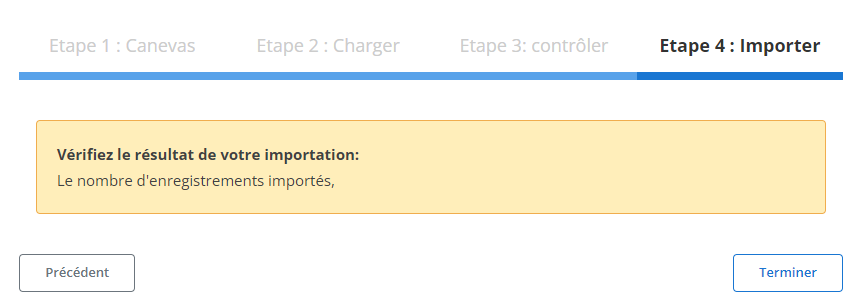
Cette action valide l’importation et enregistre les informations dans la base de données.
-
Confirmation d'importation:
Un message confirmera le succès de l'opération et l’intégration de toutes les cartes grises sans erreur.
Grâce à ce processus structuré, les gestionnaires peuvent économiser du temps tout en assurant une saisie cohérente et conforme des données des cartes grises. Cette méthode réduit les erreurs et garantit une gestion efficace des informations liées aux véhicules.
Exportation des données des cartes grises
L’exportation des données relatives aux cartes grises permet de générer un fichier complet regroupant toutes les informations essentielles sur les véhicules enregistrés dans le système. Ce fichier, souvent disponible dans des formats standards tels que CSV ou Excel, constitue un outil stratégique pour la gestion des flottes automobiles. Il facilite le suivi, l’analyse, et le partage des données avec différentes parties prenantes, comme les gestionnaires de flotte, les partenaires logistiques, ou les auditeurs.
Grâce à cet outil, les utilisateurs peuvent extraire et exploiter des données pour surveiller l’état des immatriculations, gérer les coûts associés, et garantir la conformité des véhicules aux réglementations en vigueur. De plus, cette exportation simplifie la communication interne en fournissant des informations claires et consolidées sur la flotte, tout en soutenant les prises de décision basées sur des analyses précises.
En permettant une visualisation détaillée des informations clés, l’exportation contribue à une gestion optimale des ressources, assure une transparence accrue dans les processus administratifs, et réduit les risques d’erreurs dans le suivi des véhicules. Elle est également précieuse pour préparer des audits, renforcer la conformité réglementaire, ou anticiper les besoins futurs en matière de gestion de flotte.
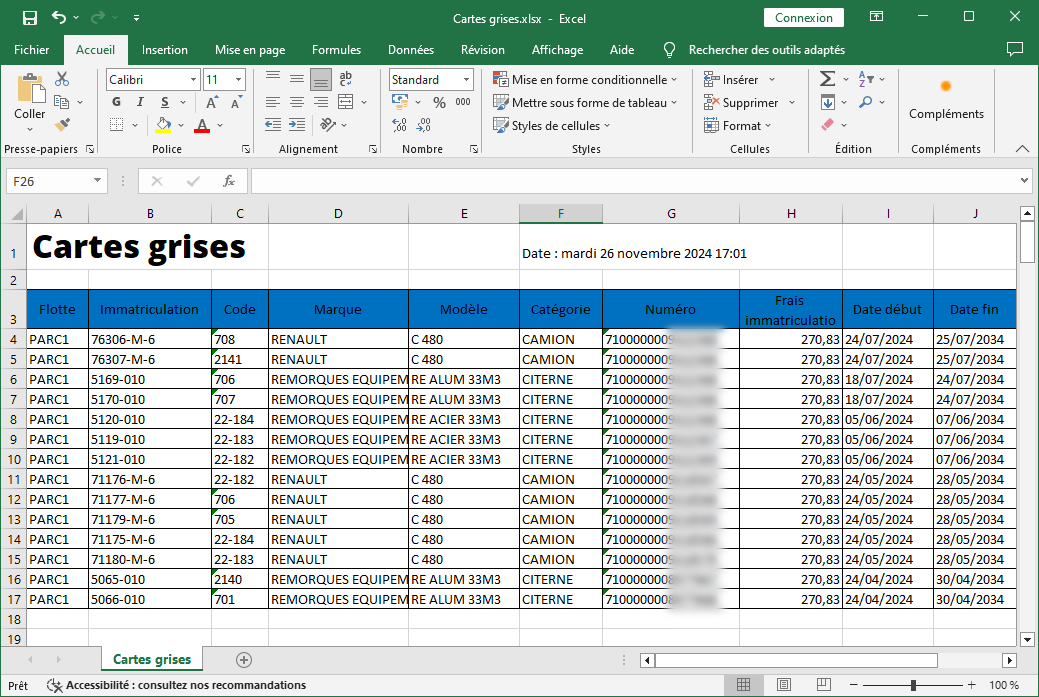
Les informations exportées incluent
Les colonnes incluses dans l’exportation offrent une vue complète et détaillée des cartes grises :
-
Flotte: Cette colonne désigne le nom ou l’identifiant de la flotte à laquelle appartient le véhicule. Elle permet de catégoriser les véhicules en fonction de leur usage ou de leur service.
-
Immatriculation: Le numéro d’immatriculation du véhicule est précisé, offrant une identification unique et simplifiant les démarches administratives liées à la gestion des plaques d’immatriculation.
-
Code: Cette information sert de référence interne ou d’identifiant unique pour chaque véhicule, facilitant le suivi dans les systèmes de gestion.
-
Marque: La marque du véhicule, comme Peugeot, Renault ou BMW, est indiquée pour permettre une analyse des préférences et performances des fabricants.
-
Modèle: Le modèle du véhicule est spécifié, apportant un détail supplémentaire pour différencier les véhicules de même marque.
-
Catégorie: Cette colonne précise la catégorie du véhicule (par exemple, utilitaire, berline, SUV), offrant une vue d’ensemble sur la diversité et la composition de la flotte.
-
Numéro: Le numéro de référence associé au véhicule, utilisé dans les systèmes internes pour un suivi plus granulaire.
-
Frais d’Immatriculation: Le montant des frais d’immatriculation est indiqué, permettant une analyse des coûts associés à chaque véhicule.
-
Date de Début: Cette colonne affiche la date à laquelle le véhicule a été ajouté à la flotte ou a commencé à être utilisé, facilitant le suivi historique.
-
Date de Fin: La date de fin correspond à la fin de l’utilisation ou à la sortie du véhicule de la flotte, permettant une gestion précise du cycle de vie.
-
Utilisateur: Cette colonne recense le nom ou l’identifiant de l’utilisateur principal du véhicule, assurant une traçabilité claire de son utilisation.
L’organisation soignée des données exportées améliore la gestion des flottes en permettant d’identifier rapidement les véhicules nécessitant des mises à jour administratives, un entretien ou un remplacement. Elle offre également une base solide pour évaluer les coûts et optimiser les ressources, tout en garantissant une conformité stricte aux normes et réglementations.
En exploitant ces données, les gestionnaires de flotte peuvent mieux anticiper les besoins en véhicules, négocier efficacement avec les fournisseurs, et assurer une utilisation optimale des actifs. L’exportation des données des cartes grises devient ainsi un levier essentiel pour une gestion moderne, transparente et proactive des véhicules d’entreprise.

