Module · Admin
Gray Card List
Gray Card List
This section presents a comprehensive and organized view of the registration documents registered within the system, providing an essential tool for tracking and managing vehicle-related information. Each record is enriched with key data, allowing a precise understanding of the characteristics and history of the vehicles in the fleet.
With a clear structure and detailed information, users can easily navigate records, compare data and quickly identify vehicles meeting specific criteria. This system promotes optimal fleet management, ensuring total transparency on costs, periods of use and administrative details. By making data accessible and usable, this overview contributes to informed decision-making to maintain rigorous monitoring and administrative compliance.
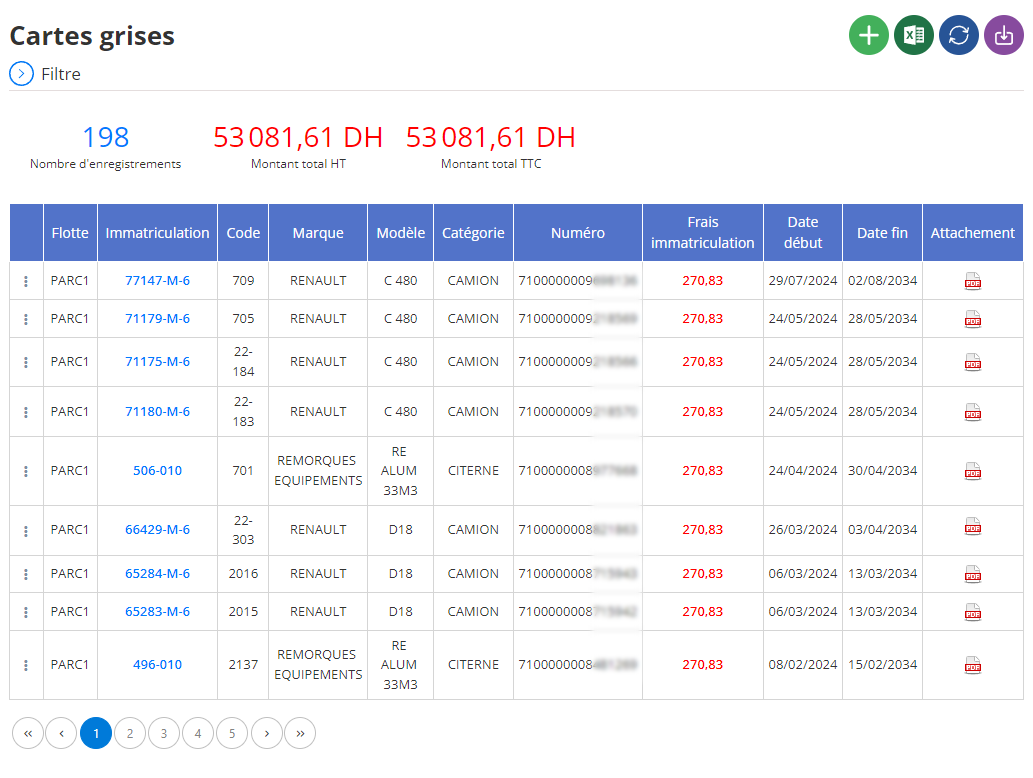
Organization of gray cards in table form
In the main interface, the gray cards are displayed in table form, offering a structured and intuitive representation of the data. Each row corresponds to a specific vehicle, while each column provides crucial information for thorough and efficient management:
- Fleet:This field indicates the group or category of vehicles to which a particular record belongs. It facilitates the identification of specific fleet segments and simplifies their management.
- Registration:This number is the heart of each vehicle’s identification. It allows you to quickly identify a vehicle in the system, reducing the risk of confusion.
- Code:This internal or reference code provides an additional tracking method for each record, particularly useful in large fleets with complex systems.
- Brand:This column specifies the brand of the vehicle, an essential element for analyzes of the diversity or standardization of vehicles within the fleet.
- Model:Here the exact model of the vehicle is specified, making it possible to distinguish variants within the same brand. This information is particularly useful for reporting or planning based on technical specifications.
- Category:This field describes the type of vehicle (for example, utility vehicle, sedan, or heavy goods vehicle), crucial data for adapting maintenance or renewal strategies.
- Number:This internal number, often used for administrative or logistical needs, ensures reliable secondary identification.
- Registration Fees:The costs associated with vehicle registration are indicated here, allowing precise financial monitoring and better budget management.
- Start Date:This column indicates the date from which the registration document is active, essential data for monitoring validity periods.
- End Date:The end date provides information on the duration of administrative or legal use of the registration document, simplifying the management of renewals or deactivations.
- User:This field specifies the employee or manager associated with the use of the vehicle. It is useful for individual monitoring and establishing responsibilities.
- Attachment:This column allows you to link associated documents, such as scans of registration documents, invoices or certificates. This functionality centralizes the resources necessary for administrative checks or audits.
This detailed table simplifies the administrative and financial management of vehicles. It allows managers to track cost developments, plan renewals or reallocate vehicles based on operational needs. With a precise and structured overview, users can better anticipate administrative needs and constraints.
By combining clarity, accessibility and richness of information, this tool is a strategic asset for any company seeking to optimize the management of its registration documents and guarantee continuous compliance with current regulations.

