Module · Admin
Import/Export Telescopic
Import/Export Telescopic
Bulk import and export of telescopic authorization data provides powerful tools for centralized and efficient management of vehicle and equipment authorization information.
Bulk import allows you to quickly add multiple permission records into the system using a preformatted file. This feature reduces manual entry time, minimizes errors, and ensures consistent and accurate data updating. It simplifies the information integration process while ensuring optimized authorization tracking.
Data export offers the possibility of centralizing and analyzing all the essential information of telescopic authorizations. By generating a structured file containing details such as vehicle characteristics, associated amounts and authorization periods, this functionality facilitates data sharing and exploitation. The exported files, usually in CSV or Excel format, meet the needs of different departments, such as operations management, accounting or audits.
By combining these two tools, fleet managers benefit from a complete solution to optimize the management, tracking and analysis of telescopic authorizations, while ensuring increased transparency and compliance.
Mass import of telescopic authorizations
Bulk import of telescopic permissions provides a convenient and efficient solution for adding multiple records simultaneously into the system, using a preformatted file. This feature is particularly useful for companies or fleet managers who want to centralize authorization information quickly and without errors.
By allowing you to upload a file containing all the necessary data, this method simplifies the addition process and reduces manual entry time. This also ensures consistent and accurate updating of permissions, providing better management and optimized tracking.
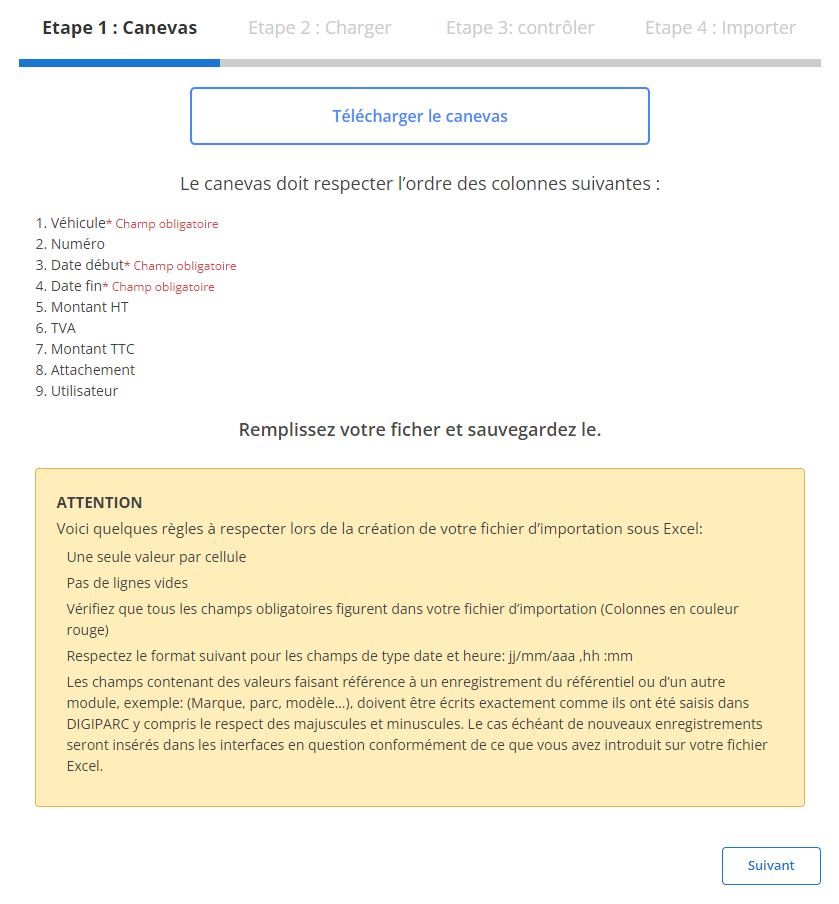
Step 1: Download and prepare the template file
Before importing, download a template file specifically designed for this operation. This file includes predefined columns that must be filled correctly to ensure smooth import.
-
Download the template file:
The file is available in the interface. It has all the columns needed for import.
-
Meet column requirements:
The required fields are:
- vehicle
- Start date
- End date
-
Prepare your file:
- Make sure there is only one value per cell.
- Remove blank lines to avoid errors.
- Make sure the dates follow the expected format (dd/mm/yyyy).
- Correctly complete all required fields for each line.
Step 2: Load the telescopic permissions file
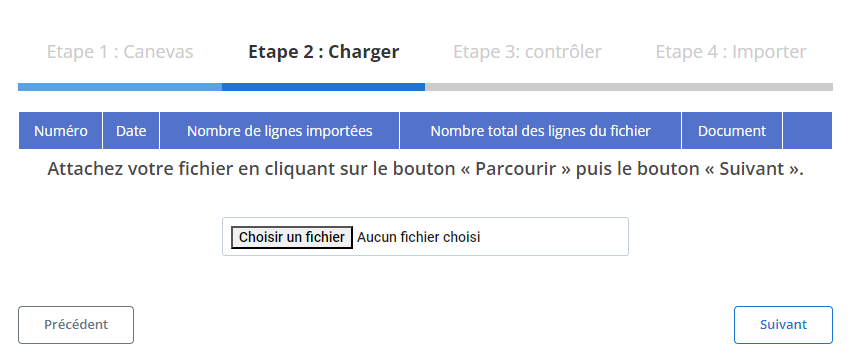
Once the file is prepared, proceed to load it into the system.
-
Select file:
Click "Browse" to locate and select the file on your device.
-
Start loading:
Once the file is selected, click "Next" to start data analysis. The system will analyze the file and provide a summary of the information.
-
Check the data summary:
- The system will display the total number of lines in the file.
- It will also show which rows are ready for import and which have errors.
Step 3: Verifying the imported data
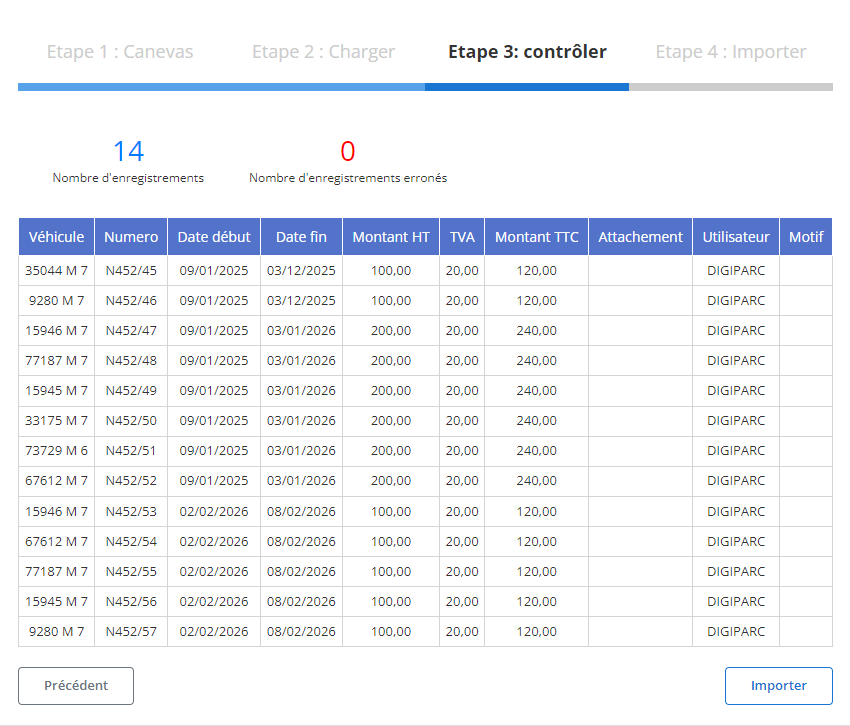
Once the file is loaded, a summary table will be displayed with the extracted data. This step is crucial to validate the information before its final import.
-
Check reported errors:
- Errors, such as missing required fields or incorrect formats, will be highlighted.
- For example, if a date or required field is missing, this will be flagged.
-
Validate correct records:
Rows without errors will be marked ready for import. Review the fields for accuracy, including:
- vehicle
- Start dateAndEnd date
- Amount excluding tax, VAT, AndAmount including tax
- AttachmentAndUser
Step 4: Finalize the import of telescopic permissions
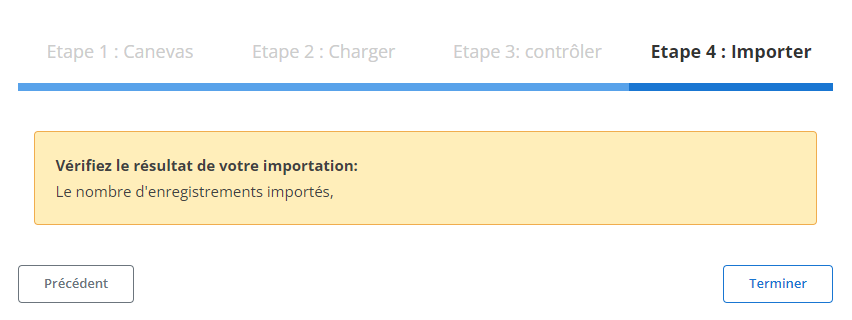
Once the data has been verified and corrected, proceed with the final import.
-
Click "Import":
This will validate the addition of the records to the system.
-
Import confirmation:
A confirmation message will appear to indicate that the import was successful.
This structured import process saves time and reduces the risk of errors when mass adding telescopic authorizations. Thanks to this method, information is integrated precisely and coherently into the system, guaranteeing optimal monitoring and smooth management of authorizations. Managers thus benefit from a powerful tool to optimize the management of data linked to their vehicles.
Export of telescopic authorization data
The export of data related to telescopic authorizations is a strategic functionality allowing fleet managers to centralize and analyze essential information relating to the use of vehicles and equipment. This operation generates a detailed file containing key information such as vehicle characteristics, associated financial amounts, and authorization periods. Generally available in universal formats such as CSV or Excel, this file is designed to meet the needs of different departments, such as operations management, accounting, or even internal audits.
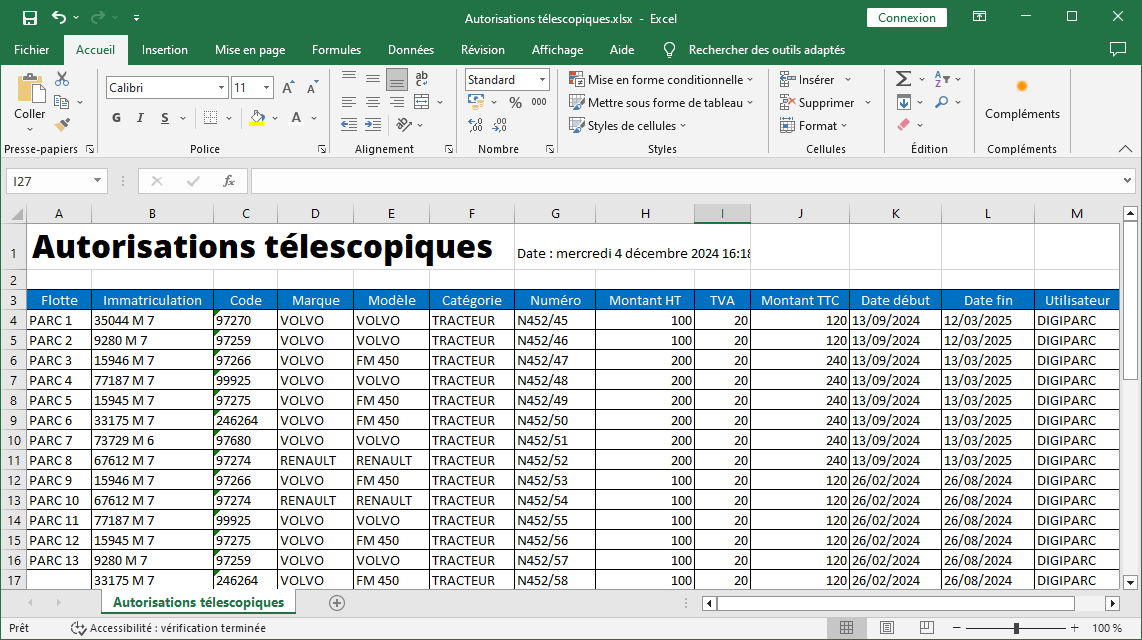
The export file includes several carefully organized columns, allowing for clear and quick reading:
-
Fleet: Identifies the fleet group or division to which the vehicle or equipment belongs. This field facilitates the management of operational units.
-
Registration: Specifies the vehicle registration, allowing unique identification for each item.
-
Code: Assigns a distinct code to each telescopic authorization, guaranteeing optimal traceability and simplifying searches in the system.
-
Brand and Model: Details the make and model of the vehicle or equipment, providing a better understanding of the specifications and capabilities of the resources used.
-
Category: Classifies vehicles or equipment according to their use or type, helping to filter and analyze data according to relevant criteria.
-
Number: Provides a specific number associated with the authorization for simplified management and rapid identification during checks or audits.
-
Amount excluding VAT, Amount including VAT: Presents the associated financial data, with a clear distinction between the amount excluding taxes, the VAT applied, and the total amount including tax, for precise accounting.
-
Start Date and End Date: Indicates the validity periods of each authorization, providing visibility on the duration of use and allowing renewals to be organized.
-
User: Mentions the person responsible or the collaborator linked to the use of the equipment or vehicle, ensuring increased responsibility and traceability.
Exporting telescopic authorization data is not limited to simple information extraction. It is designed to optimize management processes, by strengthening transparency, facilitating informed decision-making, and improving resource planning.
Whether assessing costs, organizing renewals or preparing audits, this file constitutes a valuable tool for proactive and efficient management. With a consolidated, detailed view of data, managers can ensure optimal equipment utilization, while maintaining strict compliance with regulatory and operational requirements.

