Module · Fleet
Suivi Kilométrages
Suivi Kilométrages
La section "Derniers Kilométrages" fournit un accès rapide aux enregistrements de kilométrage les plus récents pour chaque véhicule de la flotte. Cette fonctionnalité permet aux utilisateurs de rester informés en temps réel des distances parcourues, assurant un suivi précis et continu.
Grâce à cette interface, les utilisateurs peuvent visualiser les données les plus récentes sans avoir à effectuer de recherches approfondies. Le tableau présente les kilométrages enregistrés, avec des informations essentielles telles que l’immatriculation, la date de l’enregistrement et la source de la donnée (ex. manuel, carburant, intervention), facilitant ainsi la gestion quotidienne des véhicules.
En gardant les utilisateurs informés des derniers kilométrages, cette section contribue à une gestion efficace de la flotte, en permettant une meilleure planification de la maintenance et un suivi rigoureux des distances parcourues.
Consultation des derniers kilométrages enregistrés
Ce tableau présente un aperçu des derniers enregistrements de kilométrage pour chaque véhicule, avec plusieurs colonnes permettant une visualisation rapide des informations importantes :
-
Immatriculation: Numéro d'immatriculation unique du véhicule. Ce champ est souvent cliquable (affiché en vert), permettant d'accéder aux détails du véhicule en question.
-
Marque: Nom du constructeur du véhicule (par exemple, Renault, Tadano Faun, Seat), pour une identification rapide du fabricant.
-
Modèle: Modèle spécifique du véhicule, tel que « Renault VU », « Merlo P38,13 » ou « Seat Ibiza », offrant une description plus détaillée.
-
Catégorie: Type de véhicule ou fonction (ex. Tracteur, Engin, Grue, Berline), classifiant les véhicules selon leur usage ou leur design.
-
Genre: Sous-catégorie ou nature d'utilisation du véhicule (ex. Véhicule utilitaire (VU), Chariot télescopique, Mobile, Véhicule léger), qui précise l'usage ou l’équipement spécifique.
-
Date: Date de l'enregistrement du kilométrage, fournissant un contexte temporel pour chaque donnée.
-
Kilométrage: Distance totale parcourue au moment de l'enregistrement. Les valeurs en rouge attirent l'attention sur des kilométrages élevés ou inhabituels, qui peuvent nécessiter une vérification ou une maintenance spécifique.
-
Source: La dernière colonne,Source, indique l'origine de l'enregistrement du kilométrage, c'est-à-dire comment la donnée a été collectée ou ajoutée au système. Voici les types de sources possibles :
- Manuel: Le kilométrage a été saisi manuellement par un utilisateur, probablement après une vérification physique du véhicule.
- Demande d’intervention: La donnée kilométrique provient d'une demande de maintenance ou d'intervention, indiquant que l'enregistrement a été effectué dans un contexte de réparation ou d'entretien.
- Carburant: Le kilométrage a été enregistré lors d'un ravitaillement en carburant, une méthode souvent utilisée pour vérifier le kilométrage au moment du remplissage.
- Véhicule: Les données sont directement issues du véhicule lui-même, probablement via un système de suivi automatique ou un capteur, assurant ainsi une précision sans intervention humaine.
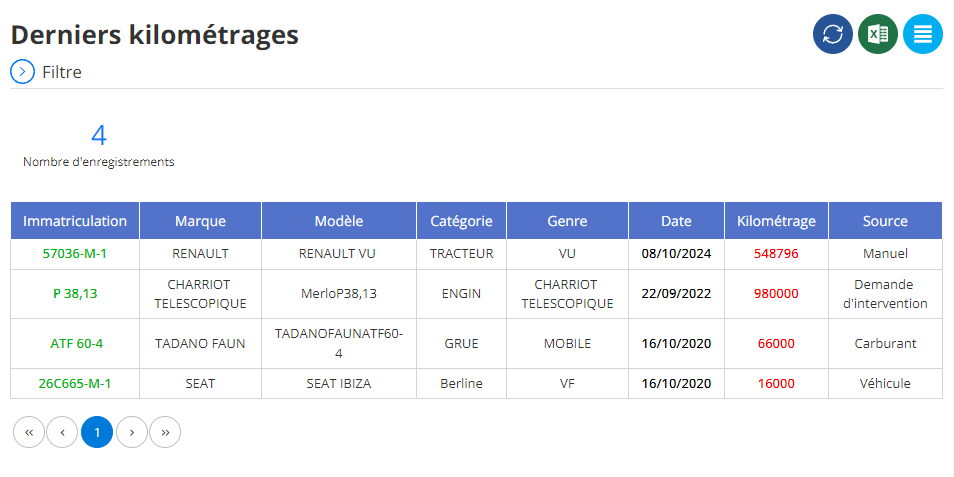
Cette interface permet aux utilisateurs de surveiller les mises à jour de kilométrage de manière claire et ordonnée, tout en offrant des options de filtrage et de tri pour optimiser la gestion des données kilométriques.

