Module · Fleet
Exportation Kilométrages
Exportation Kilométrages
La fonctionnalité d'exportation des kilométrages permet de générer un fichier téléchargeable contenant toutes les informations enregistrées sur les données de kilométrage dans le système. Ce fichier peut être utilisé pour plusieurs finalités, telles que :
- Analyses internes: Comparaison des kilométrages parcourus par les véhicules, en fonction de la marque, du modèle, de la catégorie, ou des dates d’utilisation. Cela permet d’optimiser la gestion de la flotte et de prendre des décisions éclairées sur la maintenance ou le remplacement des véhicules.
- Audits: Collecte des données kilométriques pour des vérifications ou des contrôles de conformité.
- Partage de données: Transfert d’informations kilométriques aux partenaires, à d'autres départements ou à des prestataires externes.
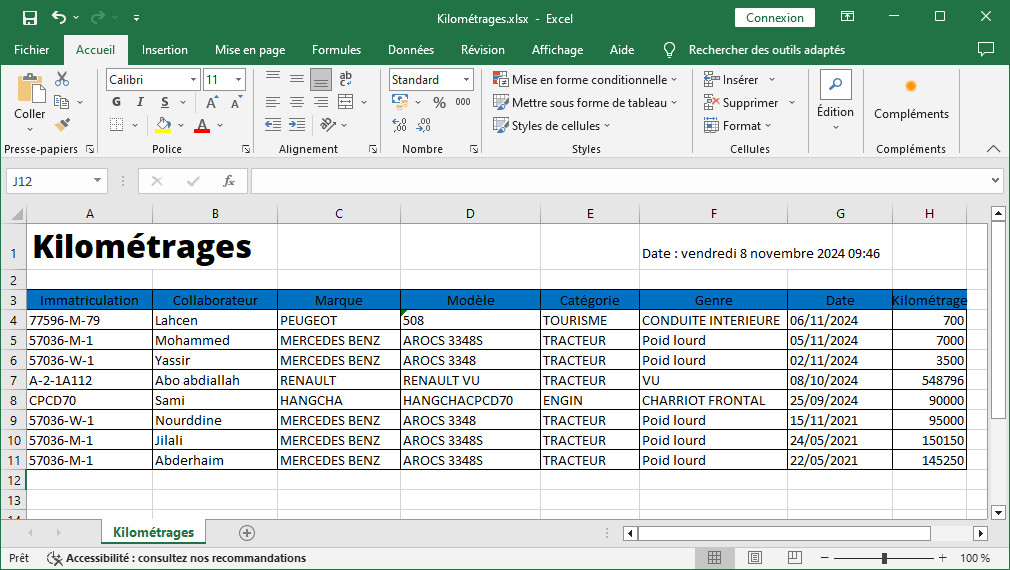
Les informations exportées incluent
- Immatriculation: Numéro d'immatriculation unique de chaque véhicule associé au kilométrage.
- Collaborateur: Nom de l’utilisateur associé à chaque entrée de kilométrage.
- Marque et Modèle: Constructeur et modèle du véhicule pour une identification précise.
- Catégorie et Genre: Type de véhicule (ex. : tracteur, engin) et usage spécifique (ex. : conduite intérieure, poids lourd).
- Date et Kilométrage: Date de l'enregistrement et distance parcourue, fournissant un historique précis de l'utilisation de chaque véhicule.
Dans l’illustration fournie, un exemple de fichier Excel présente les données de kilométrage organisées en colonnes : immatriculation, collaborateur, marque, modèle, catégorie, genre, date et kilométrage. Ce format structuré permet une vue d'ensemble rapide des enregistrements et facilite les opérations de tri, de filtrage, et d'analyse des distances parcourues. Grâce à cette exportation, il est possible de centraliser les informations kilométriques, d’effectuer des comparaisons ou d’extraire des rapports pour améliorer la gestion opérationnelle de la flotte.