Module · Fleet
Liste des véhicules
Liste des véhicules
L'affichage des véhicules sous forme delisteoffre une vue détaillée et organisée, présentant chaque véhicule sous forme de lignes dans un tableau. Ce format permet de visualiser simultanément plusieurs informations clés telles que le modèle, la catégorie et la marque, facilitant ainsi la gestion et l'analyse des véhicules.
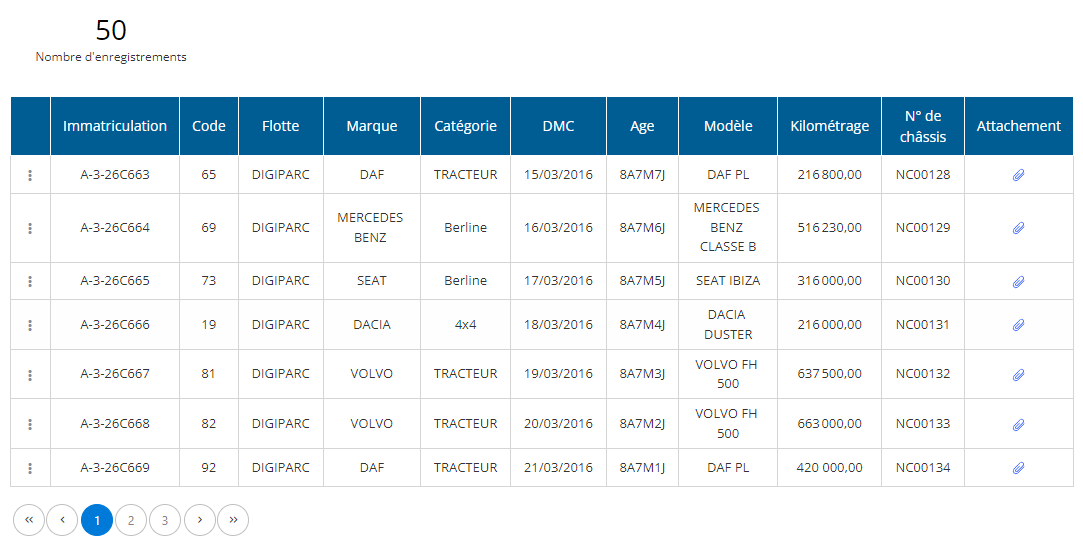
Affichage des véhicules en liste
Dans la partie centrale de l'interface, les véhicules sont présentés sous forme de tableau. Chaque ligne correspond à un véhicule, et chaque colonne contient une information spécifique, comme décrit ci-dessous :
- Immatriculation: Affiche le numéro d'immatriculation du véhicule.
- Code: Code interne utilisé pour identifier le véhicule dans le système.
- Flotte: Indique la flotte ou la sous-flotte à laquelle le véhicule est rattaché.
- Marque: Marque du véhicule (exemple : Volvo, SEAT).
- Catégorie: Catégorie du véhicule (exemple : tracteur, berline).
- DMC (Date de mise en circulation): Date à laquelle le véhicule a été mis en circulation.
- Âge: Âge actuel du véhicule, calculé en fonction de sa date de mise en circulation.
- Modèle: Modèle spécifique du véhicule.
- Kilométrage: Nombre total de kilomètres parcourus par le véhicule.
- Indexe horaire: Suivi du temps d’utilisation en heures, utilisé notamment pour les machines et équipements.
- N° de châssis: Numéro de châssis du véhicule, utile pour l'identification.
- Attachement: Indique la présence de documents ou fichiers associés au véhicule (par exemple, des documents d'entretien ou des contrats).
Cette vue structurée vous permet d'obtenir rapidement une vision d'ensemble sur l'état et les caractéristiques de chaque véhicule, facilitant la prise de décision et l'accès aux informations essentielles.

