Module · Fleet
Filtrage Achat
Filtrage Achat
Accédez en un clin d'œil aux informations clés de vos contrats d’achat grâce à un système de filtrage avancé. Ce module vous permet de rechercher et de trier vos contrats selon des critères pertinents, comme le nom du fournisseur, la date de signature, ou encore le statut du contrat. En appliquant ces filtres, vous simplifiez considérablement la navigation dans votre base de données, vous évitant de parcourir de longues listes et vous permettant d’accéder directement aux informations essentielles.
Que vous souhaitiez obtenir un aperçu des contrats en cours, vérifier ceux signés avec un fournisseur particulier, ou suivre les contrats proches de leur échéance, cet outil vous apporte une organisation optimale et un gain de temps précieux. Avec une vue structurée et ciblée, la gestion de vos contrats d'achat devient plus fluide et performante, vous permettant de mieux répondre aux besoins de suivi et d’analyse de votre activité.
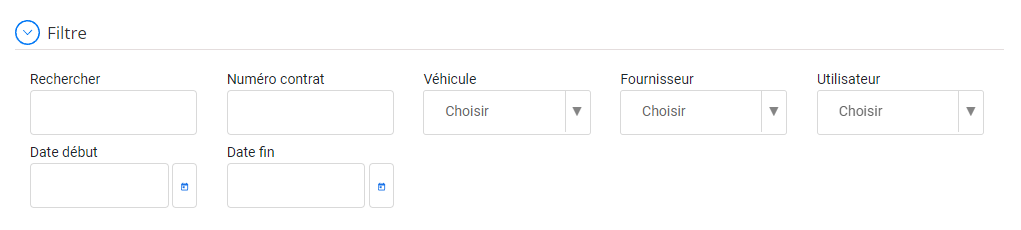
Filtrer et rechercher les contrats d'achat
Cette interface est conçue pour vous permettre de rechercher rapidement et efficacement les contrats d'achat qui vous intéressent parmi une grande quantité de données. Elle vous offre la possibilité de filtrer les contrats en fonction de différents critères.
- Rechercher:Ce champ vous permet d'effectuer une recherche libre sur tous les champs du contrat (numéro de contrat, fournisseur, etc.).
- Numéro de contrat:Saisissez le numéro de contrat exact ou une partie de celui-ci pour filtrer les résultats.
- Véhicule:Vous pouvez sélectionner un véhicule spécifique dans la liste déroulante pour afficher uniquement les contrats liés à ce véhicule.
- Fournisseur:Choisissez un fournisseur parmi la liste pour filtrer les contrats passés avec ce fournisseur.
- Utilisateur:Si les contrats sont associés à des utilisateurs spécifiques, vous pouvez filtrer par utilisateur.
- Date de début:Indiquez la date à partir de laquelle vous souhaitez afficher les contrats.
- Date fin:Spécifiez la date jusqu'à laquelle vous voulez inclure les contrats dans votre recherche.

