Module · Fleet
Liste Horaires
Liste Horaires
L'affichage des index horaires sous forme de liste offre une vue détaillée et structurée, où chaque enregistrement apparaît sous forme de lignes dans un tableau. Ce format permet de consulter simultanément plusieurs informations clés pour chaque index horaire, facilitant ainsi le suivi et l’analyse des heures d'utilisation.
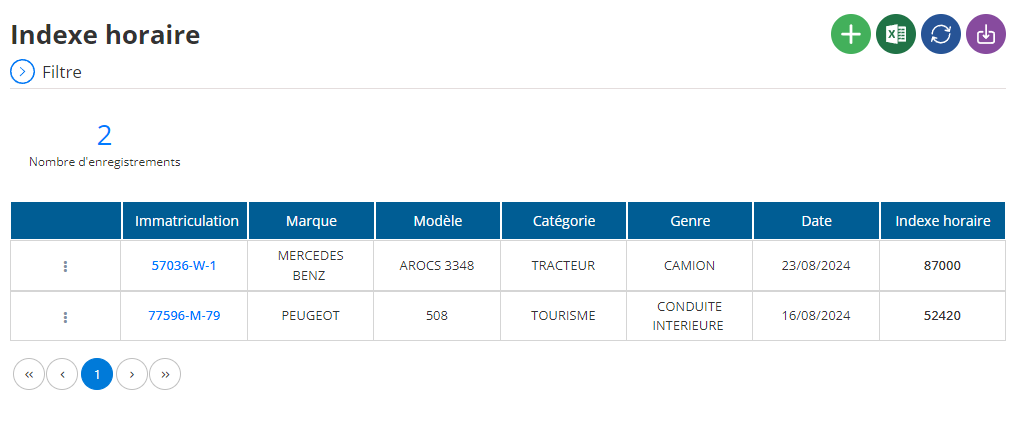
Affichage des index horaires en liste
Dans la section centrale de l'interface, les index horaires sont présentés en tableau. Chaque ligne représente un enregistrement d'index horaire, et chaque colonne contient une information spécifique, décrite comme suit :
- Immatriculation: Affiche le numéro d'immatriculation du véhicule associé à l'index horaire.
- Marque: Indique la marque du véhicule (par exemple, Mercedes, Volvo).
- Modèle: Modèle spécifique du véhicule pour lequel l'index horaire est enregistré.
- Catégorie: Catégorie du véhicule, telle que "tracteur" ou "engin de chantier".
- Genre: Type d’usage ou de classification du véhicule, comme "utilitaire" ou "industriel".
- Date: Date de l’enregistrement de l’index horaire.
- Indexe horaire: Heure d'utilisation actuelle enregistrée pour le véhicule.
Cette vue en tableau fournit un aperçu global et organisé des index horaires, facilitant ainsi la gestion, le suivi de l'utilisation des véhicules, et la prise de décisions basées sur les heures d'opération.

