

Module · Fleet
Rental Management
Rental Management
Lease Management offers a comprehensive, centralized solution to oversee every stage of the lease lifecycle. Designed to meet the needs of businesses operating in a dynamic environment, this feature ensures smooth, accurate and efficient organization of rental transactions.
From an intuitive interface, users can create new contracts taking into account the specific conditions of each rental. Once in place, these contracts can be easily updated to reflect changes such as pricing adjustments, extensions or changes in terms. Contract details can be consulted at any time, allowing rapid access to the information necessary for informed decision-making.
In the event of end of contract or uselessness, the deletion of obsolete documents guarantees a database that is always clean and relevant. This centralization of information also makes it possible to monitor the status and histories of all ongoing or finalized contracts, thus facilitating audits, planning and performance analysis.
Thanks to this structured and accessible management, companies benefit from increased visibility on their rental operations, strengthen their organizational efficiency and ensure rigorous monitoring of contractual commitments. An optimal approach to maximize transparency and performance in rental management.
Adding a rental contract
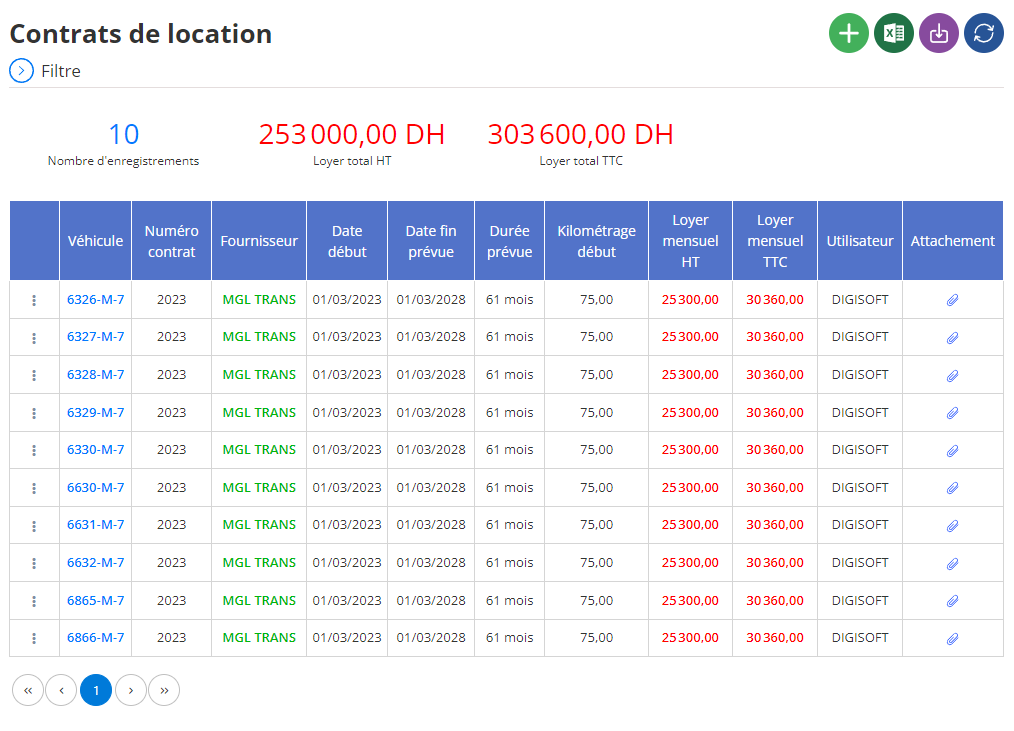
Adding a rental contract is an essential operation to structure and optimize the management of rented vehicles within the company. This intuitive interface has been designed to record, in an exhaustive and detailed manner, information relating to rental contracts. This ensures rigorous monitoring and total transparency in resource management.
Vehicle selection
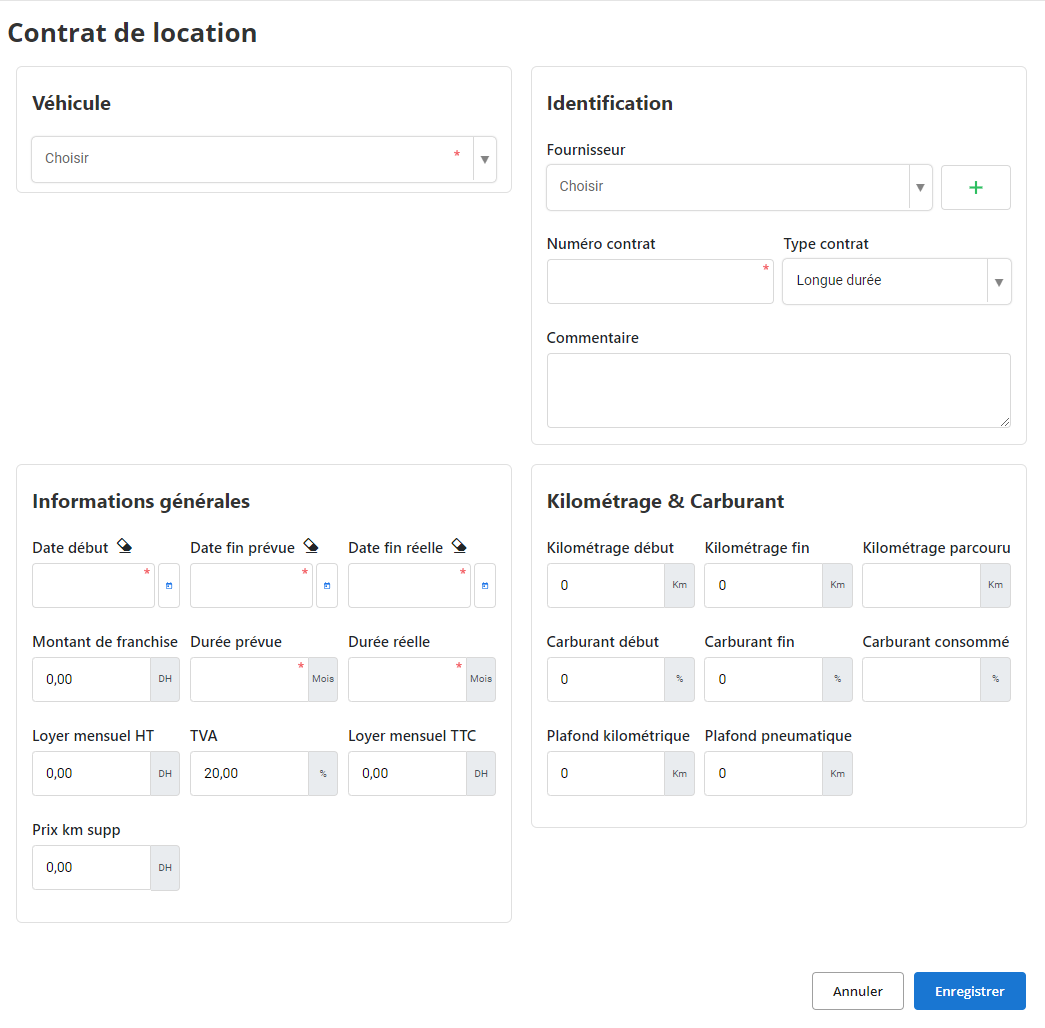
The first step is to choose the vehicle in question from a drop-down list. This choice is essential, because it allows the contract to be directly linked to a specific vehicle. Once selected, this vehicle will be recorded in the contract history, thus facilitating access to specific data, such as its condition, mileage or rental history.
Supplier and contract information
In this section it is possible to specify the supplier of the vehicle, whether a specialized company or an individual. You must also indicate the unique contract number, which will serve as the main identifier, and select the type of contract, such as short or long term rental. This information is essential to formalize the terms of the agreement and to differentiate contracts in the database.
General rental information
This part brings together key information on the duration and costs of the rental:
- Dates: Enter the start dates, planned end dates and, if available, the actual end date. This guarantees precise monitoring of the effective duration of the rental.
- Excess amount: Specify the amount that must be covered by the company in the event of damage.
- Monthly rent: Indicate the monthly rental cost excluding taxes (HT) and all taxes included (TTC). These fields allow a clear evaluation of expenses.
- Price per additional kilometer: This field is used to calculate additional costs if the defined mileage limit is exceeded.
This data allows effective cost management and anticipation of possible budget overruns.
Mileage tracking and fuel consumption
Mileage and fuel management is a fundamental aspect to evaluate vehicle use. This section allows you to record:
- Mileage: The start and end values, as well as the total mileage traveled.
- Fuel: The levels at the start and end of the rental to calculate total consumption.
- Mileage and tire limits: Predefined thresholds can be defined to control wear and avoid unnecessary exceedances.
Thanks to this data, it becomes easier to monitor the state of wear of vehicles and plan the necessary maintenance.
Comment field:A space is reserved to enter comments specific to the contract. This field is useful for adding additional information, such as special clauses, observations on the condition of the vehicle or even recommendations for future management.
By following this process, managers can ensure optimal and professional rental contract management. This methodology not only promotes transparency but also efficiency in vehicle fleet management.
Modification of a rental contract
Modifying a rental contract is an essential operation to guarantee the accuracy and relevance of the information recorded, while allowing effective monitoring of the management of rented vehicles. This carefully structured process ensures transparency and updating of key contract data.
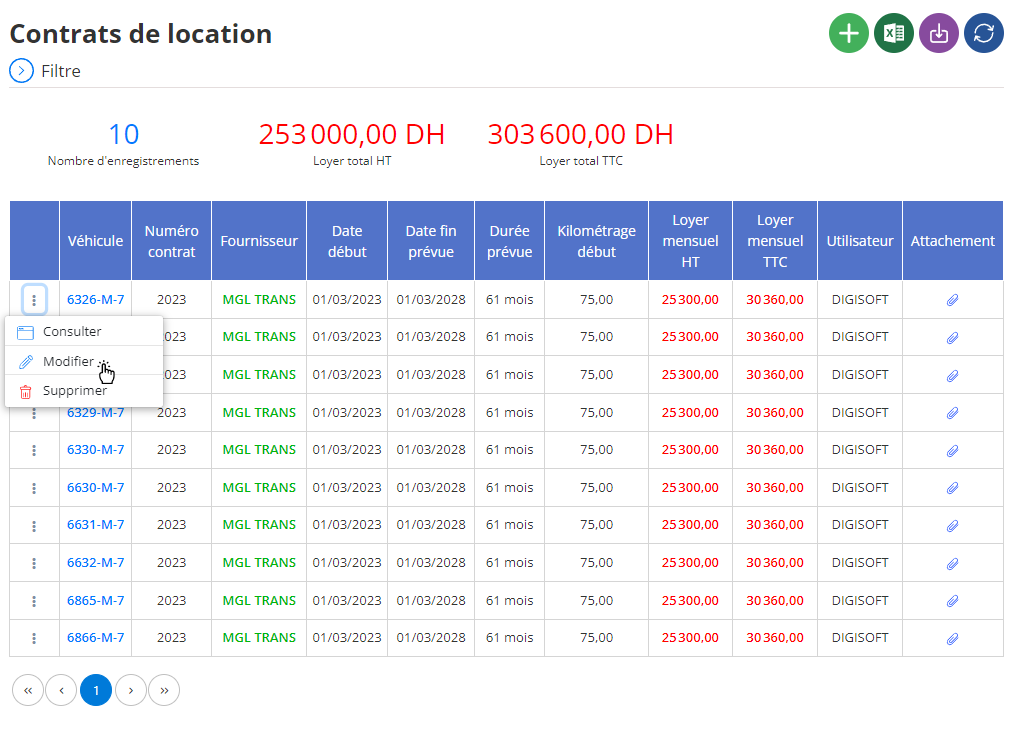
To get started, go to the section dedicated to rental contracts within the system. Use the search tools provided to quickly locate the contract in question. These tools make it possible to apply different criteria, such as the contract number, the supplier, the start date or even the specific characteristics of the vehicle concerned. Once the contract has been identified, select it to access the modification interface.
Updating key information
In this interface, you will have the possibility to modify several essential elements relating to the rental contract. These elements may include:
- Dates: Adjust the start, scheduled end or actual end dates of the rental in the event of an extension or change to the initial schedule.
- Financial details: Change the monthly rent, VAT or other associated costs if adjustments are needed based on new negotiated terms.
- Mileage: Update the initial or final mileage data if corrections are required to reflect the reality of vehicle use.
- Fuel: Correct fuel level information at the start and end of the rental to ensure accurate billing.
- Comments: Add or edit contract-specific observations, such as vehicle condition remarks or adjustments needed for future similar contracts.
Each update must be carried out carefully in order to maintain consistency in the recorded data and to avoid any confusion or error that could impact overall vehicle management.
Once the necessary updates have been made, it is imperative to click on “Save” to validate the changes. This action ensures that all changed information is correctly integrated into the system and that the contract history remains up to date. In case of significant changes, it is advisable to add a note in the “Comment” field to document the reasons for the adjustments made.
With a structured and clear modification process, companies can ensure that leases continually reflect actual needs and current agreements. This contributes to better resource management and optimization of vehicle rental expenses.
Deleting a rental contract
To delete a rental contract, first access the list of contracts saved in the system. Use the search tools to quickly find the contract in question, by applying criteria such as the contract number, the supplier or the characteristics of the vehicle. Once the contract has been identified, select it and choose the “Delete” option to initiate the procedure.
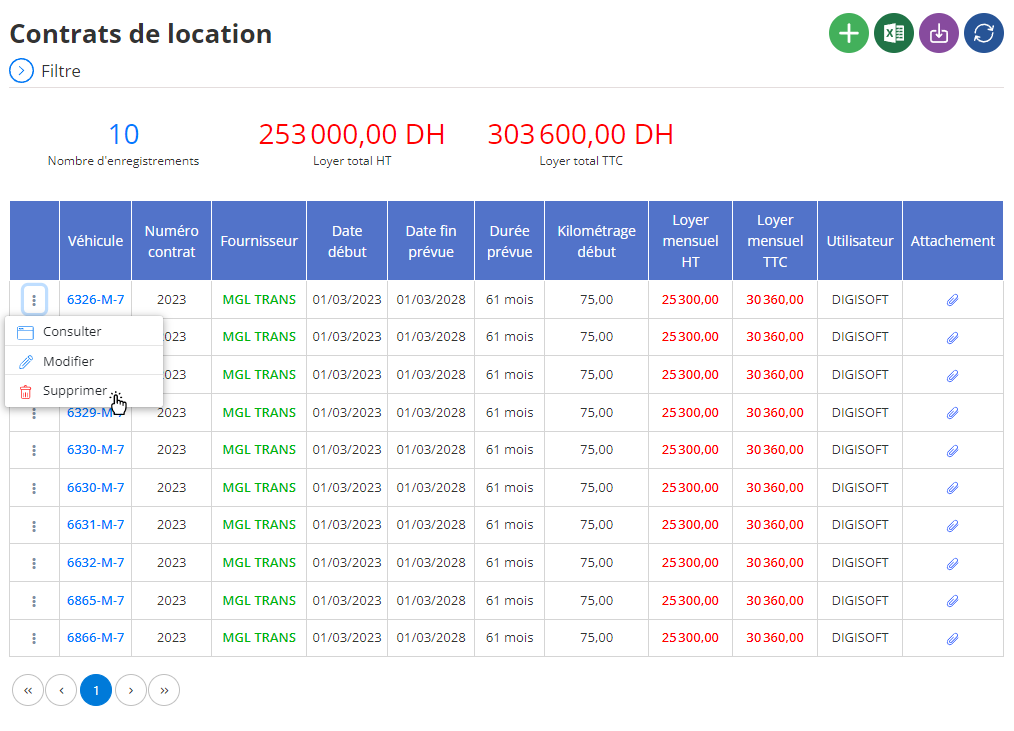
Before confirming the deletion, a validation window will appear to remind you that this action is final and irreversible. Deleting a contract results in the complete loss of information associated with it, including financial details, mileage data and related comments. It is therefore essential to ensure that this deletion is intentional and that no essential data will be deleted by mistake.
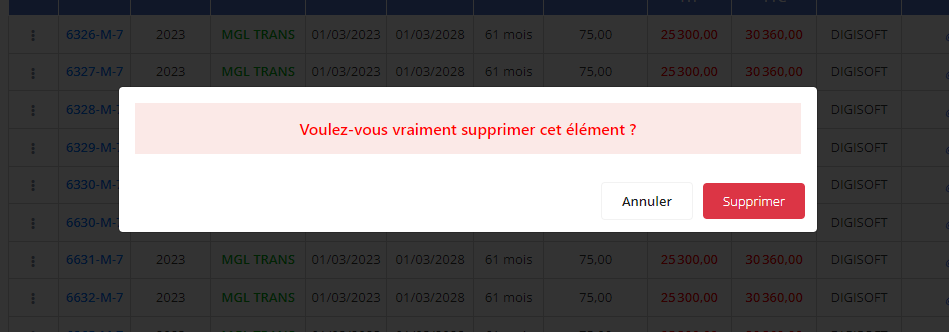
Deleting a lease should be done with caution, especially if this information may be useful for future audits or vehicle fleet management. Before proceeding, it may be relevant to archive important data, such as rental histories or financial information, so that they remain accessible for administrative or analytical purposes. This precaution ensures that only truly obsolete or unnecessary information is removed from the system, while maintaining rigorous resource management.
Consultation of a rental contract
The rental contract consultation interface provides access to all the information recorded regarding a specific contract. This tool provides a comprehensive and detailed view of essential data, making it easier to track and manage vehicle rentals.
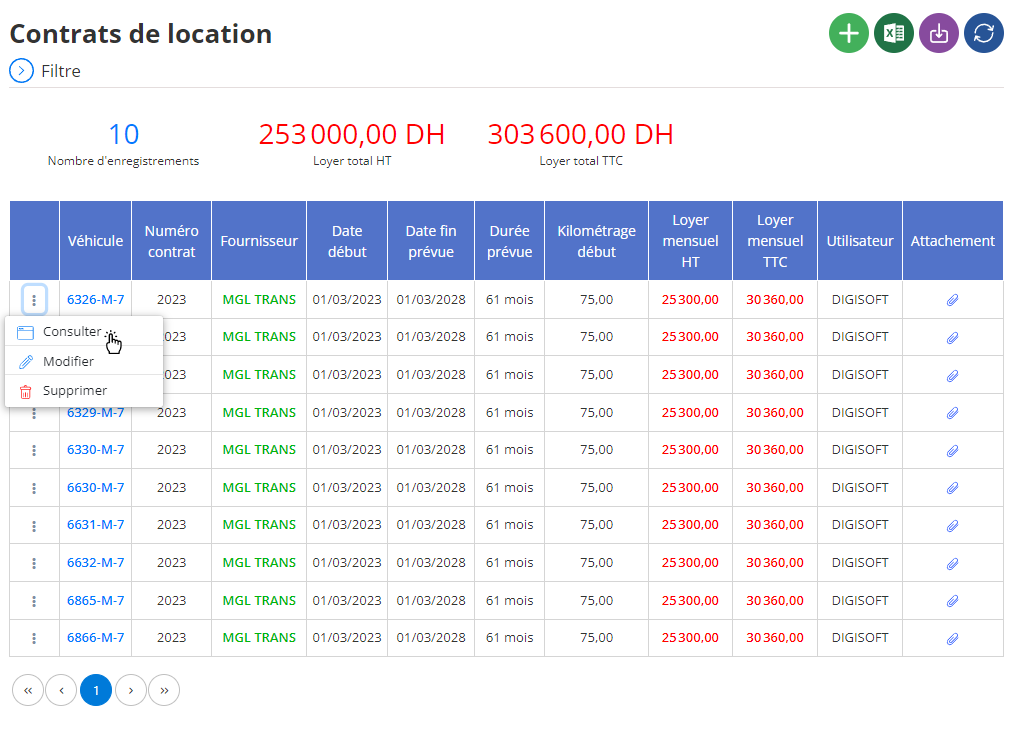
When you select a particular contract, all the information relating to it is displayed in an organized manner. The following details are accessible:
- Vehicle concerned:This section displays the model, make, and other characteristics of the rented vehicle. It allows you to quickly check which vehicle is associated with the contract in question.
- Supplier :Information relating to the rental provider is specified here, including the name of the company or rental agency, making it easier to contact if necessary.
- Type of contract:This category specifies the nature of the contract, for example “long-term rental” or “short-term”. This helps to understand the specific terms associated with the rental.
- Rental dates:The planned start and end dates (as well as the actual end date if it differs) are clearly displayed, allowing you to check whether the contract has been respected or if there have been adjustments.
- Financial information:This section brings together data on the monthly rent (excluding and including tax), the amount of the excess, as well as the price of the additional kilometer. This information provides a clear view of rental costs.
- Mileage:The initial and final mileage, as well as the mileage traveled, are shown here. This makes it possible to monitor the use of the vehicle and verify that it remains within the limits established in the contract.
- Fuel:Fuel levels at the start and end of the rental, as well as estimated consumption, are mentioned. This data makes it possible to evaluate actual consumption during the rental period.
- Comments:A space is dedicated to specific observations or remarks associated with the contract. This may include notes on the condition of the vehicle, adjustments made to the contract, or other relevant information.
By centralizing all this data, this interface ensures rigorous monitoring and simplified management of rental contracts. It also helps ensure full traceability, essential for effective planning and informed decision-making.