Module · Fleet
Dossier Véhicule
Dossier Véhicule
LaFiche Véhiculeest un outil essentiel dans Digiparc pour la gestion centralisée des véhicules. Elle regroupe toutes les informations détaillées d'un véhicule spécifique, facilitant ainsi le suivi des opérations quotidiennes et la gestion du cycle de vie du véhicule. Cette fiche sert de référence pour diverses actions telles que l'entretien, la consommation de carburant, et l'historique global du véhicule.
Cette fiche joue un rôle crucial dans le processus de gestion de flotte, offrant une vue d'ensemble complète de l'état et des performances de chaque véhicule. En mettant à jour et en consultant régulièrement la fiche véhicule, les gestionnaires de flotte peuvent assurer des opérations efficaces, des interventions en temps opportun, et une optimisation des coûts.
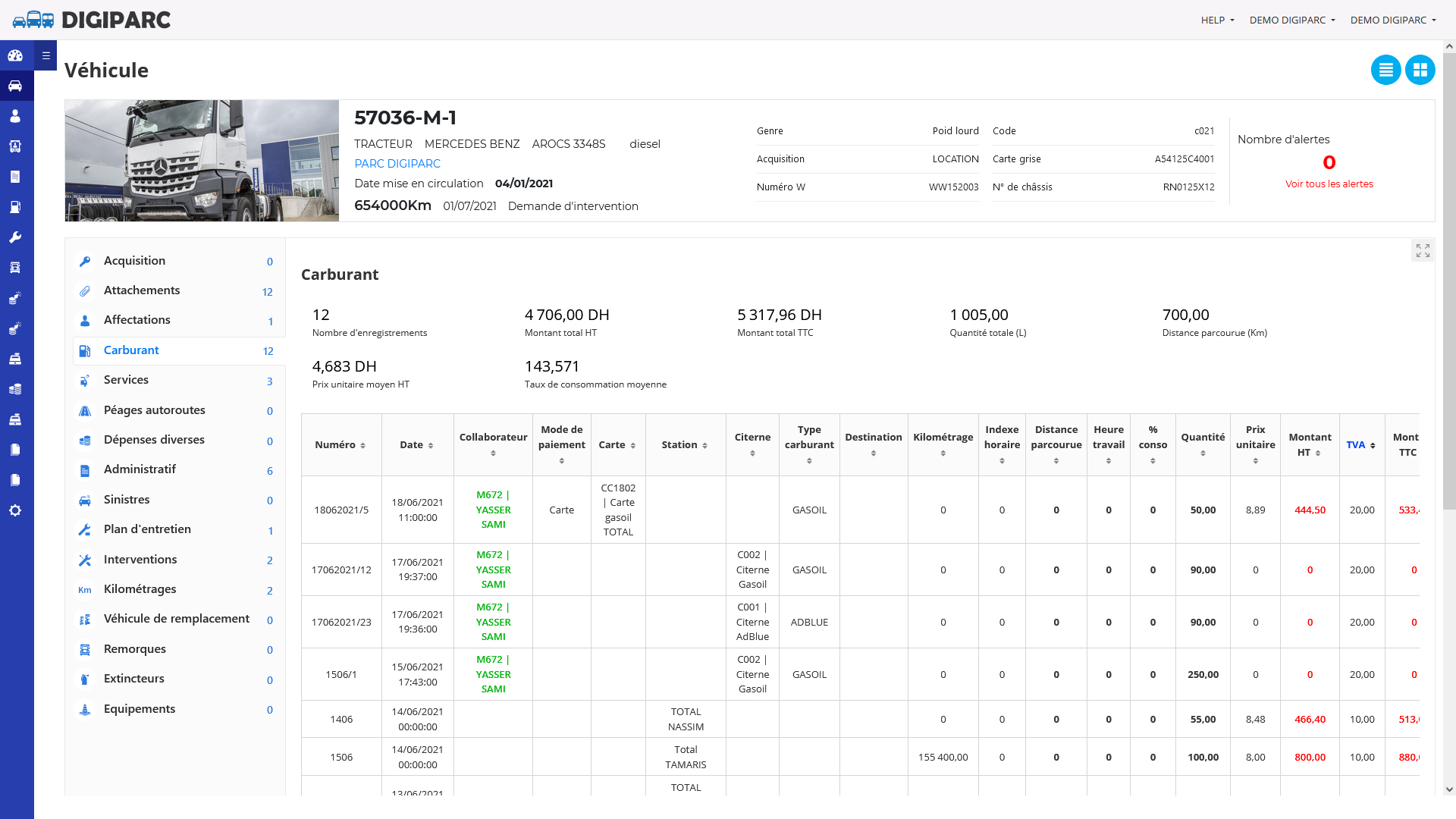
Sections clés de la fiche véhicule
En haut de la fiche du véhicule, vous trouverez les principales informations nécessaires à sa gestion. Ces informations incluent letype de véhicule, ainsi que lamarqueet lemodèle. Vous y verrez également letype de carburantutilisé, ainsi que lemode d'acquisitiondu véhicule.
Ladate de mise en circulationdu véhicule est affichée pour indiquer quand il a commencé à être utilisé, de même que lekilométrage actuel. Les informations administratives, telles que lenuméro de plaque, laréférence de la carte grise, et lenuméro de châssis, sont également incluses pour une gestion complète des documents.
Enfin, la sectionAlertesvous informe de toute alerte relative au véhicule, en indiquant leur nombre et leur niveau d'importance. Vous pouvez gérer les alertes directement depuis cette section pour assurer un suivi optimal de l'état du véhicule.
Menu latéral de la fiche véhicule
Le menu latéral de la fiche véhicule dans Digiparc vous permet d'accéder rapidement aux différents éléments de gestion liés à un véhicule. Voici un aperçu des options disponibles :
- Acquisition :Informations sur les conditions d'acquisition du véhicule (ex. : achat, location).
- Attachements :Espace pour joindre et consulter des documents relatifs au véhicule (ex. : factures, contrats).
- Affectations :Gérer les affectations du véhicule aux différents conducteurs ou collaborateurs.
- Carburant :Suivi détaillé de la consommation de carburant du véhicule avec les informations sur les pleins réalisés.
- Services :Suivi des services effectués sur le véhicule (entretien, réparations, etc.).
- Péages autoroutes :Gestion des frais de péage liés aux déplacements du véhicule.
- Dépenses diverses :Suivi des autres dépenses liées au véhicule, en dehors des services ou du carburant.
- Administratif :Gestion des documents administratifs du véhicule, tels que les cartes grises et les assurances.
- Sinistres :Suivi des accidents ou incidents impliquant le véhicule.
- Plan d'entretien :Planification et suivi des entretiens préventifs et correctifs.
- Interventions :Gestion des demandes et historiques d'interventions techniques sur le véhicule.
- Kilométrages :Historique et suivi des relevés de kilométrage pour le véhicule.
- Véhicule de remplacement :Gestion des véhicules de remplacement attribués temporairement en cas d'immobilisation.
- Remorques :Suivi des remorques associées au véhicule, si applicable.
- Extincteurs :Gestion des équipements de sécurité, comme les extincteurs présents dans le véhicule.
- Équipements :Gestion des équipements supplémentaires associés au véhicule (ex. : GPS, radio, etc.).
Ce menu facilite une navigation fluide et rapide dans la fiche véhicule, permettant aux gestionnaires d'accéder facilement à toutes les informations nécessaires à la gestion du véhicule.

