

Module · Fleet
Ajout de pièces jointes aux contrats
Ajout de pièces jointes aux contrats
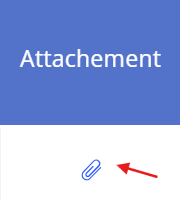
La colonne "Attachement" dans l'interface des contrats de location. Cette colonne permet l'ajout de pièces jointes aux contrats. Grâce à cette fonctionnalité, les utilisateurs peuvent associer des documents ou fichiers spécifiques à chaque contrat directement depuis la liste affichée.
Explication du fonctionnement :
-
Chaque ligne correspond à un contrat de location.
-
Dans la colonne "Attachement", une icône (en forme de trombone) est affichée.
-
En cliquant sur cette icône, l'utilisateur peut télécharger et joindre des fichiers liés au contrat (exemple : copie du contrat signé, factures, documents administratifs, etc.).

-
Une fois le fichier ajouté, il sera accessible pour consultation ou téléchargement ultérieur.
Cette fonctionnalité améliore la gestion documentaire des contrats en permettant un accès rapide et centralisé aux pièces justificatives.