Module · Fleet
Leasing Management
Leasing Management
The “Leasing Contract Management” section offers users a comprehensive solution for administering all aspects of leasing contracts related to the vehicle fleet. This functionality makes it possible to centralize and optimize the monitoring of financial commitments, while guaranteeing the accuracy and timeliness of the data.
With this tool, users benefit from several management options:
-
Adding new contracts: Easily integrate new leasing contracts into the system by filling in essential information, such as the vehicle concerned, financial terms, durations and specific conditions. This ensures immediate consideration of new financial commitments and facilitates the integration of new vehicles into the fleet.
-
Modification of existing contracts: Perform updates on current leasing contracts to adjust information according to developments or specific needs. Whether to extend the duration of a contract, modify the payment conditions, or adapt the financial terms, this option guarantees flexible and responsive management.
-
Quick consultation of contracts: Easily access the details of each contract for precise monitoring. The interface allows you to see all important information at a glance, such as the lease amount, payment due dates and vehicle information. This allows financial commitments to be closely monitored and future expenses planned.
-
Removal of obsolete contracts: Delete contracts that are no longer relevant, such as expired or canceled contracts. This action helps maintain a clean and organized database, making it easier to access active contracts without being distracted by outdated information.
This comprehensive management of leasing contracts contributes to a clear vision of current and future financial commitments. It allows fleet managers to make informed decisions, control vehicle costs and ensure good budget forecasting. By consolidating all essential information in one place, this functionality simplifies contract tracking and improves the efficiency of fleet financial management.
Add a new leasing contract
To integrate a new leasing contract into the Digiparc system, follow the steps detailed below. This operation will allow you to keep rigorous monitoring of your financial commitments and ensure that your leasing information is up to date.
In the leasing contracts section, locate and click on the add button, symbolized by a “+”. This action will open an input form intended to collect all the essential information for the new contract. Make sure you have the necessary details on hand for a complete and accurate record.
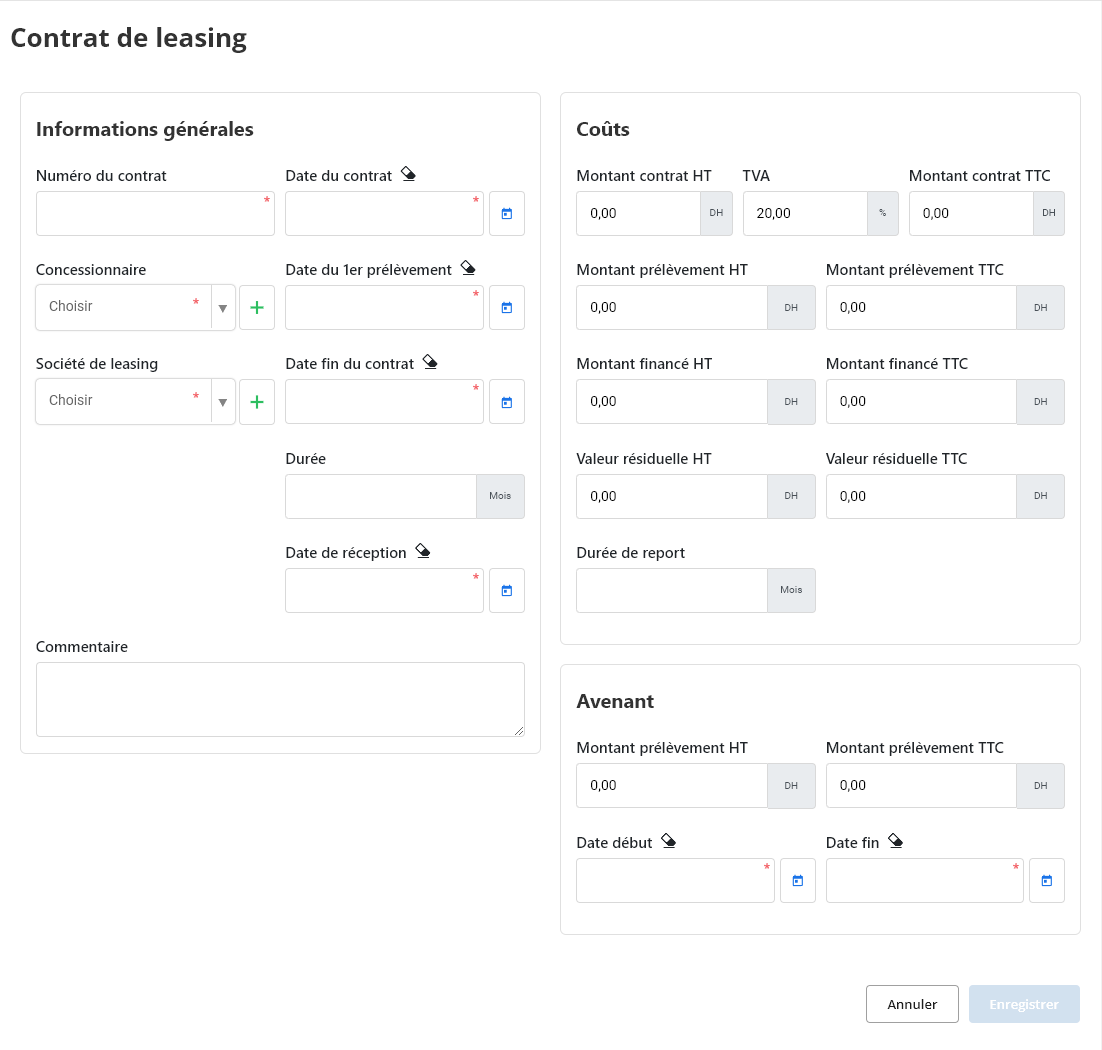
General Information
This section brings together the essential data that identifies and contextualizes the leasing contract.
- Contract number: A unique identifier assigned to each contract to facilitate its management and monitoring.
- Contract date: The date the contract was signed and came into force.
- Dealer: The company or professional who established the leasing contract with the tenant.
- Leasing company: The financial entity that offers financing for the vehicle.
- Date of first collection: The date the first rent payment will be taken.
- End date of contract: The date on which the leasing contract ends, marking the end of the lessee's payment obligations.
- Duration: The total duration of the leasing contract, expressed in months or years.
- Date received: The date the vehicle was delivered to the lessee.
- Postponement duration: A possible payment deferral period, if it has been negotiated.
- How: A free field allowing you to add additional information or details concerning the contract.
Costs
This part details the different costs associated with the leasing contract:
- Contract amount excluding tax, VAT, tax included: The total amount of the contract excluding taxes, the amount of applicable VAT and the total amount including taxes.
- Direct debit amount excluding tax, including tax: The amount excluding taxes and all taxes included of each periodic debit (rent).
- Amount financed excluding tax, including tax: The total amount of financing granted by the leasing company.
- Residual value excluding tax, including tax: The estimated value of the vehicle at the end of the contract, which may be owed by the lessee if he wishes to repurchase the vehicle.
- Postponement duration: The length of time payments can be deferred.
Amendment
This section allows you to manage any modifications made to the initial contract:
- Direct debit amount excluding tax, including tax: The amount of changes made to the monthly payments in the event of an amendment.
- Start date, End date: The dates of entry into force and end of validity of the amendment.
Note:The absence of certain fields or the addition of specific fields may vary depending on leasing companies and contract types.
Modification of a leasing contract
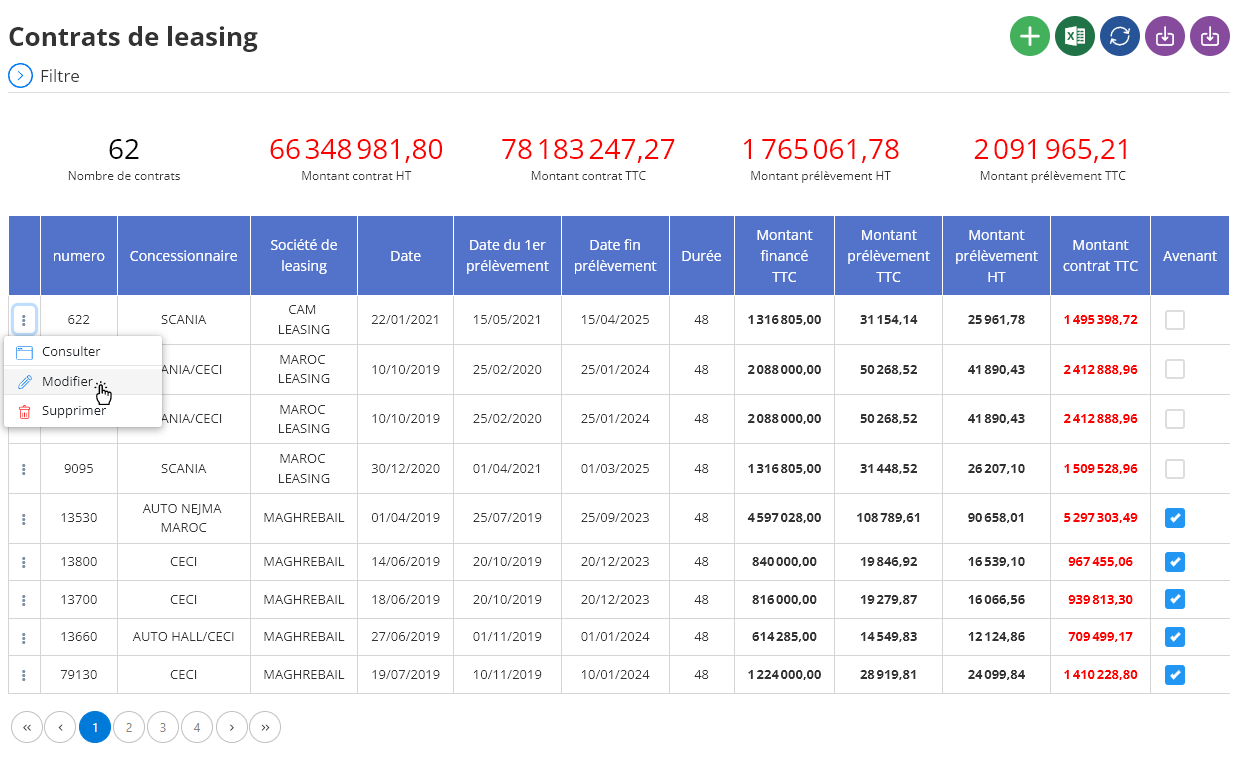
To update an existing leasing contract, first navigate to the list of leasing contracts in the system. Search for the specific contract you want to edit based on the vehicle or any other available search criteria, then click the "Edit" button.
In the modification interface, you will be able to adjust various contractual details, such as payment terms, duration, amount, or any other information relevant to the contract. Make sure every change is carefully checked to ensure data accuracy. Once the changes have been made, click “Save” to validate and save the update. This functionality helps maintain accurate and up-to-date financial information, essential for effective management of leasing commitments.
Deletion of a leasing contract
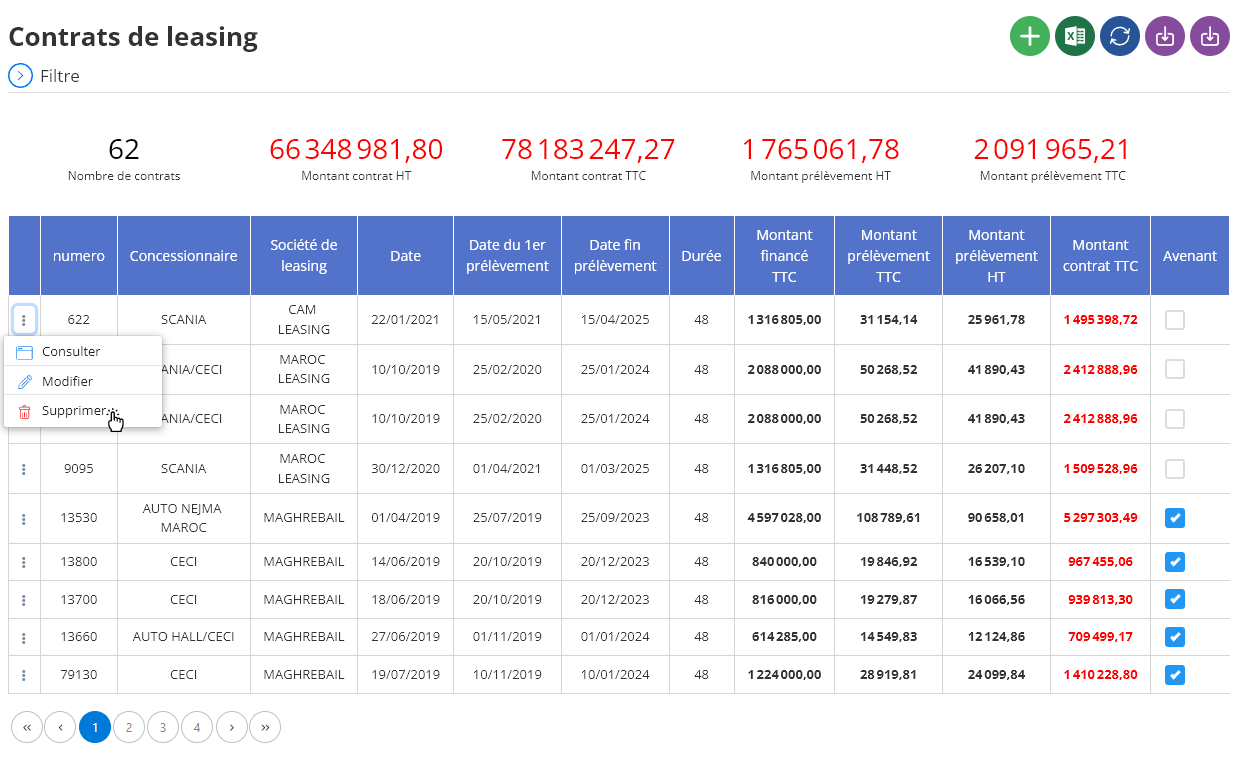
To delete a leasing contract from the database, navigate to the list of leasing contracts and select the one you want to delete. Then click on the “Delete” button to initiate the removal process.
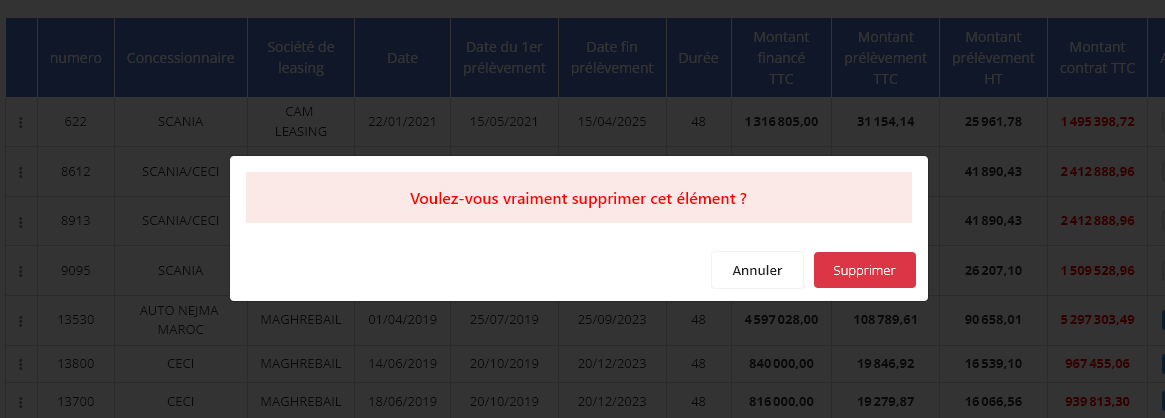
A confirmation window will appear asking you to validate this permanent deletion. This operation is irreversible and will result in the complete deletion of the leasing contract from the system, including all associated data. It is recommended to check this decision carefully before proceeding, as the information cannot be recovered once deleted.