

Module · HR
Export Absences
Export Absences
This section allows you to produce a file bringing together all the data relating to absences recorded in the system. The generated report offers a complete and structured view, including all the essential information for operation outside of the main platform.
This exportable document meets several organizational needs. It can be used as a support to analyze absences, whether in the context of human resources management, to carry out accounting calculations, or even as part of internal and external audits. Additionally, this report facilitates interdepartmental communication and collaboration, sharing reliable data with other departments, such as management or financial management.
Its clear and orderly format guarantees immediate accessibility to information, enabling informed decision-making and effective planning. By making this data available, the organization ensures better traceability and increased transparency on absences within its teams.
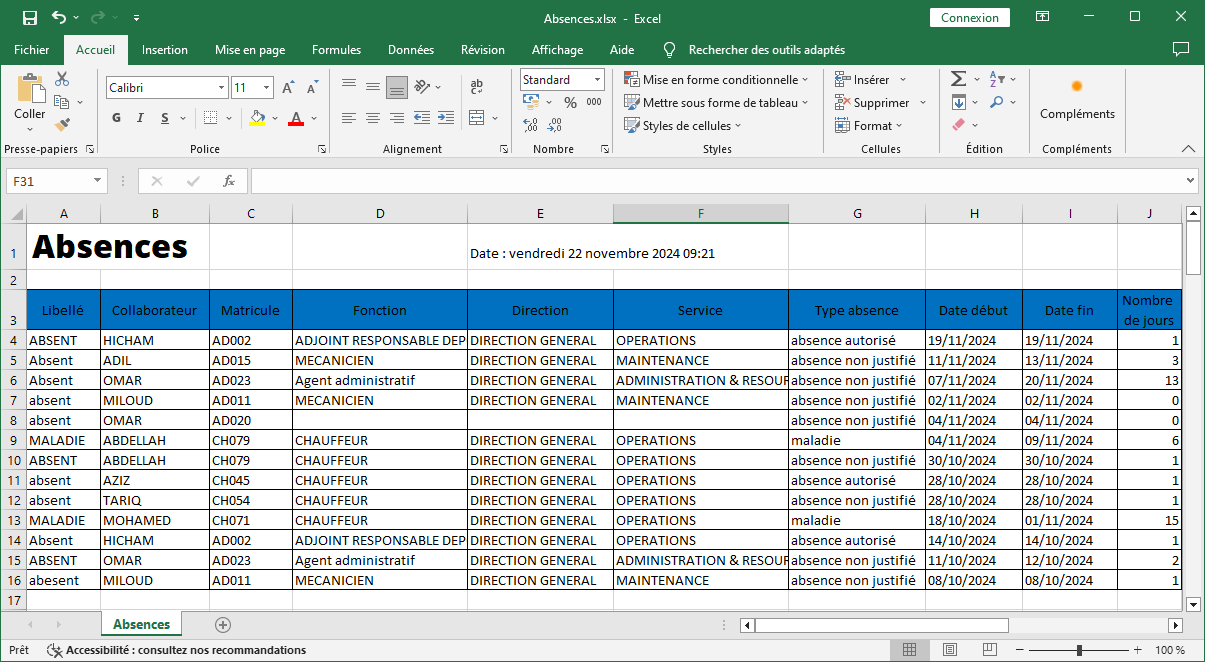
Exported absence information
Exporting absence data from the system provides a comprehensive and organized view, making it easier to analyze, track and make strategic decisions in human resources management. Here is the key information included in this exported table:
-
Wording: This is the description or title of the absence, allowing the reason or context of the absence to be quickly identified (for example, annual leave, sick leave, etc.). This column makes it easier to classify and consult data.
-
Collaborator: This column mentions the name of the employee concerned, providing direct visibility on the absences of each employee, which is essential for individual follow-up of files.
-
Registration number: The employee's registration number is also included, guaranteeing unique and rapid identification of each employee within the system.
-
Function: This data specifies the position occupied by the employee, making it possible to assess the impact of their absence on the team and operations.
-
Direction: This column indicates the direction or department to which the employee belongs. This allows a global analysis of absences at the organizational unit level, facilitating adjustments at the strategic level.
-
Service: The department or subdivision in which the employee works is specified, providing an even more detailed and localized view of absenteeism.
-
Type of absence: This category specifies the nature of the absence (paid leave, sick leave, unpaid leave, etc.), helping to understand trends and prioritize solutions based on the main causes of absenteeism.
-
Start date: This column indicates the first day of the absence, essential for tracking current absences and workforce planning.
-
End date: The end date of the absence is also included, providing a clear view of the duration of the absence and making return predictions easier.
-
Number of days: This field automatically calculates the total duration of the absence in days, making it possible to measure the impact of the absence on overall productivity.
-
Comment: This section contains additional remarks or notes concerning the absence, such as special circumstances or details provided by the employee or manager.
-
Justified: This column indicates whether the absence was justified or not, ensuring transparent and compliant management of absenteeism data.
By structuring this data in a clear and complete manner, this export constitutes an essential tool to guarantee smooth absence management aligned with the company's objectives.