

Module · HR
Export Interviews
Export Interviews
Exporting interview data allows you to generate a file containing all the information recorded on the interviews carried out with employees. This Excel file facilitates performance monitoring and analysis, allowing human resources managers to have a complete overview for informed decisions and optimized employee management.
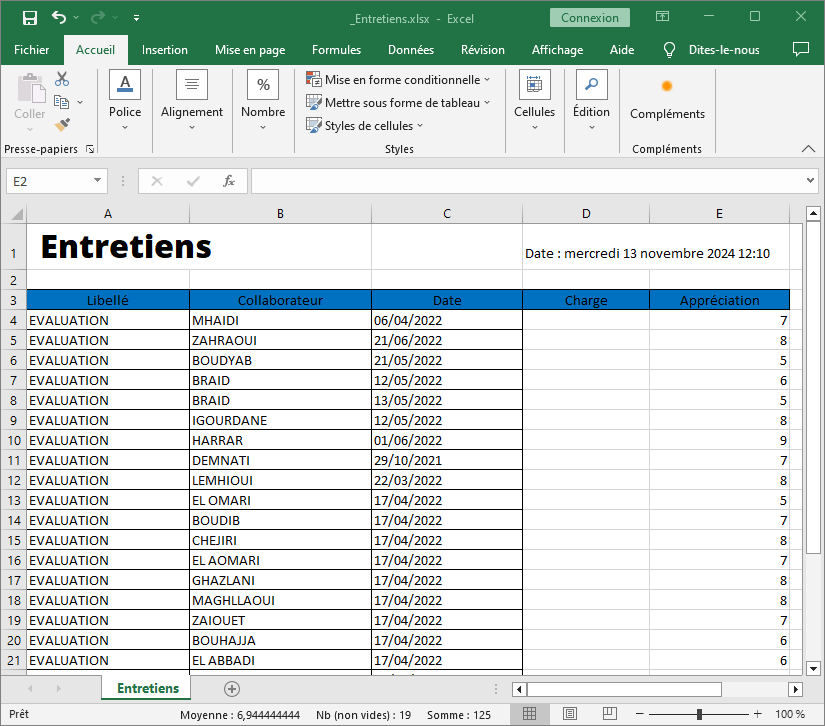
The exported information includes
Each column of the Excel file represents important data:
- Wording: Title of the interview, for example, “ASSESSMENT”.
- Collaborator: Name of the employee who passed the interview.
- Date: Date à laquelle l’entretien a eu lieu, permettant de garder un historique chronologique des évaluations.
- Charge: Additional information about the context of the interview (although this column is empty here, it could include relevant information such as position or function).
- Appreciation: Note or evaluation awarded during the interview, indicating the performance or general opinion of the employee.
Advantages of this structured export
Cette présentation structurée des données dans un fichier Excel offre une vue globale et organisée sur les entretiens, permettant aux utilisateurs d’effectuer facilement des tris et des filtres. Cela simplifie le suivi des évaluations des collaborateurs et fournit un outil de gestion efficace pour analyser les performances au fil du temps, planifier des formations et optimiser les ressources humaines.
En offrant une flexibilité de tri et d’analyse, cette exportation est un atout pour toute organisation cherchant à améliorer sa gestion des talents et à suivre les performances individuelles de manière détaillée et proactive.